
1.4.0 build 20241212 rel. 48194 breaks 160Mhz Channel width selection

Had this firmware get pushed from the app. Expected some LONG awaited features and fixes but was instead disappointed to find out it has actually removed the ability to select 160Mhz Channel width and forced my 3 Deco X60's to use 80Mhz.
Please advise.
- Copy Link
- Subscribe
- Bookmark
- Report Inappropriate Content
David-TP wrote
@Luciano7 Yes, the beta firmware works for both Deco X60(US)_V3.20 and V4.20.
Best regards.
After applying the beta version 1.6.1, both on x60_US V3.20 and on x60_US V4.20, the channel width for 160 MHz once again appeared in the DECO settings.
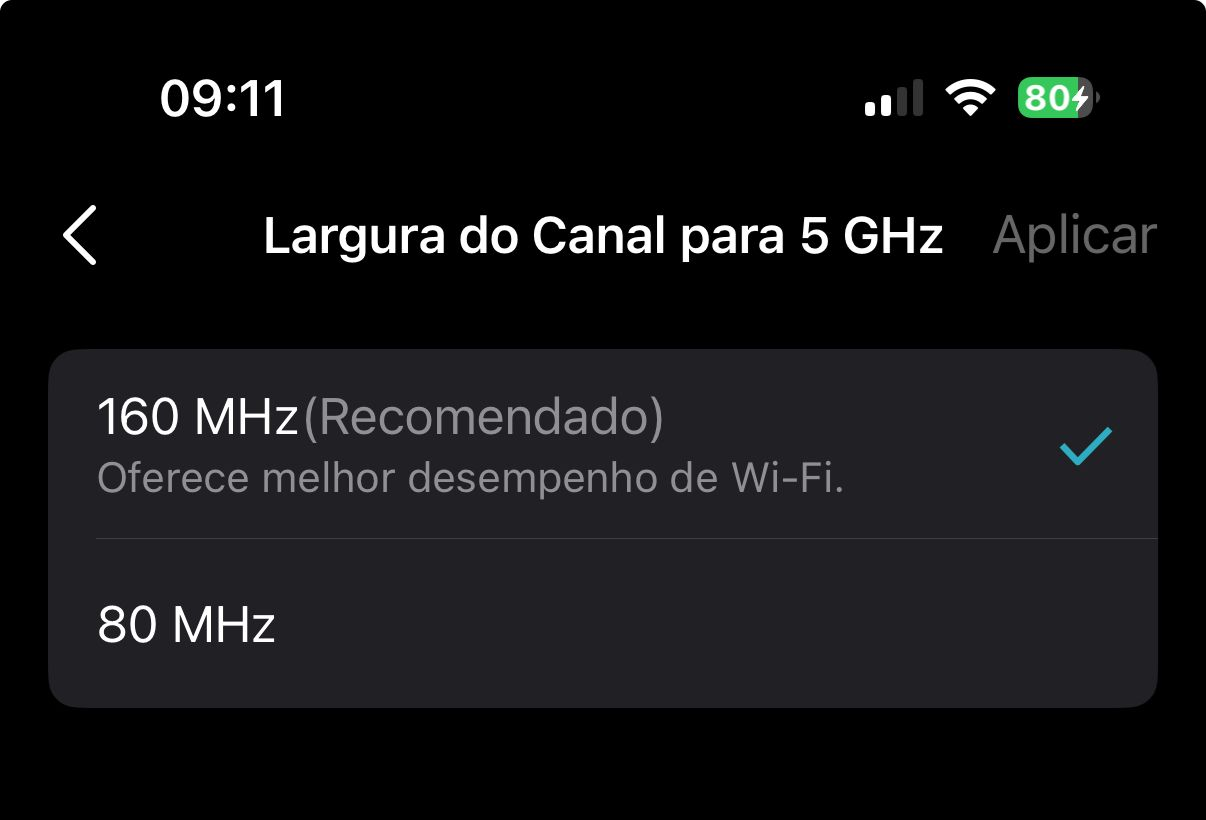
Note: I am using DECO US while living in Brazil.
Thank you very much, David-TP, for your resilience and patience.
- Copy Link
- Report Inappropriate Content

@David-TP - does the EU firmware waiting for beta release solve the other two issues reported for Deco X60 (3.20) :
- Wired devices present on LAN but not directly connected to the Deco device not appearing in devices since 1.4.0 firmware released
- App usage (especially viewing clients) frequently showing 0 devices and crashing Deco mesh entirely
- I experienced this also with the beta firmware (build 54799) from this thread in an earlier post which has now been replaced with the 1.6.1 beta firmware.
Anyone using the 1.6.1 US firmware experiencing the above two issues and could confirm if they are happening?
- Copy Link
- Report Inappropriate Content
@David-TP
Hi :) Do we have any update for the EU models ? thx!
- Copy Link
- Report Inappropriate Content
GGJB wrote
- App usage and crashing Deco mesh entirely
@GGJB I will note, I cannot recall a time in the last 2 years with this router that the following HASNT been happening. So it may not even be related to the router firmware or router itself and more to the app.
The app is extremely buggy. It constantly launches to a blank page showing no devices connected, of an error showing the router offline even when it's not. It almost ALWAYS requires force-closing the app to get the app to actually refresh the client list or perform certain functions. It also commonly loads the app to a blank page that shows as if you have no router connected to your account, and the page says "let's paint your home in WiFi".
An example of some of the functions that rarely work properly are the download speed view (the thing that shows the speed of the mesh + each client)
In the current beta firmware - notifications for new device alerts does not work (yes it's all turned on) while notifications for existing devices connect/disconnect work fine.
And yes, I have experienced and continue to experience this issue @GGJB mentions here.
Everything I say in this message applies to all previous firmware, except the notification issue which is only this latest beta firmware. And the "let's paint your home in WiFi" bug is an app issue definitely
It feels like opening the app is flipping a coin on whether it will work or whether I will need to close and try again.
@David-TP needless to say after this long message, but the app could use some improvement. If you could pass this message along to the people who can do something about it I would appreciate it. I know it's not entirely related to this specific model, or this issue (missing 160mhz) but still may be, and at least one of these issues is definitely from and only appears in this last beta.
I went to the playstore reviews of the app, clicked "this device only" and "1 star" and immediately found 10 reviews from the last 3 months mentioning this "let's paint your home in WiFi" bug. My device is an Samsung phone.
- Copy Link
- Report Inappropriate Content
@David-TP any update on when the EU update is coming please?
- Copy Link
- Report Inappropriate Content
@David-TP Do you have any updates on the schedule for the official or beta fix for the EU version? It has now been over 6 months since the issue first appeared.
- Copy Link
- Report Inappropriate Content

Hi, the firmware is still under active development. This new version expands regional compatibility beyond the EU version(including multiple region codes), which necessitates additional development and testing phases.
The latest news I've received is about to be ready in early March. I'll keep this post updated.
Thank you very much for your time and patience.
- Copy Link
- Report Inappropriate Content

@David-TP Hi TP-Link team,
Model: Deco X60 (AX5400)
Hardware Version: EU V3.20
Current Firmware: 1.4.0 Build 20241212 Rel. 48194
Issue: 160 MHz channel width option is completely missing in the Deco app (under 5 GHz Advanced). Also missing some other settings.
Please provide the latest EU V3.20 beta firmware (1.6.1 or newer) download link so I can manually upgrade via web UI.
Thank you!
- Copy Link
- Report Inappropriate Content
@David-TP Are we going to have release in the next 2 weeks? I see regular firmware updates for other models but for x60 it seems that is left behind :)
Thank you
- Copy Link
- Report Inappropriate Content

@David-TP Early March of which year? 
- Copy Link
- Report Inappropriate Content
Information
Helpful: 3
Views: 7436
Replies: 65
Voters 3


