
Be550 new firmware 1.1.3 devices won't connect to wifi

Be550 new firmware 1.1.3 devices won't connect to wifi

45 Reply
Re:Be550 new firmware 1.1.3 devices won't connect to wifi
2025-08-27 01:59:33 - last edited 2025-08-27 02:02:08

Hi@Mtr77 ,

I'm glad you shared that the new firmware version has restored the router's regular operation.
For the static channel, do you mean adding the option for fixed channels for IoT and guest networks, similar to the main network?

Indeed, the IoT network and guest network currently don't support fixed channels. You can submit your feature request here, and other users with similar needs can vote on it.
Thank you again for your support. We welcome you to come back and share your experiences.yes

Nice to Meet You in Our TP-Link Community. Check Out the Latest Posts: △Pre-release Firmware for Archer AX50 Introduces New Parental Control Features and Enhancements △Introducing AI QoS: Elevate Your Gaming Experience on the Archer GE800 Gaming Router △Connect TP-Link Archer BE550 to Germany's DS-Lite (Dual Stack Lite) Internet via WAN △Tether KidShield Test Recruitment - Safeguarding Children's Online Experience If you found the post or response helpful, please click Helpful. If an answer solves your problem, click "Recommended Solution" so that others can benefit from it.
  0  
  0  
#42
Options
Re:Be550 new firmware 1.1.3 devices won't connect to wifi
2025-09-24 11:05:51

hi !! im on 1.2.1 firmware..when i choose Wireless Router Mode i cant connect to the internet.  

it says that the Ethernet port is not connected..


no problem in AP mode..


any help ??

  0  
  0  
#43
Options
Re:Be550 new firmware 1.1.3 devices won't connect to wifi
2025-09-25 08:42:52 - last edited 2025-09-25 08:43:46

Hello @Geops ,

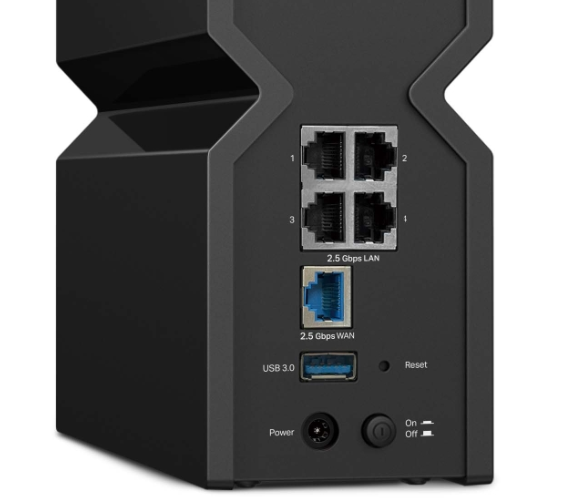
In AP mode, you may have previously connected your modem or main router to the LAN port of the BE550. Please now connect the Ethernet cable to its WAN port.
Nice to Meet You in Our TP-Link Community. Check Out the Latest Posts: △Pre-release Firmware for Archer AX50 Introduces New Parental Control Features and Enhancements △Introducing AI QoS: Elevate Your Gaming Experience on the Archer GE800 Gaming Router △Connect TP-Link Archer BE550 to Germany's DS-Lite (Dual Stack Lite) Internet via WAN △Tether KidShield Test Recruitment - Safeguarding Children's Online Experience If you found the post or response helpful, please click Helpful. If an answer solves your problem, click "Recommended Solution" so that others can benefit from it.
  0  
  0  
#44
Options
Re:Be550 new firmware 1.1.3 devices won't connect to wifi
2025-09-25 08:53:36

  @Joseph-TP 


no was connected correct...this problem appear after 1.2.1 update...i reset and now i think is ok..if i have again disconnection i will report it here again ..thanks

  1  
  1  
#45
Options
Re:Be550 new firmware 1.1.3 devices won't connect to wifi
2025-09-25 08:57:37

  @Geops ,

Feel free to contact us any time.

Nice to Meet You in Our TP-Link Community. Check Out the Latest Posts: △Pre-release Firmware for Archer AX50 Introduces New Parental Control Features and Enhancements △Introducing AI QoS: Elevate Your Gaming Experience on the Archer GE800 Gaming Router △Connect TP-Link Archer BE550 to Germany's DS-Lite (Dual Stack Lite) Internet via WAN △Tether KidShield Test Recruitment - Safeguarding Children's Online Experience If you found the post or response helpful, please click Helpful. If an answer solves your problem, click "Recommended Solution" so that others can benefit from it.
  0  
  0  
#46
Options


