
VPN: username has invalid format
 This thread has been locked for further replies. You can start a new thread to share your ideas or ask questions.
Hi!
When I try to enter email in the username field, I see an error saying "Invalid format." It seems to be objecting to the "." and "@". This username was provided to me by my VPN provider.
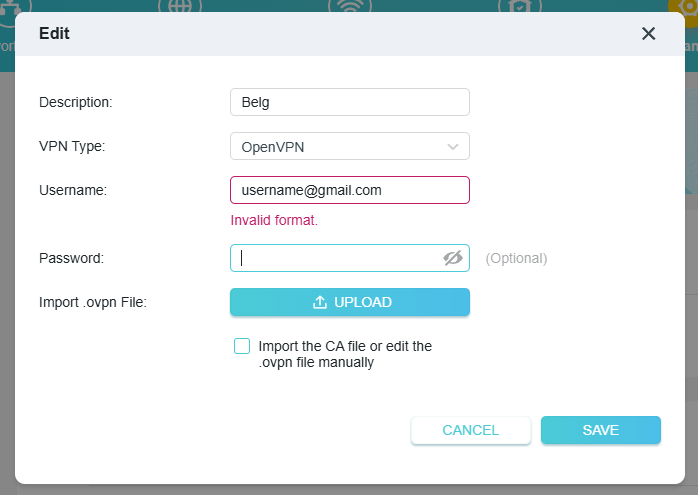
- Copy Link
- Subscribe
- Bookmark
- Report Inappropriate Content


Hello@LexaDel ,
Welcome to our community.
May I know who your VPN provider is?
Please confirm that you have set up OpenVPN correctly: How to install a VPN on TP-Link Wi-Fi Router(For expressVPN,nordvpn, etc).
For the username, you can refer to How to get configuration files from OpenVPN service providers.
- Copy Link
- Report Inappropriate Content
Hi,
Unfortunately, this known bug hasn't been fixed by TP-Link yet. (unless there is a newer beta firmware that I don't know about)
https://community.tp-link.com/en/home/forum/topic/710472
On other Archer models you can actually use "." and "@".
- Copy Link
- Report Inappropriate Content
@woozle Hi, yes I read that post.
- Copy Link
- Report Inappropriate Content
Hello@LexaDel ,
Welcome to our community.
May I know who your VPN provider is?
Please confirm that you have set up OpenVPN correctly: How to install a VPN on TP-Link Wi-Fi Router(For expressVPN,nordvpn, etc).
For the username, you can refer to How to get configuration files from OpenVPN service providers.
- Copy Link
- Report Inappropriate Content
Information
Helpful: 0
Views: 723
Replies: 3
Voters 0
No one has voted for it yet.