
XX530v is capped at 50Mb download in a 500Mb plan

I installed this device in my house, put fiber directly on it, it registered without issues.
But I noticed a odd issue:
Any download is always capped at 50Mb/s (my plan is 500Mb/s for both downloads and uploads), but UPLOADS happen at full speed (500Mb/s).
I tried some troubleshooting but nothing seems to work!
If I return to the old ONU I was using, it downloads at full 500Mb/s (ONU in bridge mode and XX530v connecting via PPPoE).
As soon as I return the fiber cable to XX530v, the problem happens again.
I suspect it might have to do with firmware (I've updated it to latest firmware), but the problem is I can't find the original firmware that came with it (Firmware Version:0.4.0 3.0.0 v6096.0 Build 240426 Rel.38762n).
ISP told me this router is compatilble, and they advised me to contact TP LINK, which I'm doing, because it might be a software fault on device's side.
Local TP Link support couldn't help me. They just say the same old stuff like "this router is targeted to ISP, so ISP has to help you... etc etc etc".
It seems this is a secret device only ISPs have access.
I mean, come ou guys! This router is sold in many places, and we currently can buy it from stores and install it ourselves.
TP LINK has to support this device because it's sold to end users!
My network already directed me to contact Tp Link, so I demand a solution!
And my ISP is very open, you only need the right GPON SERIAL to connect. Pratically any device can be used in their network as long as the GPON SN is right.
I even tried another ONU (different from the original) and no problem with it as well.
There was even a similar topic in this forums with the EXACT SAME PROBLEM.
GPON XX530v V1 - Download speed limited to less than 50MB
Can anyone escalate it to engineers?
- Copy Link
- Subscribe
- Bookmark
- Report Inappropriate Content

IfranAli wrote
@Kevin_Z I think he meant the Lifetime value changes every restart/reset. Could be intentional or a bug. But devices do get IPv6 addresses and Proper DNS address.
Although ISPs with frequent changing DHCP-PDs (IPv6 Prefix) might have some problems. Maybe it could be fixed by the dev team to allow seamless modification of that value?
@IfranAli yes. Lifetime value reverts back to the default 1800 post reboot/restart no matter what I set it to beforehand. Due to this I downgraded back to it's previous version which at least doesn't have this issue.
Also @Kevin_Z I believe all firmware versions have something wrong with the Access Control settings. If I disable (no allow or deny list rules) IPv6 works fine but if I enable it it causes issues with IPv6 addresses and it also somehow prevents LAN devices from appearing in the active client list (Basic>Wired Clients) and maybe also prevents live download speeds from showing up in the AgiNet App.
I also have some more suggestions -
1. Add manual IPv6 DNS option in IPv6 LAN settings.
2. Add download bandwidth limit in QoS settings (as of now it only has Upload bandwidth limit).
3. Traffic Statistics (Advanced>System Tools) appears to be a blank page when viewed from a desktop but shows up fine if viewed from a phone. Could be an issue limited to my setup only so probably others can confirm.
I hope you'll forward these suggestions to the developers team for review.
- Copy Link
- Report Inappropriate Content

@Kevin_Z I think he meant the Lifetime value changes every restart/reset. Could be intentional or a bug. But devices do get IPv6 addresses and Proper DNS address.
Although ISPs with frequent changing DHCP-PDs (IPv6 Prefix) might have some problems. Maybe it could be fixed by the dev team to allow seamless modification of that value?
Pre-modify:
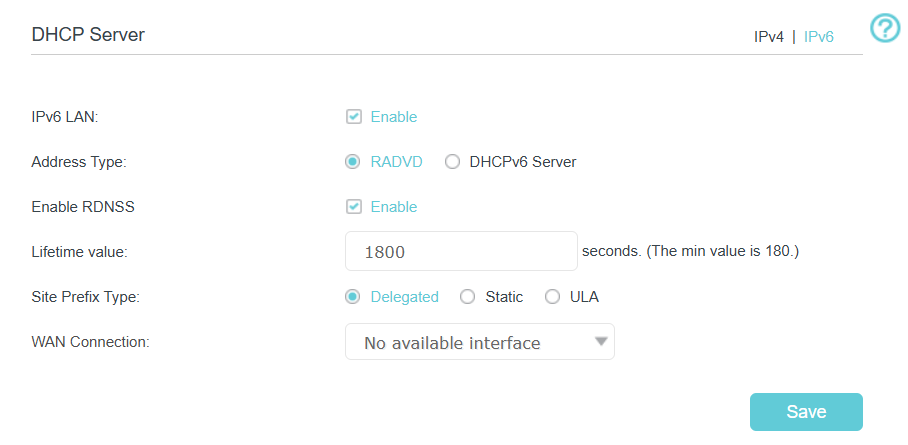
Post-Modify:
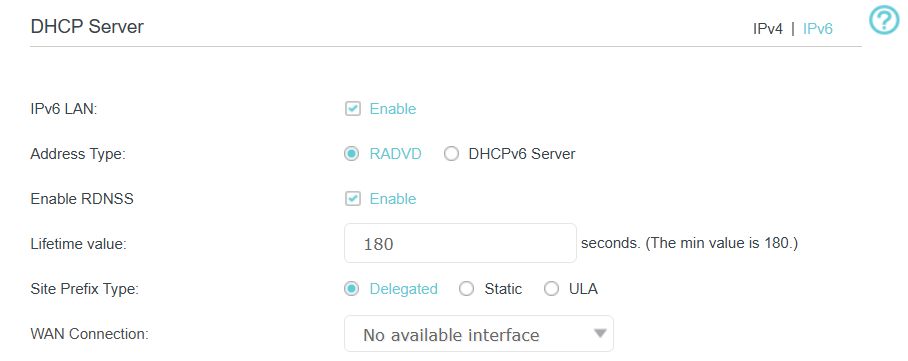
Even after restarts, it stays
- Copy Link
- Report Inappropriate Content
@xigga Post reset? or restart?
My one is working fine and I can change values. You mean reset and upload backup and do that all over again, incase the RADVD Lifetime didn't change?
- Copy Link
- Report Inappropriate Content


xigga wrote
@AnantJo tried it. And I'd say it's a step back. It says it's downgradable but in reality you can't. Tried to downgrade to 6.0.0 but it failed. 7.0.0 is already non downgradable so once you upgrade to 8.0.0 you're pretty much stuck.
Also the firmware has issues. Ipv6 Lan lifetime (RADVD), no matter what value I set it to, it always resets to 1800 post reset. 1800 secs translates to 30 minutes, meaning you'll get public ipv6 address through RA for 30 minutes at most.
TP-Link should really do something about their firmwares cause they're full of bugs.
As confirmed by IfranAli above, the latest official firmware mentioned above should have fixed the IPv6 LAN lifetime (RADVD) issue. Could you please confirm?
- Copy Link
- Report Inappropriate Content

@AnantJo I didn't test reseting to factory defaults, but upgrading the firmware didn't fix the problem.
It's the same as before here: download cap is 50 Mb/s but upload is normal for my plan (500mb/s)
- Copy Link
- Report Inappropriate Content
@AnantJo tried it. And I'd say it's a step back. It says it's downgradable but in reality you can't. Tried to downgrade to 6.0.0 but it failed. 7.0.0 is already non downgradable so once you upgrade to 8.0.0 you're pretty much stuck.
Also the firmware has issues. Ipv6 Lan lifetime (RADVD), no matter what value I set it to, it always resets to 1800 post reset. 1800 secs translates to 30 minutes, meaning you'll get public ipv6 address through RA for 30 minutes at most.
TP-Link should really do something about their firmwares cause they're full of bugs.
- Copy Link
- Report Inappropriate Content
@AnantJo This one I downloaded and used since it showed up. It fixes the IPv6 RADVD issue on downstream Android 15+ devices.
- Copy Link
- Report Inappropriate Content

@AnantJo I have tried this . The download speed is still capped at 50 Mbps. They have not fixed this issue yet .
- Copy Link
- Report Inappropriate Content

New firmware for this is available now the link is :-
https://static.tp-link.com/upload/firmware/2025/202511/20251124/XX530vv1_0.8.0_3.0.0_UP_BOOT_agc3000(250902)_2025-09-02_11.41.46.rar
Extract the rar file you will get .bin file necessary to update within the router setup.
Don't know whether it fixes the issue or not no log file
It only mentions:-
Remote Access: Added checkbox of choice of protocols (HTTP, HTTPS, ICMP) allowed/enabled by default in remote management port 80.
Provisioning Security: New checkbox for preset removal lock via Aginet Config 3
Configuration Flexibility: Confirmed support for changing service VLANs via remote access with super user.
This FW allows downgrade
Did anyone tried? I did not?
Let the community know whether it has fixed the download speed issue or not.
Regards,
- Copy Link
- Report Inappropriate Content
Unfortunately I haven't received any update from TP-Link's side regarding this issue or when the fixed firmware would be released.
My last communication with them regarding this was on 16th October 2025, in which they stated they are trying to figure out the root cause and cannot give an estimated date until they have it figured out.
I'm stuck with this bug as well and dealing the throttled speeds until the fixed firmware is released.
- Copy Link
- Report Inappropriate Content
Information
Helpful: 0
Views: 12155
Replies: 95
Voters 0
No one has voted for it yet.