
ADSL light not turning on

ADSL light not turning on

ADSL light not turning on
2025-09-11 18:40:26 - last edited 2025-10-16 02:06:19
Model: TD-W8961N  
Hardware Version: V2
Firmware Version:

Should the adsl light be turned on even if you don't have a internet provider? I don't have a internet provider and after connecting the modem to phone line, adsl light doesn't turn on

  0      
  0      
#1
Options
1 Accepted Solution
Re:ADSL light not turning on-Solution
2025-09-12 02:51:39 - last edited 2025-10-16 02:06:19

Hello @Axelore ,

Welcome to our community.


If your modem needs to access the internet via a phone line, the DSL light should be lit up. You can learn the LED Explanation on the TD-W8961N(UN)_V2_UG (from the page 3)

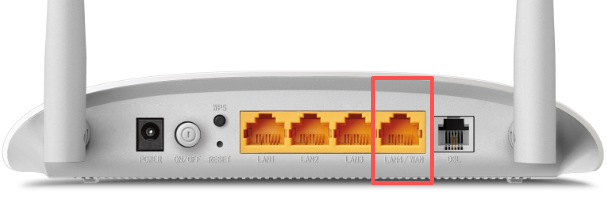
But if you connect this modem to the network source via Ethernet cable, and connect the cable to the LAN4/WAN port of the modem, it is normal for the DSL light to be off.
 

Best Regards.


Nice to Meet You in Our TP-Link Community. Check Out the Latest Posts: △Pre-release Firmware for Archer AX50 Introduces New Parental Control Features and Enhancements △Introducing AI QoS: Elevate Your Gaming Experience on the Archer GE800 Gaming Router △Connect TP-Link Archer BE550 to Germany's DS-Lite (Dual Stack Lite) Internet via WAN △Tether KidShield Test Recruitment - Safeguarding Children's Online Experience If you found the post or response helpful, please click Helpful. If an answer solves your problem, click "Recommended Solution" so that others can benefit from it.
Recommended Solution
  0  
  0  
#2
Options
2 Reply
Re:ADSL light not turning on-Solution
2025-09-12 02:51:39 - last edited 2025-10-16 02:06:19

Hello @Axelore ,

Welcome to our community.


If your modem needs to access the internet via a phone line, the DSL light should be lit up. You can learn the LED Explanation on the TD-W8961N(UN)_V2_UG (from the page 3)

But if you connect this modem to the network source via Ethernet cable, and connect the cable to the LAN4/WAN port of the modem, it is normal for the DSL light to be off.


Best Regards.


Nice to Meet You in Our TP-Link Community. Check Out the Latest Posts: △Pre-release Firmware for Archer AX50 Introduces New Parental Control Features and Enhancements △Introducing AI QoS: Elevate Your Gaming Experience on the Archer GE800 Gaming Router △Connect TP-Link Archer BE550 to Germany's DS-Lite (Dual Stack Lite) Internet via WAN △Tether KidShield Test Recruitment - Safeguarding Children's Online Experience If you found the post or response helpful, please click Helpful. If an answer solves your problem, click "Recommended Solution" so that others can benefit from it.
Recommended Solution
  0  
  0  
#2
Options
Re:ADSL light not turning on
2025-09-12 21:17:06

  @Axelore 


If you don't have a DSL services configured then the ADSL light would not be turned on.

If this was helpful click on the arrow pointing upward to make it blue. If this solves your issue, click the star to make it blue and mark the post as a "Recommended Solution".
  0  
  0  
#3
Options

