
Official Release Deco X50_V1_1.8.0 Significantly Expanded the Client Connection Details and Added Channel Selection


This Article Applies to
Deco X50(EU/US/JP/CA)/ Deco X55(EU/US/CA)_V1.0/V1.6
Firmware Medications:
New Features
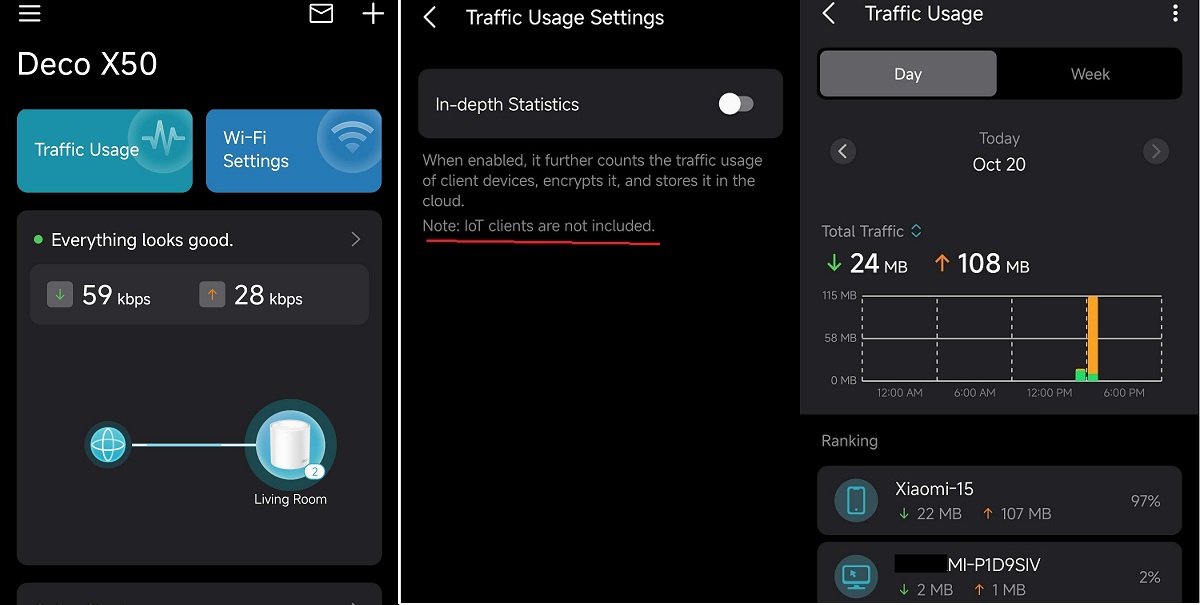
- Added Traffic Usage for online clients
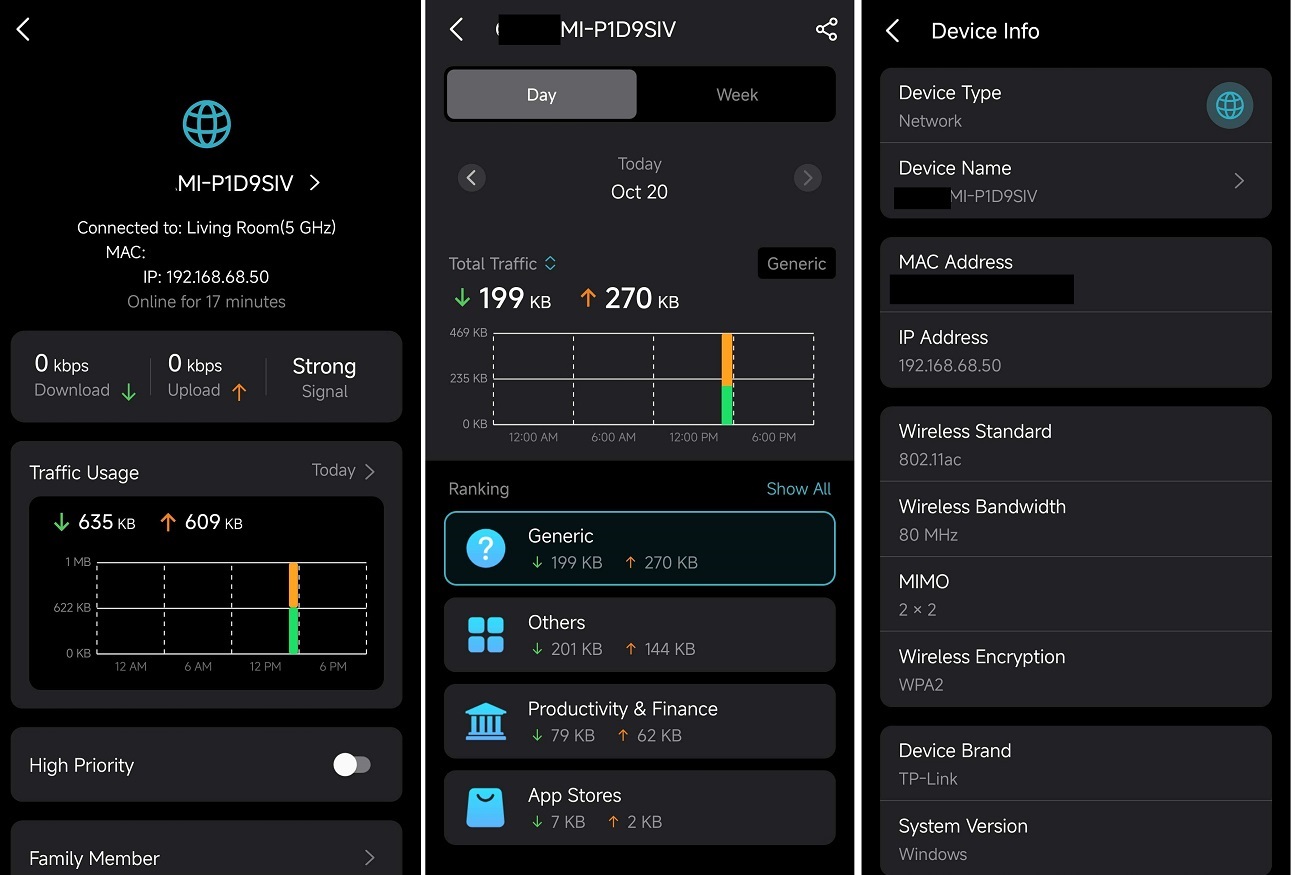
- Added device connection details, including wireless standard/bandwidth/encryption and online time.
- Added System Runtime and Online Time.
- Supported Channel Selection.
- Supported Configuration Backup.
Enhancement
- Improved 2.4 GHz Mesh Backhaul mechanism.
- Supported dynamic adjustment of the network traffic load.
- Reduced latency for App management and improved user interaction experience.
- Streamlined TP-Link Simple Setup process.
- Enhanced AI Roaming performance.
- Reduced system boot-up time.
- Updated HomeShield service for enhanced protection.
- Improved network stability and system security.
***Deco X50/Deco X55_V1_1.8.0 firmware doesn't support EasyMesh.
***Some features may not be accessible when there are other Deco models in the Mesh network.
Firmware Download Link
| Deco X50/X55_V1.0/V1.6 | 1.8.0_build_2025102213_Official (12.15 updated) |
Update Notice:
- Please make sure the Deco APP is up-to-date.
- This firmware can’t be degraded directly to the previous version.
- How to manually update the firmware via web UI.
Traffic Usage
Device Connection Information
- Copy Link
- Subscribe
- Bookmark
- Report Inappropriate Content

@David-TP Does thisfirmware also support X50-POE?
- Copy Link
- Report Inappropriate Content

@David-TP , All,
I think this is important information for product owners and decision makers:
Deco is advertised as a flexible, expandable system that is compatible with different series.
After this post and the comments, it turns out that when choosing, for example, the x50 series in the x50, x50-PoE, x50-pro, or outdoor configuration, we do not get the same set of features. I would not comment on the different HW versions. It seems that R&D is only working on the most popular series and ignoring more demanding users. Unfortunately, this later results in the entire deco network limiting its functionality to a minimum - the device with weakest functionality support - device forgotten by the product owner.
Hardware and performance limitations are understandable, but functionality should be the same for everyone.
- Copy Link
- Report Inappropriate Content
@coolspot18 Hi, I'm afraid it doesn't suit Deco X50-POE.
Best regards.
- Copy Link
- Report Inappropriate Content

I wanted to share some new findings based on the last few days of testing:
• IoT Hotspot more stable 🟢
After switching the 2.4 GHz channel setting from fixed Channel 1 to Automatic, the stability of my IoT devices improved a lot. Reconnect issues after restarts now happen only very rarely.
• Different 2.4 GHz channels per Deco unit 📡
For the first time — after enabling automatic channel selection — my units are using different 2.4 GHz channels:
– Main Deco: Channel 3
– Second Deco (another floor): Channel 10
Not sure if this is a bug or a new feature. But separate channels could theoretically improve 2.4 GHz capacity.
• Previously mentioned issues ⚙️
– Connection Preference is only rarely ignored after a restart.
– Some IoT devices showing “unknown” or attaching to the wrong Deco happens far less often.
– Traffic stats are still sometimes delayed or inaccurate.
– Roaming, Fast Roaming, and Beamforming remain reliable.
– Device list accuracy is still similar to firmware 1.6.1.
- Copy Link
- Report Inappropriate Content

Hi @David-TP
The firmware is pretty stable and a significant improvement to overall speed and connectivity. As others wrote as well, the IoT network is a bit more unstable also with devices showing up as wire-connected on the main network instead of Wifi on IoT.
In addition I am seeing some memory leak as overall memory consumption is increasing and if you are not rebooting your network every ~5 days it is becoming flaky. Daily reboots are not working at the moment as IoT causes issues with devices properly reconnecting. Also, in the past I did not have to reboot my network regularly and it remained stable.
Thanks,
Hannes
- Copy Link
- Report Inappropriate Content

As others have said, not all clients are visible in the App after updating to this firmware. They are online and working, but show as offline in the app, making the traffic management fairly useless. My network has the X50 with beta firmware as main Deco with S4's as satellites. It does not appear to make a difference if the "offline" clients are conencted to the S4's or the X50
Is it possible to downgrade until this is fixed?
Thanks,
Nathan.
- Copy Link
- Report Inappropriate Content

- Copy Link
- Report Inappropriate Content
@Mukuextrem Are you using 2.4 GHz on 20 MHz or 40 MHz ?
- Copy Link
- Report Inappropriate Content
Current Wi-Fi settings on my Deco X50 V1 (Firmware 1.8.0)
Just to share my current setup and experience with these settings:
2.4 GHz
- Channel width: 20 MHz
- Channel selection: Automatic
5 GHz
- Channel width: 80 MHz
- Channel selection: Automatic
I also tested 5 GHz at 160 MHz, which works without any issues. However, in my setup only two devices are able to benefit from 160 MHz, and for my daily use I don’t really need the extra bandwidth.
With these settings, overall stability is very good, and IoT devices are behaving more reliably than before.
- Copy Link
- Report Inappropriate Content
@Mukuextrem Thanks for sharing your setup and experience. Can you tell me are you using on High Capacity Mode? Because on High Capacity Mode all Deco use different 2.4 GHz channels because 2.4 GHz Wireless Backhaul is disabled on High Capacity Mode.
- Copy Link
- Report Inappropriate Content
Information
Helpful: 1
Views: 29526
Replies: 101
Voters 1
