
Official Release Deco X50_V1_1.8.0 Significantly Expanded the Client Connection Details and Added Channel Selection


This Article Applies to
Deco X50(EU/US/JP/CA)/ Deco X55(EU/US/CA)_V1.0/V1.6
Firmware Medications:
New Features
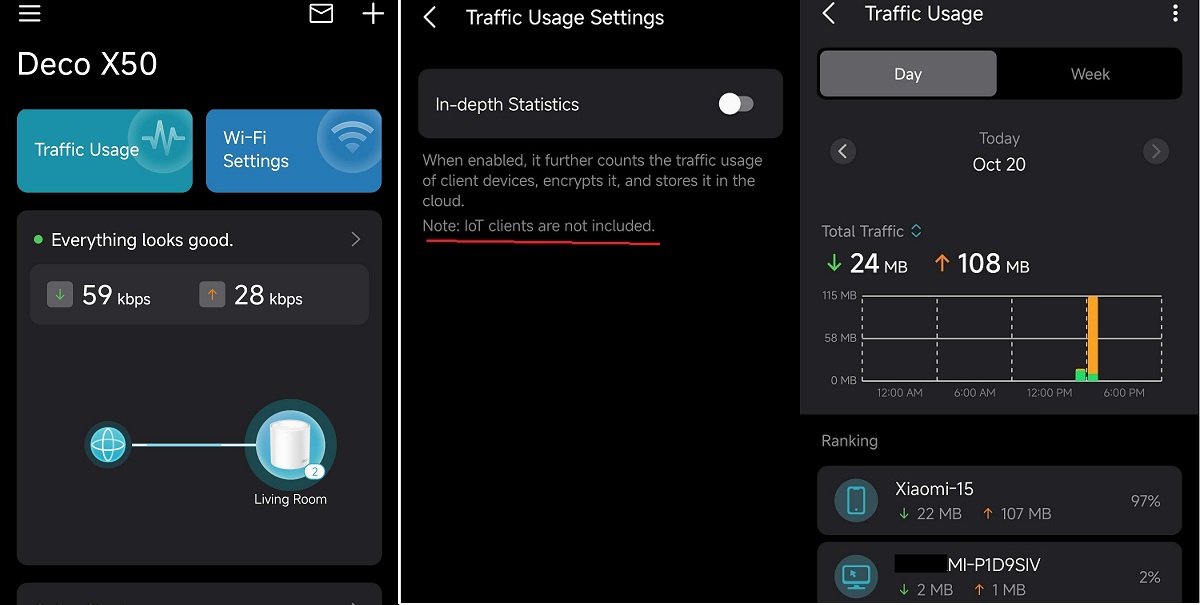
- Added Traffic Usage for online clients
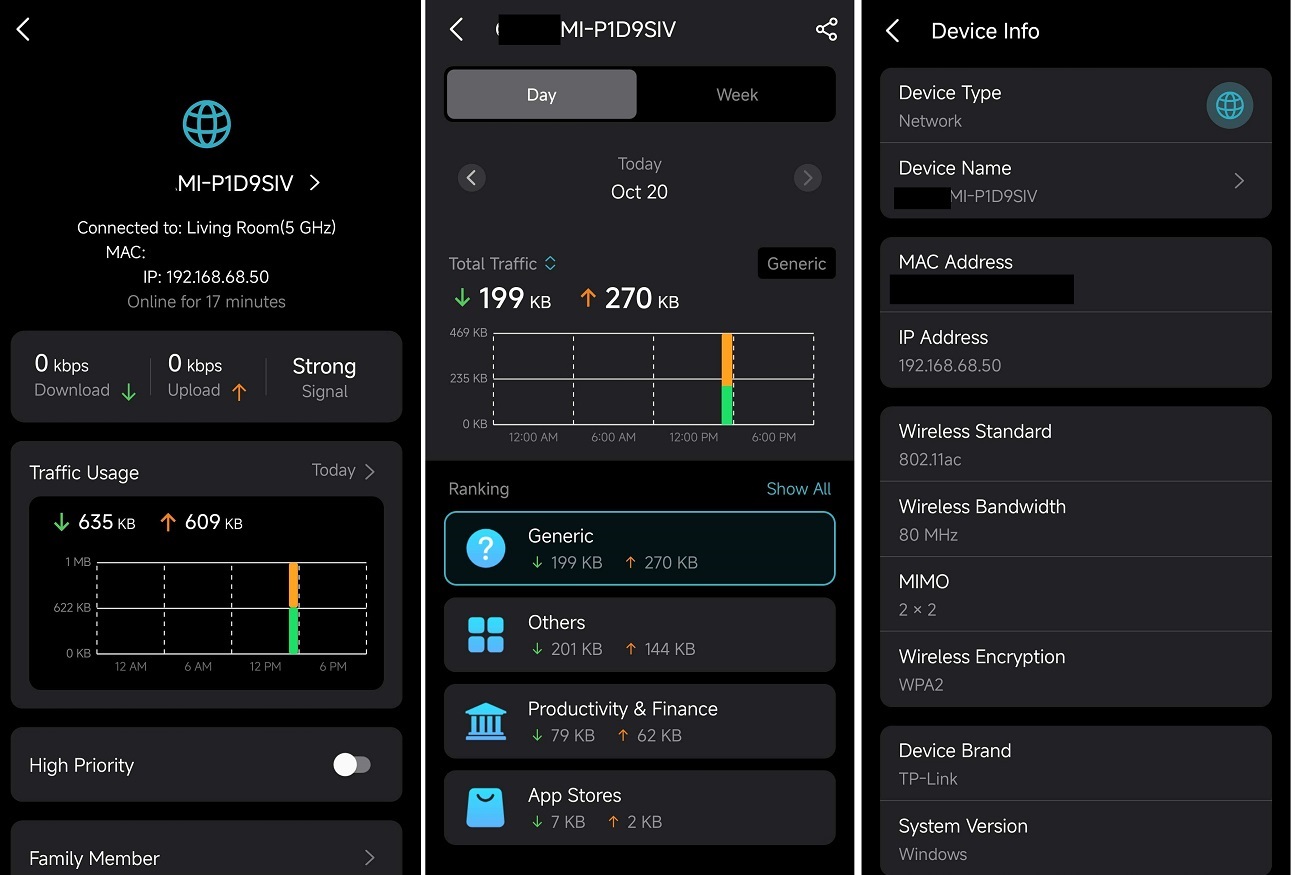
- Added device connection details, including wireless standard/bandwidth/encryption and online time.
- Added System Runtime and Online Time.
- Supported Channel Selection.
- Supported Configuration Backup.
Enhancement
- Improved 2.4 GHz Mesh Backhaul mechanism.
- Supported dynamic adjustment of the network traffic load.
- Reduced latency for App management and improved user interaction experience.
- Streamlined TP-Link Simple Setup process.
- Enhanced AI Roaming performance.
- Reduced system boot-up time.
- Updated HomeShield service for enhanced protection.
- Improved network stability and system security.
***Deco X50/Deco X55_V1_1.8.0 firmware doesn't support EasyMesh.
***Some features may not be accessible when there are other Deco models in the Mesh network.
Firmware Download Link
| Deco X50/X55_V1.0/V1.6 | 1.8.0_build_2025102213_Official (12.15 updated) |
Update Notice:
- Please make sure the Deco APP is up-to-date.
- This firmware can’t be degraded directly to the previous version.
- How to manually update the firmware via web UI.
Traffic Usage
Device Connection Information
- Copy Link
- Subscribe
- Bookmark
- Report Inappropriate Content

Wi-Fi Mode
- High Capacity
(Enabled automatically and cannot be changed because I’m using Ethernet backhaul)
2.4 GHz
- Channel width: 20 MHz
- Channel selection: Automatic
5 GHz
- Channel width: 80 MHz
- Channel selection: Automatic
- Copy Link
- Report Inappropriate Content
@Mukuextrem Okay and does it improve overall WiFi performance? Like 5 GHz performance after using 2.4 GHz on different channels on all Deco nodes.
- Copy Link
- Report Inappropriate Content
Hi, thanks for the feedback.
It is not suggested to downgrade the firmware, and the official version has just been uploaded to the EN site.
If you'd like to further cooperate with us, you can submit the Deco APP log-How to submit Deco APP log and add the model numbers of the devices that are online but in the "Offline List" on the Deco App.
Thank you very much.
Best regards.
- Copy Link
- Report Inappropriate Content
@David-TP Hope these features will be added to Deco X50 V1.30 aswell.
- Copy Link
- Report Inappropriate Content
From what I can tell so far, the main improvement is not directly on 5 GHz performance.
Using different channels on 2.4 GHz mainly seems to reduce interference and congestion in that band, especially for IoT devices. Since I’m using Ethernet backhaul (High Capacity mode), 5 GHz isn’t used for backhaul anyway, so its performance stays consistently good regardless of the 2.4 GHz channel behavior.
Indirectly, less load and fewer collisions on 2.4 GHz can help overall network stability, but raw 5 GHz throughput and latency look the same as before in my setup.
So I’d say the benefit is more about stability and capacity on 2.4 GHz, not a measurable boost to 5 GHz speeds.
- Copy Link
- Report Inappropriate Content
@Mukuextrem Thanks for the clarification ❤️
- Copy Link
- Report Inappropriate Content

I've updated my 3x X50 and everything looks OK. I also have an X50-Outdoor, and I think this prevents the "traffic usage" function from working, but I can live with that.
Yesterday I noticed (but the issue could have been older) that my laptop was sometimes all of a sudden getting weaker signal (the Windows signal strength indicator showed one or two lines) and the connection was choppy (video conference, etc.). After a while it went back to normal. This happened a few times, and during those times the Deco app showed that the laptop was connected with a strong signal.
I suspected that maybe the beam forming (which was active) might be getting confused. I deactivated it, and the connection was stable (and with full signal strength) for a few hours.Obviously I will have to check this more thoroughly and for a longer time.
My question: is this a known problem with beam forming? (note that the laptop was stationary all the time, so it shouldn't have caused any difficulties for the beam forming).
Thanks in advance for your reply!
- Copy Link
- Report Inappropriate Content

@David-TP I'm unable to use Jio 5G on the Japan version that I bought to India, I tried manually upgrading to version 1.8.0, upgrade happens successfully but the version shown is still the same. This is really Frustrating. You guy haven't been able to add 464XLAT support for JIO 5G?
|
X50-5G(1.0)
|
1.2.1 Build 20250413 Rel. 44588
|
- Copy Link
- Report Inappropriate Content
Hi,
the issue you’re experiencing is due to firmware incompatibility, not a failed update.
Your device is Deco X50-5G (V1.0), which is a different hardware model from the standard Deco X50 / X55.
Firmware 1.8.0 is released only for Deco X50/X55 V1 and does not support the X50-5G variant.
Because of this:
- The update process may appear to finish successfully
- But the firmware version remains unchanged
- New features from 1.8.0 will not be applied
The Deco X50-5G uses a separate firmware branch, and firmware files are not interchangeable between these models.
You’ll need to wait for an official firmware release specifically for Deco X50-5G.
Hope this clears things up.
- Copy Link
- Report Inappropriate Content

hi x50v1 1.8.0 release shaper is still dont work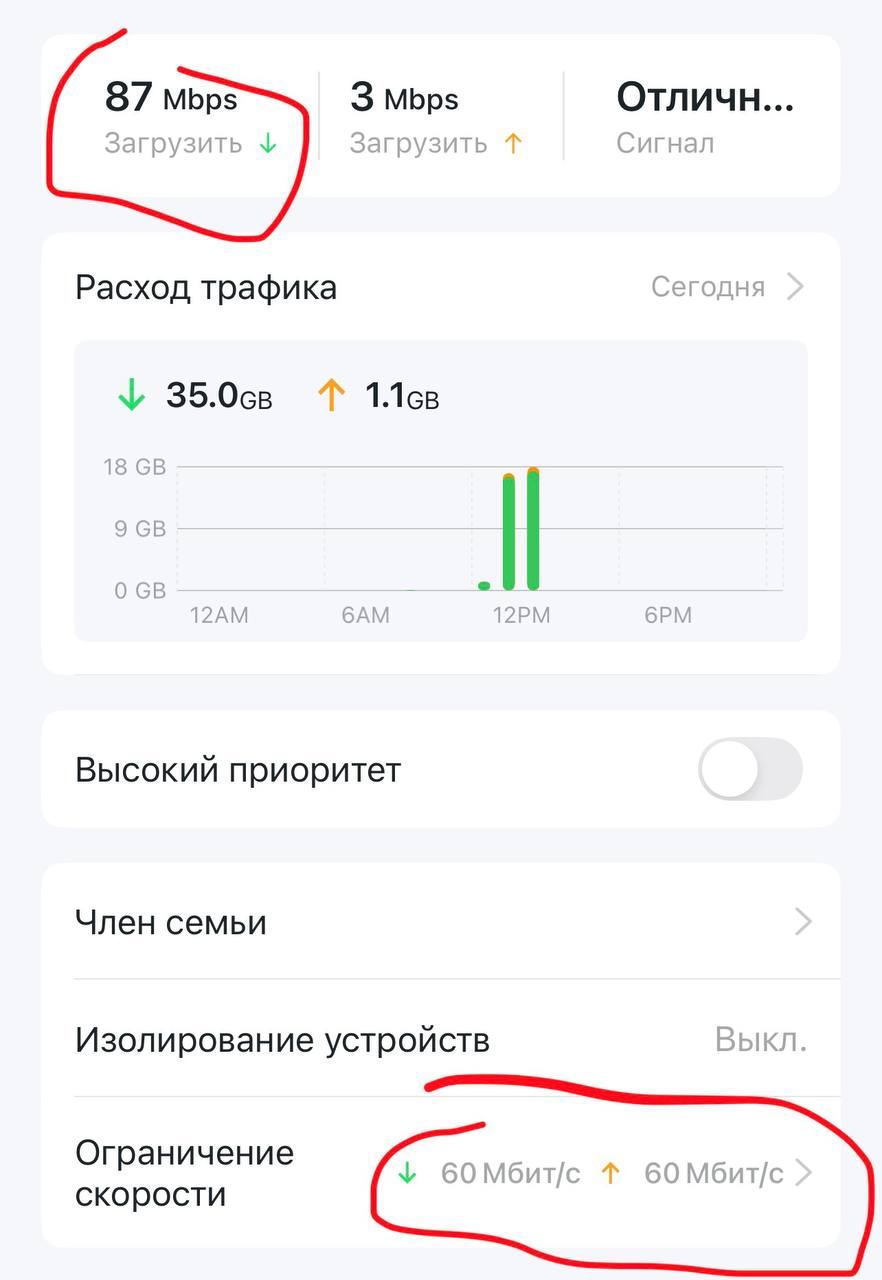
- Copy Link
- Report Inappropriate Content
Information
Helpful: 1
Views: 28598
Replies: 101
Voters 1
