
Official Release Deco X50_V1_1.8.0 Significantly Expanded the Client Connection Details and Added Channel Selection


This Article Applies to
Deco X50(EU/US/JP/CA)/ Deco X55(EU/US/CA)_V1.0/V1.6
Firmware Medications:
New Features
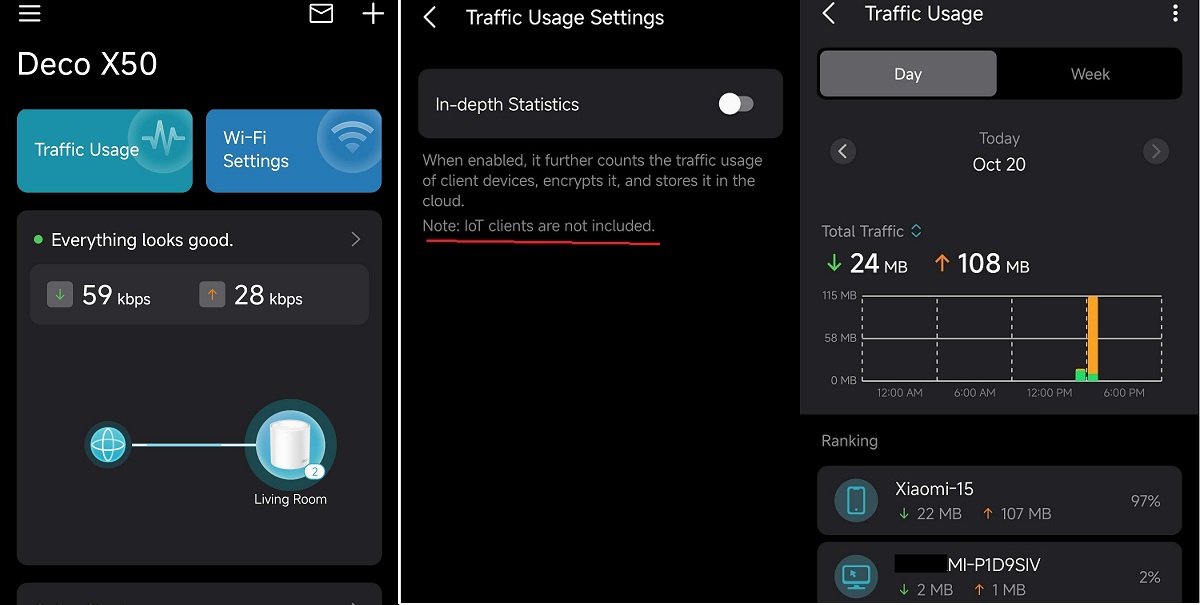
- Added Traffic Usage for online clients
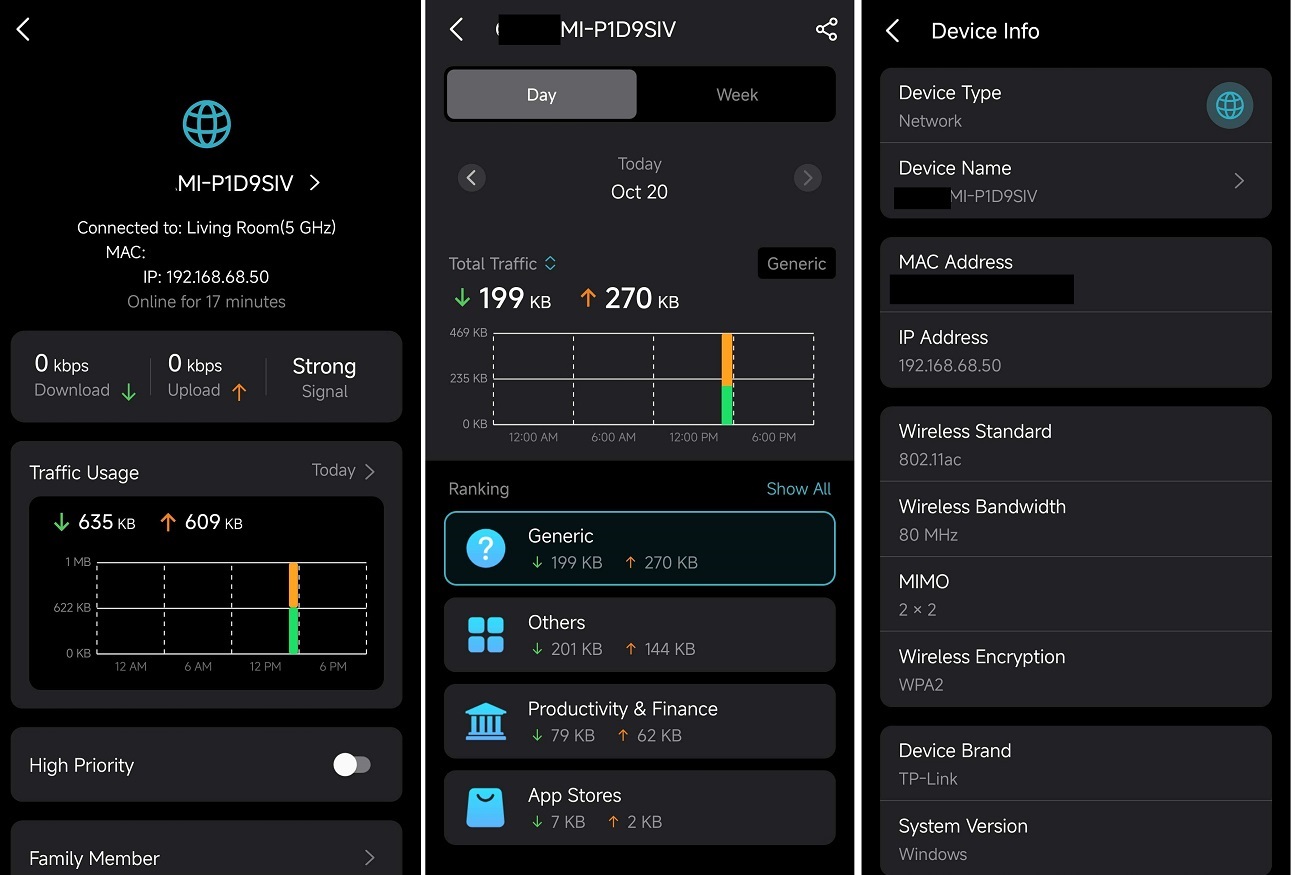
- Added device connection details, including wireless standard/bandwidth/encryption and online time.
- Added System Runtime and Online Time.
- Supported Channel Selection.
- Supported Configuration Backup.
Enhancement
- Improved 2.4 GHz Mesh Backhaul mechanism.
- Supported dynamic adjustment of the network traffic load.
- Reduced latency for App management and improved user interaction experience.
- Streamlined TP-Link Simple Setup process.
- Enhanced AI Roaming performance.
- Reduced system boot-up time.
- Updated HomeShield service for enhanced protection.
- Improved network stability and system security.
***Deco X50/Deco X55_V1_1.8.0 firmware doesn't support EasyMesh.
***Some features may not be accessible when there are other Deco models in the Mesh network.
Firmware Download Link
| Deco X50/X55_V1.0/V1.6 | 1.8.0_build_2025102213_Official (12.15 updated) |
Update Notice:
- Please make sure the Deco APP is up-to-date.
- This firmware can’t be degraded directly to the previous version.
- How to manually update the firmware via web UI.
Traffic Usage
Device Connection Information
- Copy Link
- Subscribe
- Bookmark
- Report Inappropriate Content

@David-TP
Could you please suggest or add a feature (in TPLink Deco X50 v1 Access Point mode) to more effectively block guest networks? The best solution would be VLAN tagging for the guest network.
My Network
I have created 3 VLANs in my home network.
VLAN1 Default - 192.168.0.x NoIsolate Proxmox
VLAN10 DOM 192.168.10.x NoIsolate - DECO | OMV
VLAN20 IOT 192.168.20.x Isolate - HomeAssistant
VLAN30 Monitoring 192.168.30.x Isolate
The main router is an ER605 + TL-SG1024DE Switch + 3x Deco X50 AP Mode
I wanted to achieve access from the main Wi-Fi network to all VLANs, while the guest network would only allow internet access.
I have several IOT devices connected to the guest network with the "Block access to local network" option enabled. They have addresses of 192.168.10.XXX.
When connecting to the guest network, I can't connect to OMV (in the same VLAN as the guest network), but I can access proxmox (VLAN1) and HomeAssistant (VLAN20).
I was considering buying EAP devices, but I don't have Ethernet cables running in the ceiling and the desktop devices are not aesthetically pleasing :( Deco X50 is more discreet.
- Copy Link
- Report Inappropriate Content
Hi, welcome to the community.
I'm afraid there hasn't been a plan to support VLANs in the Access Point mode.
EAP Mesh also supports only connecting the root AP via an Ethernet cable and the rest APs via WiFi Backhaul.
For more details, please refer to Frequently Asked Questions about EAP Mesh Network.
Thank you very much.
Best regards.
- Copy Link
- Report Inappropriate Content

@David-TP , Community, Team,
It would be great to have all the new features also on X50 Pro version.
- Copy Link
- Report Inappropriate Content

Hi everyone,
I installed the new 1.8.0 firmware on my Deco X50 V1. My setup consists of only two Deco X50 units, connected via Ethernet backhaul, no other devices, and I’m using Wi-Fi Router mode, not Access Point mode. Here’s my experience so far:
- Stability: Very stable, comes close to the reliability of 1.6.1.
- Network speed: Excellent, no issues observed.
- Traffic monitoring: Mostly works, but values are not always up-to-date and occasionally show incorrect data.
- App device view: The app generally shows connected devices accurately and which Deco they are connected to, similar to 1.6.1.
- Exception: IoT devices sometimes do not reconnect properly after a restart, or show “unknown” as connection type.
- In my case, these IoT devices include smart litter box, smoke detectors, Tuya smart plugs, Tuya smart lights, and similar devices.
- Roaming & Fast Roaming: Works perfectly, for example with iPhones.
- Beamforming: Functions well.
Summary:
- Overall, 1.8.0 is very stable and fast, and the app device view is mostly accurate.
- Only IoT device handling after restarts needs some fine-tuning.
- Once that is improved, this version would be almost perfect.
- Copy Link
- Report Inappropriate Content

- Exception: IoT devices sometimes do not reconnect properly after a restart, or show “unknown” as connection type. -- Yes /
me too
- Copy Link
- Report Inappropriate Content
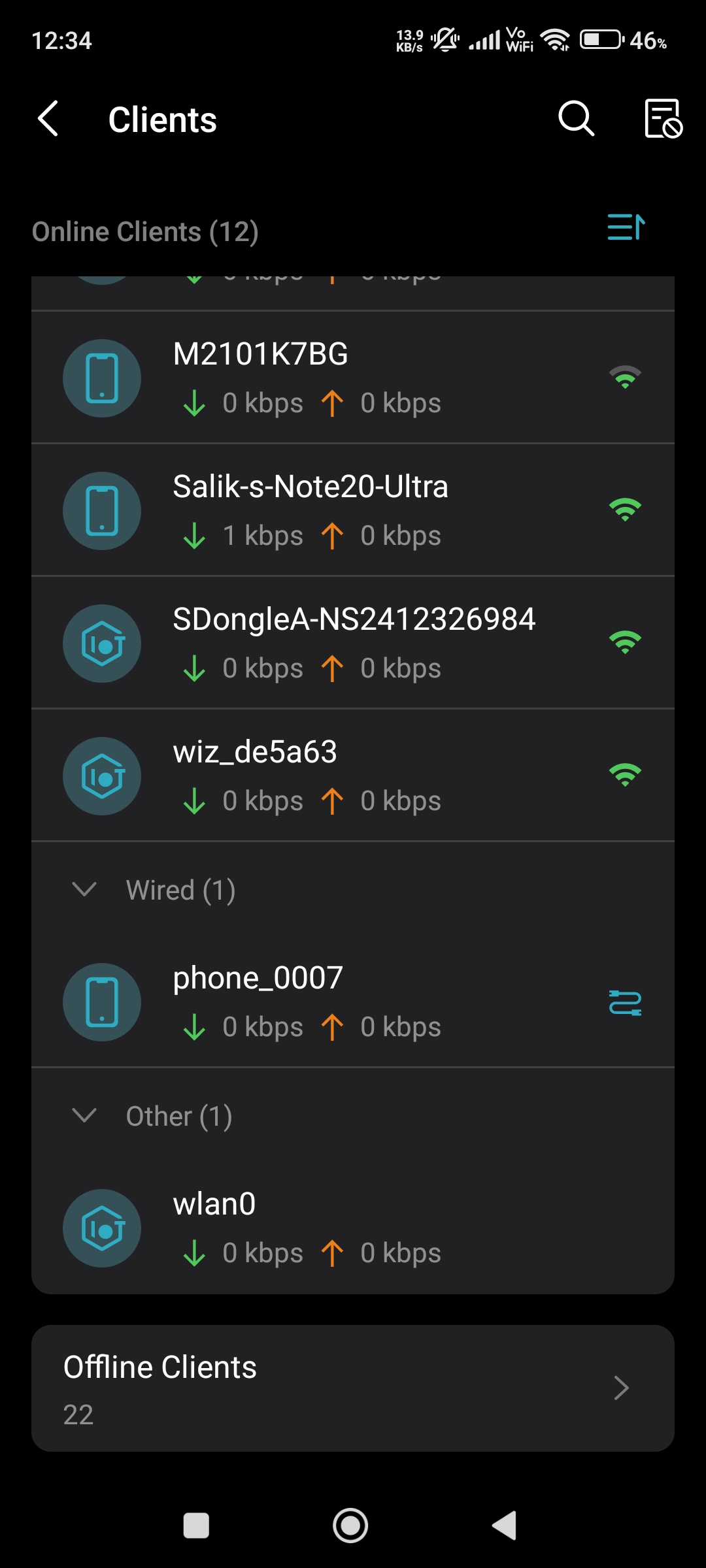
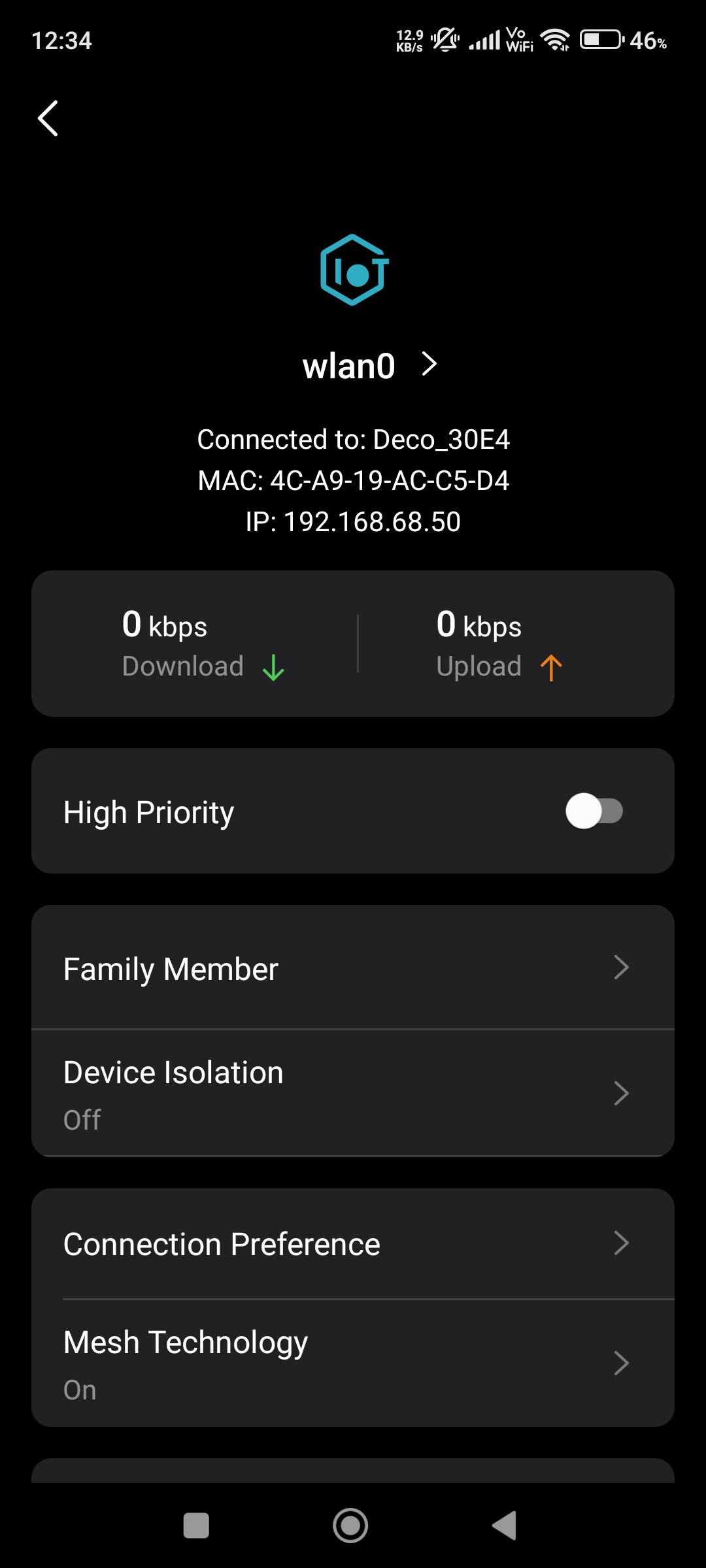
@Mukuextrem @xplodzs Yeah im also facing this IoT problem on Deco M4 aswell and even i forced them to connect on specific Deco unit by using Connection Preference but still Iot devices could'nt connect to that specific Deco units and still connected on different Deco units which are far away from them this happend after the reboot whole deco system. Also signal strength of those iot devices disappeared in Deco App. 😭 Here you can also check in the screenshots below.
- Copy Link
- Report Inappropriate Content

- Copy Link
- Report Inappropriate Content
Hi everyone,
after some more time testing the new 1.8.0 firmware on my Deco X50 V1, I’d like to share an update specifically focused on IoT network behavior — including some details that might be useful for others.
🧪 Setup:
- Two Deco X50 units with Ethernet backhaul
- Running Wi-Fi Router Mode, not AP mode
- A dedicated IoT Wi-Fi/secondary SSID separate from the main network
✔️ Positive results:
- System stability and performance remain strong — very close to firmware 1.6.1 in terms of reliability.
- Network speed is consistently good.
- Roaming and Fast Roaming work flawlessly (tested with iPhone devices).
- Beamforming also performs well and consistently.
⚠️ IoT-specific behaviour (new findings):
- After a reboot, some IoT devices do not reconnect properly — even when preferred connection priority is set to a specific Deco unit.
- Affected devices sometimes show as “unknown” connection type or attach to the wrong Deco.
- Devices affected on my side include: smart litter box, smart smoke detector, Tuya smart plugs, Tuya lamps, and similar IoT-type devices.
🔧 Temporary fix / Workaround:
Disabling the IoT network temporarily and enabling it again usually restores proper behavior — devices reconnect correctly and attach to the assigned node.
📌 Conclusion:
Firmware 1.8.0 is stable, fast, and overall reliable — especially compared to 1.6.1.
The only area that still needs refinement is IoT reconnection handling after reboots, particularly when using a dedicated IoT SSID. With some fine-tuning here, this release could become a near-perfect version for Deco X50 V1 users.
If anyone else is running a similar setup, I’d be very interested in hearing whether you’re seeing the same behavior or different results.
- Copy Link
- Report Inappropriate Content
@Mukuextrem Thank you very much for the feedback. It is a very very detailed feedback report.
- Copy Link
- Report Inappropriate Content
Hi, I'm afraid the similar firmware hasn't been ready for Deco X50_V1.2 by now. You can regularly visit the community here. If the new firmware is ready for testing, there might be a similar post as well.
Sorry for the inconvenience.
Best regards.
- Copy Link
- Report Inappropriate Content
Information
Helpful: 1
Views: 29543
Replies: 101
Voters 1
