
Official Release Deco X50_V1_1.8.0 Significantly Expanded the Client Connection Details and Added Channel Selection


This Article Applies to
Deco X50(EU/US/JP/CA)/ Deco X55(EU/US/CA)_V1.0/V1.6
Firmware Medications:
New Features
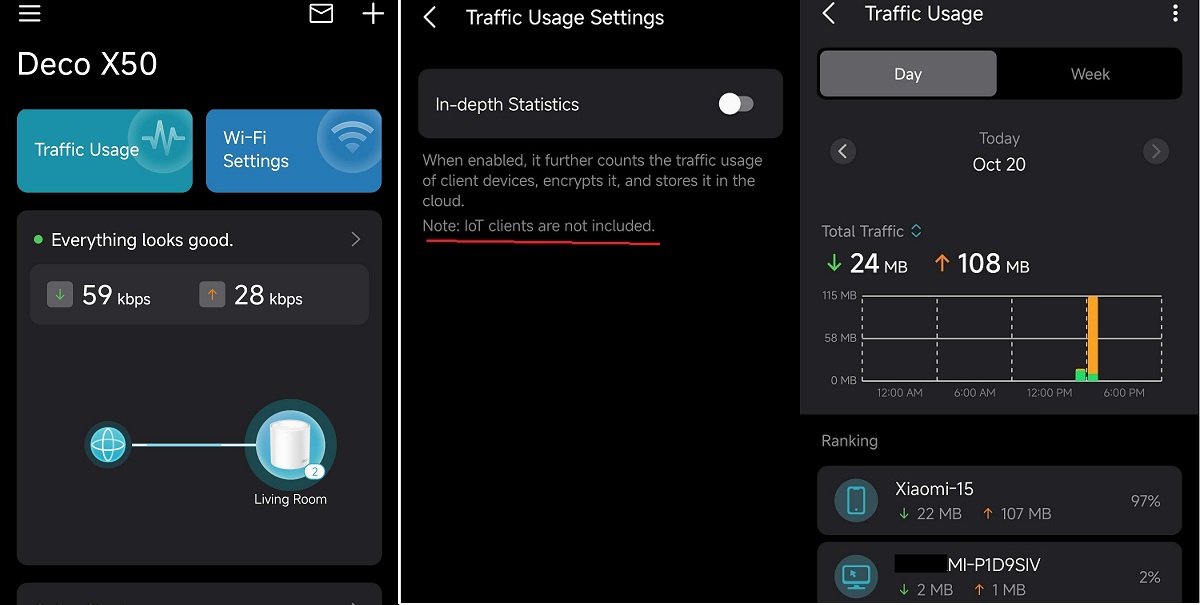
- Added Traffic Usage for online clients
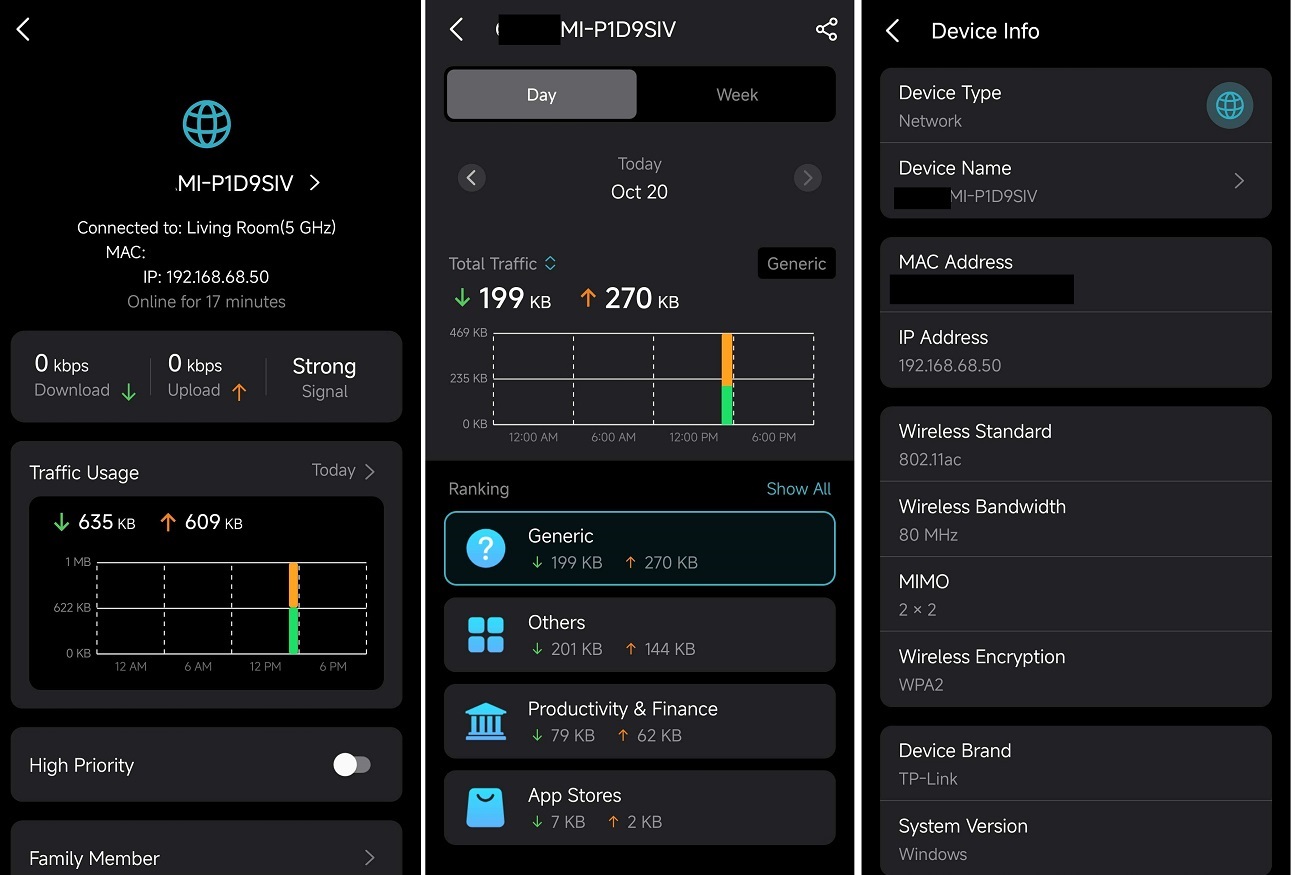
- Added device connection details, including wireless standard/bandwidth/encryption and online time.
- Added System Runtime and Online Time.
- Supported Channel Selection.
- Supported Configuration Backup.
Enhancement
- Improved 2.4 GHz Mesh Backhaul mechanism.
- Supported dynamic adjustment of the network traffic load.
- Reduced latency for App management and improved user interaction experience.
- Streamlined TP-Link Simple Setup process.
- Enhanced AI Roaming performance.
- Reduced system boot-up time.
- Updated HomeShield service for enhanced protection.
- Improved network stability and system security.
***Deco X50/Deco X55_V1_1.8.0 firmware doesn't support EasyMesh.
***Some features may not be accessible when there are other Deco models in the Mesh network.
Firmware Download Link
| Deco X50/X55_V1.0/V1.6 | 1.8.0_build_2025102213_Official (12.15 updated) |
Update Notice:
- Please make sure the Deco APP is up-to-date.
- This firmware can’t be degraded directly to the previous version.
- How to manually update the firmware via web UI.
Traffic Usage
Device Connection Information
- Copy Link
- Subscribe
- Bookmark
- Report Inappropriate Content
Hi, thanks for the update.
Have you run a speed test on this device via https://www.speedtest.net/.
After further troubleshooting with some users, most feedback was due to the incorrect information of the "Real-time speed rate" on the Deco App. The actual speed test shows the network speed on the client is indeed capped at the "Speed Limit".
Best regards.
- Copy Link
- Report Inappropriate Content

@David-TP Hi!
When will the update be offered automatically? My X50 tells me I'm up to date on version 1.7.1
Thanks
- Copy Link
- Report Inappropriate Content

- Copy Link
- Report Inappropriate Content
Regarding Deco X50/X55_V1.0/V1.6 1.8.0_build_2025102213_Official (12.15 updated)
I have a Deco X50 V1 3 pack. (CA) This 1.8.0 firmware update doesn't appear on the Canadian site for firmware updates.
The local Canadian site still lists "Deco X50(CA)_V1_1.6.7 Build 25031412" as the latest firmware which is the version that I have installed.
This page says that the 1.8.0 update "Applies to Deco X50(EU/US/JP/CA)/ Deco X55(EU/US/CA)_V1.0/V1.6" but the firmware download link shows EU as the region for the firmware and encourages me to go to the local page (but 1.8.0 is not there).
I also have a BE67 as my main router and just updated the BE67 (US) with the latest firmware. Everything is currently working well.
Is it safe to install this 1.8.0 on my Canadian X50?
Thanks
- Copy Link
- Report Inappropriate Content
Hi, yes. it is safe to install the 1.8.0 firmware bin file on your Deco X50(CA)_V1.0.
Best regards.
- Copy Link
- Report Inappropriate Content

- Copy Link
- Report Inappropriate Content

@David-TP I am guessing this firmware is not compatible with a X55 (US) ver 1.3?
Channel and width selection is exactly what I've been waiting for...
- Copy Link
- Report Inappropriate Content
@whatisk You can download the firmware for Deco X55 (V1.3) from the link below. 👇🏻
https://community.tp-link.com/en/home/forum/topic/849638
- Copy Link
- Report Inappropriate Content

Hardware Version: V1
Firmware Version: 1.3.1 Build 20251122 Rel36074
Hi,
I bought a Deco X50 (1-pack). The Traffic Usage for online clients feature is not available in my current firmware.
All these features are available in Firmware v1.6.7. It is truly disappointing that even after almost one year, no firmware update has been released for Hardware Version 1.30.
Please let me know when these features will be provided.
Also, the 2.4GHz signal does not cover long distance properly. Please look into this issue and improve it. I hope it will be fixed in the next update.
- Copy Link
- Report Inappropriate Content

what about BE25???
- Copy Link
- Report Inappropriate Content
Information
Helpful: 1
Views: 29458
Replies: 101
Voters 1
