
Internet Port Negotiation Speed Setting dont work

Internet Port Negotiation Speed Setting dont work

Internet Port Negotiation Speed Setting dont work
2025-11-01 18:50:17 - last edited 2025-11-21 07:22:44
Model: Archer AX23  
Hardware Version: V1
Firmware Version: 1.1.1 Build 20240822 Rel. 42048(4555)

with evary day power outages i want to save power disabling 5ghz and set wan speed to lower, to increase my ups time. 


I change  WAN port speed to 100mb but it always show and work on 1000mbps
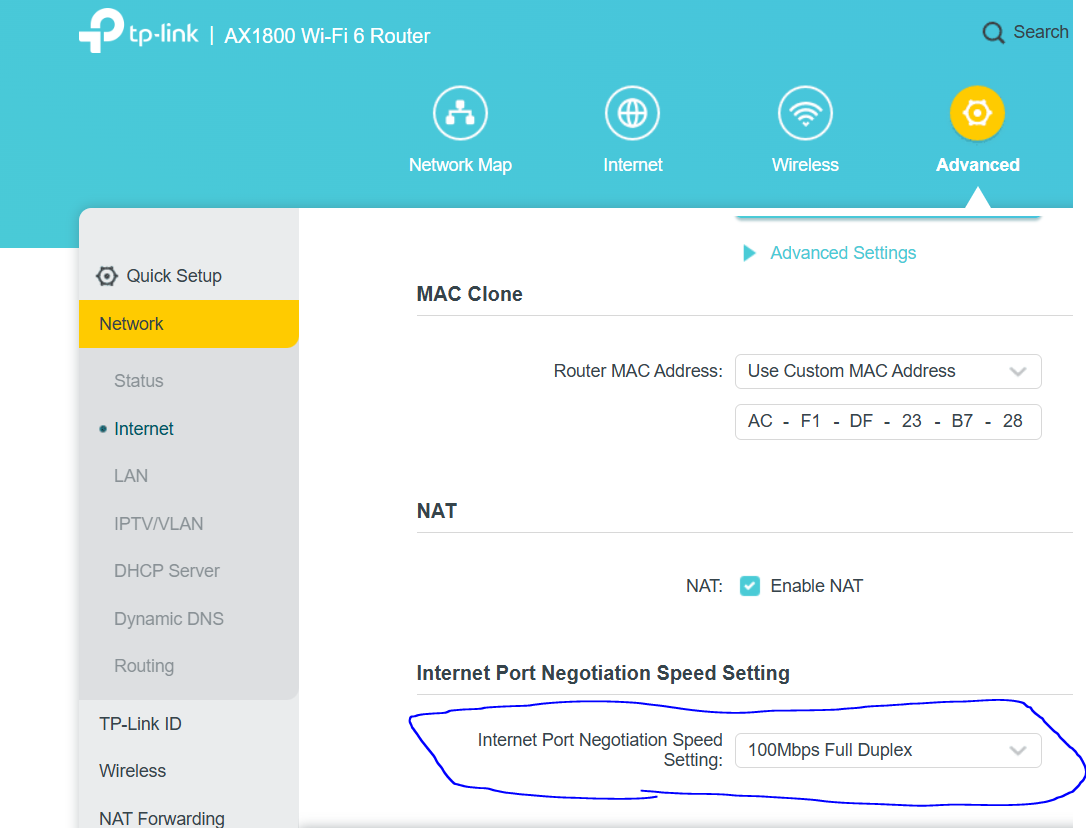


Save-reboot:
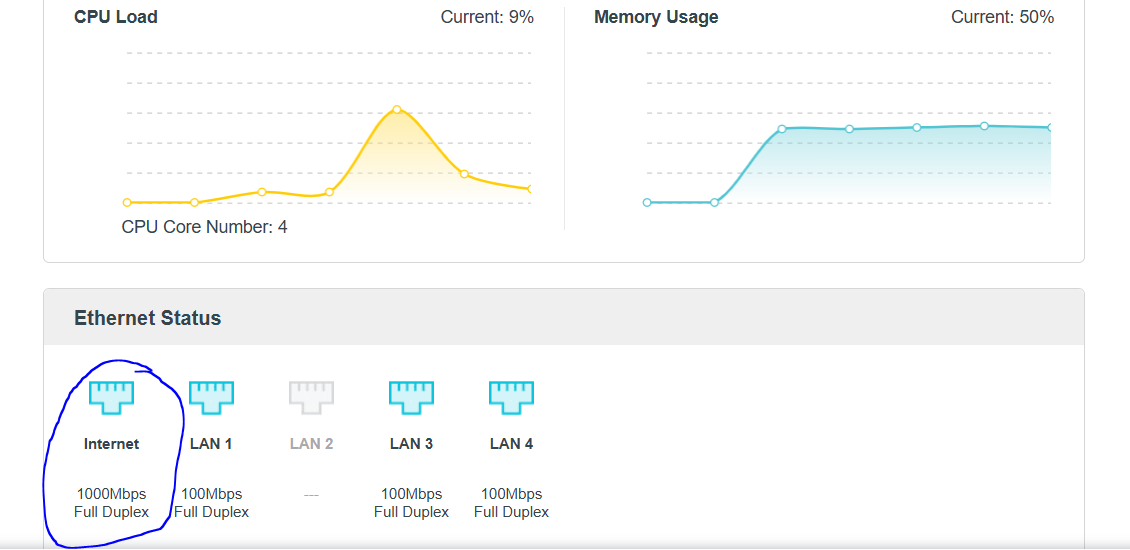
 

0
0
#1
1 Accepted Solution
Re:Internet Port Negotiation Speed Setting dont work-Solution
2025-11-04 08:03:07 - last edited 2025-11-21 07:22:44

Hello @YuriyB ,

Thanks for contacting our community.


If you don't restart, will the negotiation speed of 100Mbps remain in effect?

I noticed that all your LAN ports working in 100Mbps, have you connected the wired clients to LAN ports with CAT5 cables? If yes, you can also consider connecting the router's WAN port to modem via CAT5 cable.


Welcome to Community! Get the latest posts: △New Firmware for Archer GE550/GE650 V1 Introduces AI-QoS, EasyMesh IoT Expansion, and More! △New Firmware Releases for Archer BE805 V1/BE450 V1 to Support VPN Merge, New ECO Mode, and More! More posts, please see: △ Get the Ongoing Pre-release Firmware for Wi-Fi Routers Here— Subscribe for Updates! Urgent problems with your Wi-Fi Router, Range Extender, or DSL Modem? Please reach out via private Messages or @Joesph-TP in your new thread directly. Click Or ☆Recommended Solution if the post/answer helps.
Recommended Solution
0
0
#2
1 Reply
Re:Internet Port Negotiation Speed Setting dont work-Solution
2025-11-04 08:03:07 - last edited 2025-11-21 07:22:44

Hello @YuriyB ,

Thanks for contacting our community.


If you don't restart, will the negotiation speed of 100Mbps remain in effect?

I noticed that all your LAN ports working in 100Mbps, have you connected the wired clients to LAN ports with CAT5 cables? If yes, you can also consider connecting the router's WAN port to modem via CAT5 cable.


Welcome to Community! Get the latest posts: △New Firmware for Archer GE550/GE650 V1 Introduces AI-QoS, EasyMesh IoT Expansion, and More! △New Firmware Releases for Archer BE805 V1/BE450 V1 to Support VPN Merge, New ECO Mode, and More! More posts, please see: △ Get the Ongoing Pre-release Firmware for Wi-Fi Routers Here— Subscribe for Updates! Urgent problems with your Wi-Fi Router, Range Extender, or DSL Modem? Please reach out via private Messages or @Joesph-TP in your new thread directly. Click Or ☆Recommended Solution if the post/answer helps.
Recommended Solution
0
0
#2

