
Solution Resolving Limited Accessibility to Google Services on Specific ISP Networks (Starlink/Launtel)


This Article Applies to:
Deco BE65/BE63/BE11000(EU/US/AU/CA/UK)_V2.0/2.6
Deco BE25(US/EU)_V1.0/V1.6
Deco BE65 Pro(EU/US/AU/CA)_V1.0/V1.6
Deco BE65(EU/US/AU/CA)_V1.0/V1.6
Phenomenon Description:
Recently, there was some feedback that users are experiencing frequent difficulties connecting to Google services(such as Google Calendar, Gmail, YouTube, etc) while using Deco mesh systems on the following ISP networks: Starlink (Global), ISOMEDIA (US), Fastel (US), and Launtel (AU).
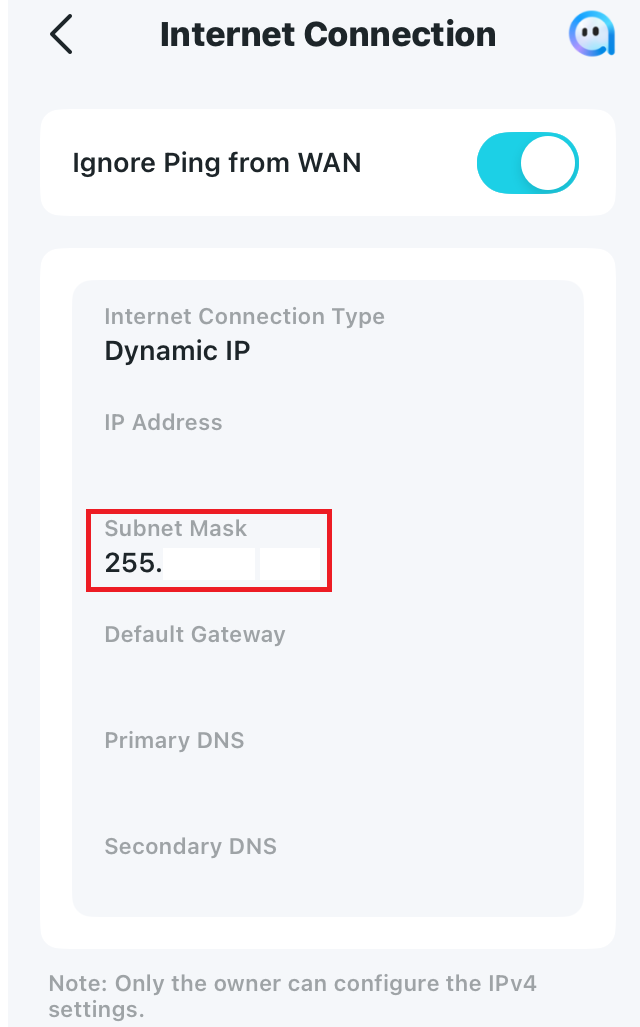
After further troubleshooting, we found that in most cases, the IPV4 WAN subnet mask is often lower than /16, such as 255.192.0.0(/10), 255.0.0.0(/8), or 252.0.0.0(/6), which probably caused the connection issue with Google services.
Available Solutions:
-
Official firmware versions are planned to be released soon to fix this issue.
-
Currently, it is recommended to install the following beta versions as a workaround:
| Deco BE65 Pro_V1.0/1.6 | 1.2.10_build_20251212_Early Access |
| Deco BE65/BE63/BE11000_V2.0/2.6 | 1.2.10_build_20251229_Official |
| Deco BE25_V1.0/V1.6 | 1.1.0_build_20250912_Beta |
| Deco BE65_V1.0/V1.6 | 1.1.1_build_20251209_Beta |
Update Notice:
Please be sure you have read the Beta Test Agreement before upgrading the Pre-release firmware!
How to manually update the firmware via web UI.
-
If you also experienced a similar issue on other Deco models, please comment below with the following details:
- Deco model and current firmware version
- The Internet service provider and IPV4 WAN Subnet mask on the Deco App>More>Internet Connection>IPV4 Subnet Mask
- The web resources that can't be accessed.
- Copy Link
- Subscribe
- Bookmark
- Report Inappropriate Content

I have some problems to access to Google websites like Gmail, Google Drive, Google Analytics and so on using Deco BE85 and Starlink bypassed (deco as main routeur)
Here a re my technical infos, can you please provide a new firmware to fix this :
Deco model and current firmware version : deco be85 and 1.2.1 Build 20250731 Rel. 15505 firmware
The Internet service provider and IPV4 WAN Subnet mask on the Deco App>More>Internet Connection>IPV4 Subnet Mask : it's Starlink and 255.192.0.0 subnet mask
The web resources that can't be accessed : various Google websites including gmail.com, google drive, google ads, google analytics and more
- Copy Link
- Report Inappropriate Content

@David-TP
PX50 firmware version 1.2.3 Build 20240724 Rel 28307
IPV subnet masks was 255.192.0.0 I fhave tried changing as suggested and static IP's tried
Starlink with router in bypass mode.
Tried everything listed and then some.
No access to Google Play Store downloads/updates
Ive wasted a full day including using a heap of AP to try fix. Any chance of a Beta Firmware?
- Copy Link
- Report Inappropriate Content
Hi, welcome to the community.
Apart from the beta firmware, could you please help me test whether the following workaround helps:
Change the LAN IP address from 192.168.68.1 to 10.0.0.1 under Deco App>More>Advanced>LAN IP
Wait for your reply.
Best regards.
- Copy Link
- Report Inappropriate Content
@David-TP
I haven't updated to a Beta Firmware as I didn't see any listed for the the PX50. Can you advise?
I'm not convinced the issue is in the Deco but more with Starlink. I believe they had to change the content restrictions in Australia in the recent months.
I'm investigating with Starlink direct as well.
The IP Address changes did not work. My phone was registered with IP 10.0.2.26, Gateway 10.0.0.1, Subnet Mask 255.255.255.0 DNS 8.8.8.8 and 8.8.4.4
- Copy Link
- Report Inappropriate Content
@David-TP Hi David. You can ignor this issue for me. Starlink confirmed the issue was with them (strange but I have it in writing). They have now resolved the issue.
I'm still keen for Beta Firmware if possible as I now need to revert all my changes.
- Copy Link
- Report Inappropriate Content
Hi, thank you very much for the update.
I'm afraid there hasn't been a beta firmware for the Deco PX50, which is also why changing the LAN IP address is offered in the first place, as the engineer explained it could improve this issue as well. If Starlink has fixed the issue on the internet side, it would be better to stay on the official version.
Thanks a lot.
Best regards.
- Copy Link
- Report Inappropriate Content

@David-TP Does Deco BE65(AU)_V2_1.3.2also include this particular fix? I am on 1.2.10_build_20251212_Early Access which is the beta build mentioned in this article and while it has solved my Google issues, I am noticing a fair bit of issues with my baby camera's and doorbells on MLO (if I put them on a 2.4ghz guest network seems its OK). I wanted to try the new 1.3.2 but was worried it would reintroduce this issue and I would struggle to rollback. Thanks
- Copy Link
- Report Inappropriate Content
Information
Helpful: 3
Views: 9209
Replies: 37
Voters 1
