
Regarding Easy Mesh Connection Issues and Device AP Binding

Hi TP-Link Support,
I’m experiencing issues related to AP binding and device connectivity. Some of my IoT devices tend to connect to mesh nodes that are farther away instead of the closest EasyMesh node.
I noticed there is an AP Binding option available, but I have one question and one suggestion.
Question: After setting AP Binding, why do some devices still connect to nodes that they are not bound to? Even after multiple reboots, the device sometimes connects to the correct node and sometimes does not.
Suggestion: Would it be possible to implement an EasyMesh AP mapping feature on the router based on MAC/IP? This would allow us to configure binding rules directly, instead of waiting for the device to connect before applying the mapping.
For example, I have bound the device 50-88-11-2B-E9-FB to GE550, but occasionally it still connects to GE800 instead. Even after rebooting both the device and the router, it sometimes continues connecting to the non-bound node.
The signal strength to GE550 is excellent (full bars), whereas the signal to GE800 is very weak (minimal). Despite this, the device still sometimes connects to GE800 instead of GE550.
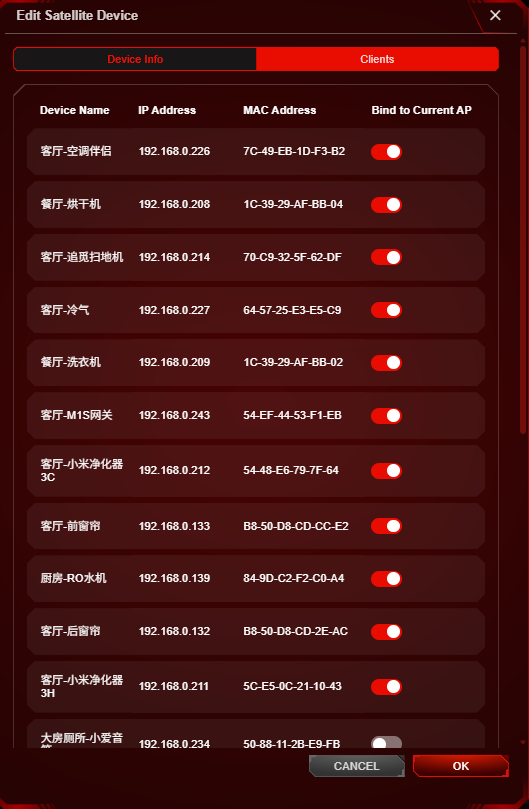
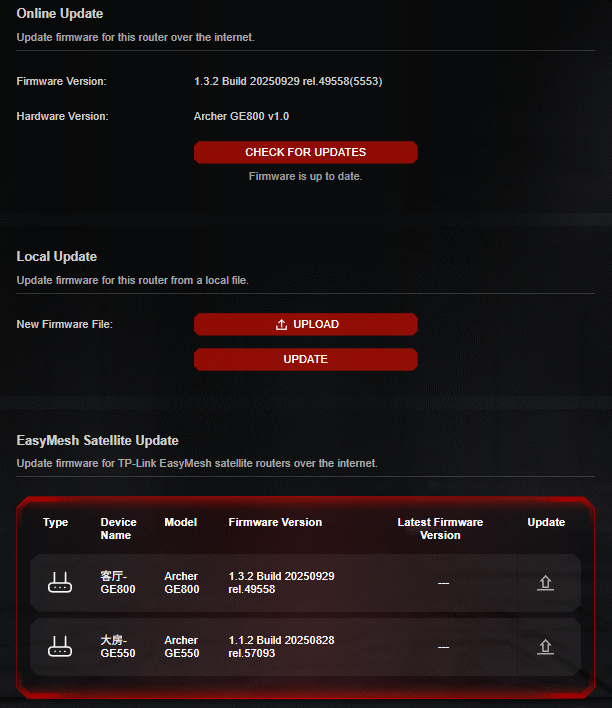
Kindly refer below for the firmware version of my mesh node and the topology.
In addition to the issues mentioned above, I also noticed that my phone is sometimes not smart enough in selecting the best node. It occasionally connects to a node with weak signal instead of the one with full signal.
Thanks.
- Copy Link
- Subscribe
- Bookmark
- Report Inappropriate Content


Hi @Jasson_Hong ,
I noticed that your other satellite should be working fine; it's likely there's a hardware issue with this new satellite node. Have you already contacted local support for RMA? If so, they will certainly handle your case properly.
Best Regards.
- Copy Link
- Report Inappropriate Content

I agree that the mentioned features like 802.11R , RSSI Threshold Configuration for EasyMesh Nodes , MLO Backhaul / Extending of MLO network etc . . . must be added to make EasyMesh as close to TP-LINK's own Deco Mesh and making it more seamless.
Currently have a : BE805 main > [ wireless ] RE655BE node
V [ wired ]
GE550 node
I do hope that one day we will get new features especially for the GE series of routers like sometimes my phone doesn't want to change node despite hitting 65dBm+++ and being in the same room as the GE550 and 2 rooms away from the RE655BE though it is probably a client issue than router but yeah. Also hope for more options for satellite routers in the WebUI and using of Tether to adjust settings as of now, my GE550 can't be accessed on the Tether App, only Web.
- Copy Link
- Report Inappropriate Content
Information
Helpful: 1
Views: 3623
Replies: 22
Voters 1