When PPPoE connection resets, router needs power cycle

When PPPoE connection resets, router needs power cycle

When PPPoE connection resets, router needs power cycle
2025-11-19 13:30:00 - last edited 2025-12-02 08:29:07
Model: Archer MR600  
Hardware Version: V2
Firmware Version: 1.8.0 0.9.1 v0001.0 Build 240716 Rel.60322n

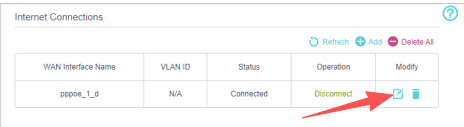
I recently started using MR600 as my router while the vendor provided router is in bridge mode. I am using PPPoE mode for the connection, now whenever my internet connection stops I have to reboot MR600 to make internet work again. The internet light keeps glowing like the connection is up, but the internet starts only after I did a reboot of MR600. I noticed similar complaints of other TP Link routers where user needs to reboot their routers to make PPPoE connection work. Is there a way to solve it ?

Thanks.

  0      
  0      
#1
Options
1 Accepted Solution
Re:When PPPoE connection resets, router needs power cycle-Solution
2025-11-20 08:33:24 - last edited 2025-12-02 08:29:07

  @Encrypter 

Hi, may I know your internet service provider?

Have you tried to set the IPV4 DNS to 8.8.8.8/8.8.4.4 on the MR600?


By the way, have you ever tried to configure PPPOE on the ISP-provided router and use a "Dynamic IP" connection type on the MR600?


Thank you very much.

Best regards.


Recommended Solution
  0  
  0  
#2
Options
1 Reply
Re:When PPPoE connection resets, router needs power cycle-Solution
2025-11-20 08:33:24 - last edited 2025-12-02 08:29:07

  @Encrypter 

Hi, may I know your internet service provider?

Have you tried to set the IPV4 DNS to 8.8.8.8/8.8.4.4 on the MR600?


By the way, have you ever tried to configure PPPOE on the ISP-provided router and use a "Dynamic IP" connection type on the MR600?


Thank you very much.

Best regards.


Recommended Solution
  0  
  0  
#2
Options