
can't ping router local IP over IPSec tunnel

Hi, I have two identical routers with the same firmware and hardware version. Both are connected via identically configured IPSec tunnels. Communication through the tunnel works fine in both cases i can ping all clients on both sides. The problem is that one router responds to pings to its local IP address, while the second one does not. I've searched through the entire configuration and can't find the setting that controls this.
- Copy Link
- Subscribe
- Bookmark
- Report Inappropriate Content


Hi, can you constantly reproduce this issue?
"From 10.10.10.1 I can ping 192.168.3.1 but i can ping 192.168.6.1."
If yes, I'd like to follow up on your case via email. At the same time, could you please help me check the following details:
Did both Archer MR600 also use the same SIM card service from one mobile ISP? Can I have the SIM ISP?
"both TP-Link routers are connected to a third-party router."
-Do you mean you have configured IPSec VPN peer connections on both MR600s to this third-party router?
Thank you very much.
Best regards.
- Copy Link
- Report Inappropriate Content
Hi, thank you very much for the feedback.
Did you set a Site-to-Site IPsec VPN connection between the two Archer MR600s?
Did you also use SIM cards for the same mobile ISP on both routers?
By the way, the default LAN IP on the MR600 is 192.168.1.1. Since there are two identical MR600s, have you tried to change the LAN IPs on both MR600s?
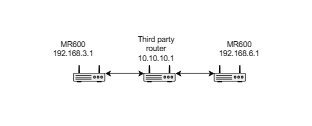
Would there be any chance you could add a network topology to show me on which side the local IP is not responding, such as

Thanks a lot.
Best regards.
- Copy Link
- Report Inappropriate Content
Hi@David-TP, both TP-Link routers are connected to a third-party router. The mobile ISPs are different. From 10.10.10.1 I can ping 192.168.3.1 but i can ping 192.168.6.1.
IPSec policy based
- Copy Link
- Report Inappropriate Content
Hi, can you constantly reproduce this issue?
"From 10.10.10.1 I can ping 192.168.3.1 but i can ping 192.168.6.1."
If yes, I'd like to follow up on your case via email. At the same time, could you please help me check the following details:
Did both Archer MR600 also use the same SIM card service from one mobile ISP? Can I have the SIM ISP?
"both TP-Link routers are connected to a third-party router."
-Do you mean you have configured IPSec VPN peer connections on both MR600s to this third-party router?
Thank you very much.
Best regards.
- Copy Link
- Report Inappropriate Content
@David-TP Hi David,
Hi, can you constantly reproduce this issue?
"From 10.10.10.1 I can ping 192.168.3.1 but i can ping 192.168.6.1."
Yes, the problem persists. I should also add that I can ping other addresses on this network, for example, 192.168.6.200 and other.
If yes, I'd like to follow up on your case via email. At the same time, could you please help me check the following details:
Did both Archer MR600 also use the same SIM card service from one mobile ISP? Can I have the SIM ISP?
Router 192.168.3.1 ping OK ISP Orange PL.
Router 192.168.6.1 no ping ISP PLAY PL.
"both TP-Link routers are connected to a third-party router."
-Do you mean you have configured IPSec VPN peer connections on both MR600s to this third-party router?
Yes, we have one main router and five routers connected to it, four of them are TP-Link.
Today I configured another MR600 router (192.168.8.1) with a card from the PLAY PL ISP, and ping works.
- Copy Link
- Report Inappropriate Content
Information
Helpful: 1
Views: 451
Replies: 4
Voters 1