
System time, firmware update and Android device connection error

Hi:
I am facing following problems
1. Android device not connected with internet, but wifi get connection without internet access. My other device IPhone, IPad and windows laptop connected properly.
2. System time showing the firmware date and time not updated as per my region or my location
3. From Deco apps always showing error during firmware updradation check. If I access through web portal with IP 192.168.68.1 firmware upgradation option working properly.
can anybody help on this
- Copy Link
- Subscribe
- Bookmark
- Report Inappropriate Content
@David-TP thanks for you response.
The android device I use Samsung S24 ultra.
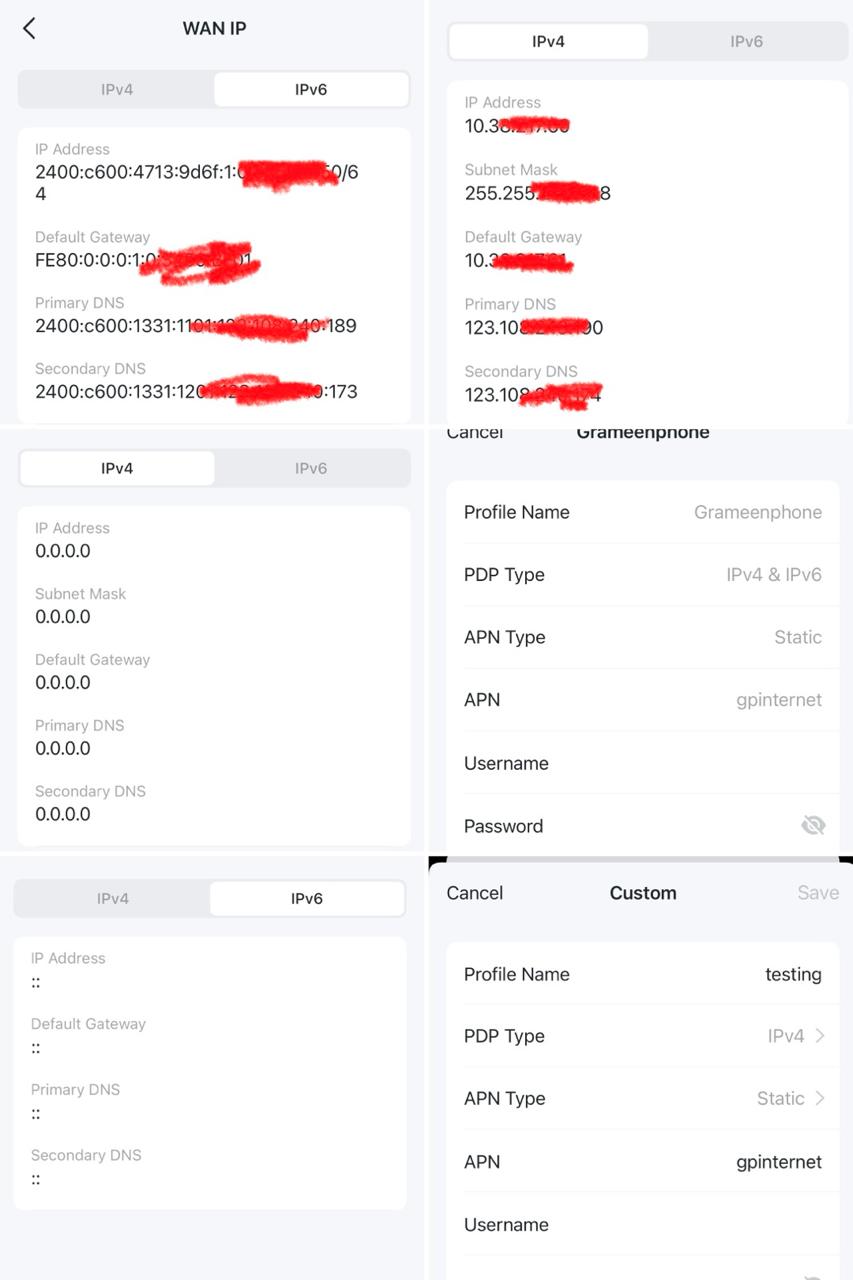
After several try I found my Cellular service provider use IPV6 preferred protocol and I found IPV4 empty. Then I forced Deco app to get IPV4 by changing the APN profile of Carrier. I am attaching all screen shot. Now System time ok, firmware update ok and also Android device have internet access.
My understanding Deco cannot handle IPV6 so that even latest Anroid device S24 ultra cant connected. Deco.
o may need update to solve this issue.
- Copy Link
- Report Inappropriate Content


Hi, welcome to the community.
Can I have the model number of the Android devices?
Please try to disable "Mesh Technology" and "Beamforming" under Deco App>More>Advanced to see whether they helped:

For the System Time, if you change to a different Time Zone, then switch it back, will it help?
As the 1.1.1 Build 20250922 Rel. 17577 is already the latest firmware for Deco X50-5G_v2, if you still constantly get errors when checking firmware upgrade on the Deco APP, you can refer to this link to submit the Deco APP log-How to submit Deco APP log and attach a screenshot of the error message.
Thanks a lot.
Best regards.
- Copy Link
- Report Inappropriate Content
@David-TP thanks for you response.
The android device I use Samsung S24 ultra.
After several try I found my Cellular service provider use IPV6 preferred protocol and I found IPV4 empty. Then I forced Deco app to get IPV4 by changing the APN profile of Carrier. I am attaching all screen shot. Now System time ok, firmware update ok and also Android device have internet access.
My understanding Deco cannot handle IPV6 so that even latest Anroid device S24 ultra cant connected. Deco.
o may need update to solve this issue.
- Copy Link
- Report Inappropriate Content
- Copy Link
- Report Inappropriate Content

@SAC365 "Deco cannot handle ipv6" is an oversimplification. It can, but not without an ipv4 address.
Looks like implementation of "464XLAT" will solve this issue.
Also, nice to see another Bangladeshi here 😁
- Copy Link
- Report Inappropriate Content
Information
Helpful: 0
Views: 334
Replies: 4
Voters 0
No one has voted for it yet.