
drop-outs

Hi
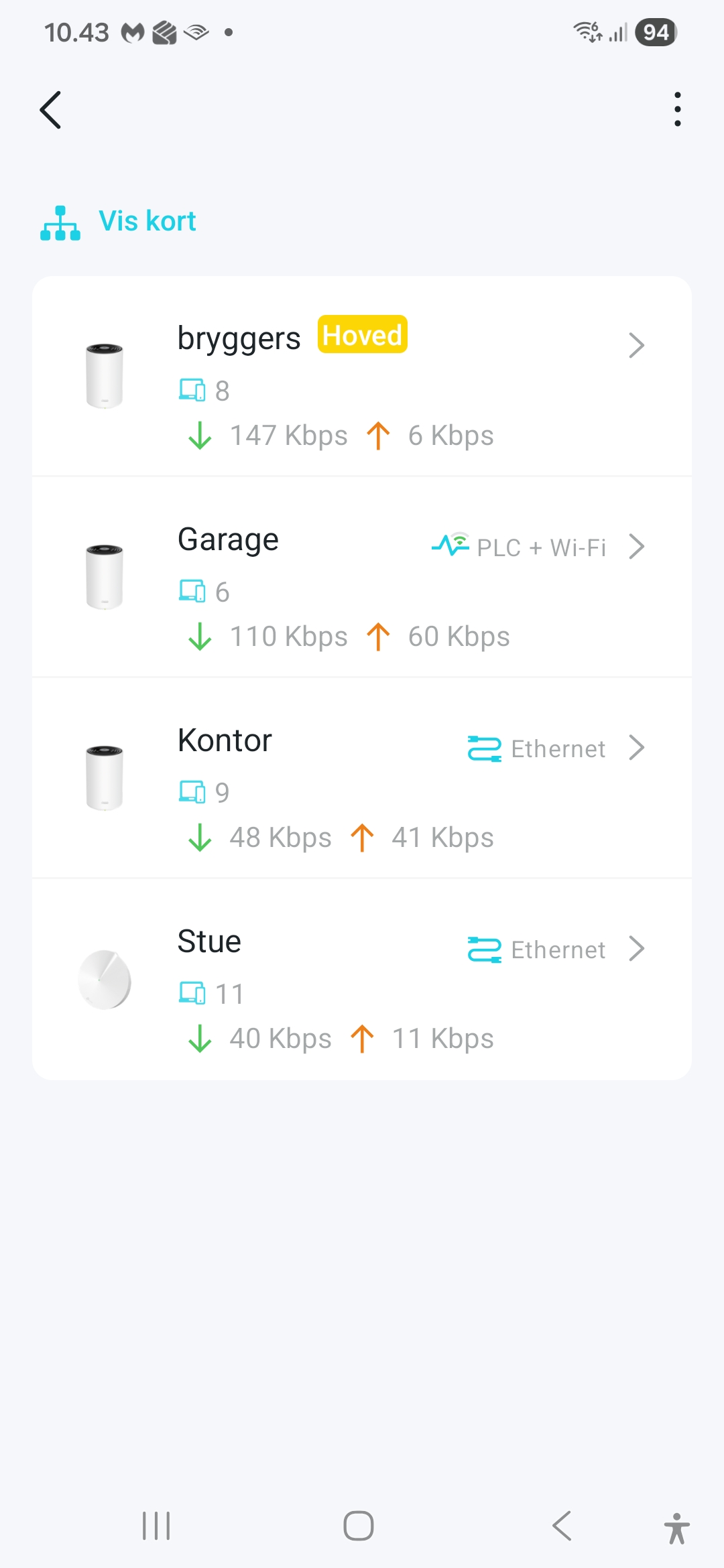
i experience in my mesh net drop-out's.
Seen as restart of tune-in on Sonos (wireless) and freeze on TV (Apple Tv unit - cabled)
Net consist of old M9's and new Px50's to support for wall penetration. Px50 is master. I'm not quite clear as to hardware versions.
I see from time to time flashing red-light on slave units units. Not seen in master as its not visible.
Will there be a log in the system that i can look into? The drop-out are not new they also existed in the old M9 network
Any suggestions how to proceed?.
- Copy Link
- Subscribe
- Bookmark
- Report Inappropriate Content

Hi, welcome to the community.
I noticed there were two satellite Deco units that use Ethernet Backhaul. Would there be a network switch after the main Deco PX50?
There is a "System log" on the web UI: Deco web interface login
You can save the log and open it via Notepad, then search for something like "wan down" to help identify the connection status of the main Deco.
By the way, would there be many smart home devices, like Sonos speakers?
Is the Apple TV connected to the main PX50?
And how long have you had the Deco? Did the drop-outs start recently?
Wait for your reply.
Best regards.
- Copy Link
- Report Inappropriate Content
hi David-tp
thank you for input. Some answers below.
1) i have checked the deco log. No hits on wan and the rest is somehow to complicated for me to read.
2) i have lots of sonos on lan wifi. And other iot devices. Iot channel is not enabled.
3) i do have 3 tp-link 5/8 port std gb switches. I am not sure if i can acces switches to see status.
4) main deco connects directly with stue satelite. Kontor is connected via 2 switches to main deco.
5) Apple tv box is ethernet connected to 1. switch after main deco
I have looked into some articles in the community.
Would it be advisable to connect the two ethernet connected satelites to same switch just after main deco? I may be able to recable to support this?
i am looking forward to your input.
- Copy Link
- Report Inappropriate Content
@nicsol @david-tp
hi
additional info
The 2 satelites decos "kontor"and "stue" are on same switch.
I tried a full reboot and "garage" went on "kontor" with plc and strong signal. However later the plc backhaul disapeared and was replaced with weak wifi.
Somehow this looks a bit like a few other posts regarding plc backhaul.
any help will be aprieciated.
- Copy Link
- Report Inappropriate Content
Hi, thanks a lot for your time and patience.
Can I have the model number of the TP-Link switches?
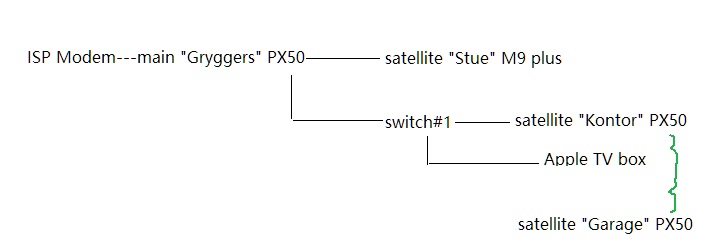
After connecting both "Stue" Deco M9+ and "Kontor" PX50 into the same switch#1, have you observed any Deco turning flashing red again?
-"Garage" PX50 supports Connection Preference. Have you tried to manually set its signal source to the main "Bryggers" PX50?
By the way, how many smart home devices do you have?
I've left a message with a beta firmware for Deco PX50. It is also suggested to install this firmware to see whether it helps to improve the network stability.
Thank you very much.
Best regards.
- Copy Link
- Report Inappropriate Content
Hi David
thanks for your reply.
I did contact Amazon that forwarded me to TP-link support. I have discussed issues with front and back-office support during the last days.
The recomandation was to avoid multiple electrical units from same wall plug, look into smart devices, refrigiraters etc. I am not able to support for all this investigation and any changes that may arise from this.
As this should be a simple out-of-the-box solution i have deemed it to complicated to solve.
I have decided to cable kontor and garage which i consider a better solution for my needs. And also cheaper.
I have just returned the px50 this morning.
I did connect kontor and stue into same switch without any change to garage drop-outs.
Regards
Nicolai Schiørring - 20854177
- Copy Link
- Report Inappropriate Content
Information
Helpful: 2
Views: 273
Replies: 5
Voters 2

