
AC 1300 T4U V1 Drops 5GHz connection

Hi, few days ago I noticed that my T4U Plus drops 5GHz connection.
I reinstalled official drivers, forced in devices menager Wireless mode to IEEE 802.11a/n/ac then to IEEE 802.11ac.
As soon I start downloading something or open firefox, connection drops. In wireless mode auto connection is capped to 2.4Ghz 144Mbps.
I checked 5GHz with my phone (Iphone 15), 5Ghz 300Mbps (OK).
My router is Orange Funbox 3.0, Wifi 5&2.4Ghz combined.
I'm using this combo (Router & T4U Plus) for 2 years and was absolutely fine.
Windows connection specs on wireless mode auto:
Identyfikator SSID: Orange_Swiatlowod_C8BA
Protokół: Wi-Fi 4 (802.11n)
Typ zabezpieczeń: WPA2-Personal
Producent: Realtek Semiconductor Corp.
Opis: TP-Link Wireless MU-MIMO USB Adapter
Wersja sterownika: 1030.52.731.2025
Pasmo sieciowe (kanał): 2,4 GHz (1)
Zagregowana szybkość łącza (odbieranie/przesyłanie): 144/144 (Mbps)
My question is if my Archer is dying or I did something wrong?
- Copy Link
- Subscribe
- Bookmark
- Report Inappropriate Content


@NoName_2002 , We have released solutions that may help you, please click here.
Joseph-TP wrote
Hello @NoName_2002 ,
Thanks for contacting our community.
The investigation shows that Windows Update automatically pushed and installed driver version 1030.52.731.2025.
You previously mentioned 'T4U Plus drops 5GHz connection'. Did this start after Windows automatic updates?
If possible, you can try rolling back the Windows driver to the previous version.
Here is a quick method:
If Windows has just automatically updated the driver, you can usually roll it back to the previous working version.
- Right-click the Windows Start menu and select Device Manager.
- Expand the Network adapters list.
- Find and right-click on the corresponding TP-Link Wireless MU-MIMO USB adapter or similar, then select Properties.
- Switch to the Driver tab.
- Check if the Roll Back Driver button is available (not grayed out):
- If available: Click the button, select a reason for rolling back in the pop-up dialog (e.g., "Previous version of the driver performed better"), and click "Yes". The system will automatically restore the old driver.
- If unavailable (grayed out): This means the system has not retained a backup of the old driver.
quickest method. If Windows has just automatically updated the driver, you can usually roll it back to the previous working version.
- Copy Link
- Report Inappropriate Content

Hi,
Can you test if the 5 GHz stays connected after you separate the 2.4 GHz band and the 5 GHz band into two different SSIDs on the Orange Funbox 3.0 ?
- Copy Link
- Report Inappropriate Content
@woozle Yes, I've already tried that. For some time 5Ghz is active then it disconnects and switch to 2.4GHz. WiFi status bar shows weak signal 2/5 but for 2 years as I mentioned was everythink fine, strong signal (my router is directly below Archer). Every other device shows full signal exepts Archer. I've bought Archer TX55E, so I will tell you if new Archer is working correctly or it was something router problem related.
- Copy Link
- Report Inappropriate Content
Unfortunately my archer died. Even on 2.4GHz it will turn off itself every 10 seconds.
New Archer works fine (320 Mbps) but I have problem event with it. TX55E comes with built in Bluetooth (via Motherboard internal USB) but Windows 11 in device manager reports Code 43 "A request for the USB device descriptor failed". I've tried diffrent connector (JUSB1, JUSB2), reconnecting cable to Archer, but problem remains. I've tried to install drivers for BT but of course installer returns no bluetooth card found.
- Copy Link
- Report Inappropriate Content
So, now you have two USB devices that won't work on your computer?
I am starting to wonder whether there might be a problem with the USB controller of your computer?
Can you please plug the Archer T4U in a different computer to verify it is really dead?
- Copy Link
- Report Inappropriate Content
@woozle So, old Archer is definetly dead. Other devices like my laptop or girlfriend PC doesn't recognites it.
On new Archer Wi-Fi works perfectly fine (PCIe) but Bluetooth still returns Code 43 "A request for the USB device descriptor failed". I've tried to change motherboard internal USB connector (JUSB1, JUSB2).
I also have external Bluetooth adapter (Tp-Link UB500 BT 5.0) and it works fine. I've uinstall UB500 drivers hoping that resolves problem, but no.
I checked if it is USB controller problem like you said but other devices works normal (mouse, keyboard, USB hubs, cameras, joystick, throttle, driving wheel, pedals, printer, etc.). Ofc they're not plugged in all at once.
For reference my motherboard is MSI X470 GAMING PLUS MAX
- Copy Link
- Report Inappropriate Content
Then there is not much that can be done, I guess.
If possible, you may test the TX55E in another PC to see if it is faulty or not.
Also verify the USB cable that connects the TX55E to the JUSB is not damaged and the wires are in the correct order.
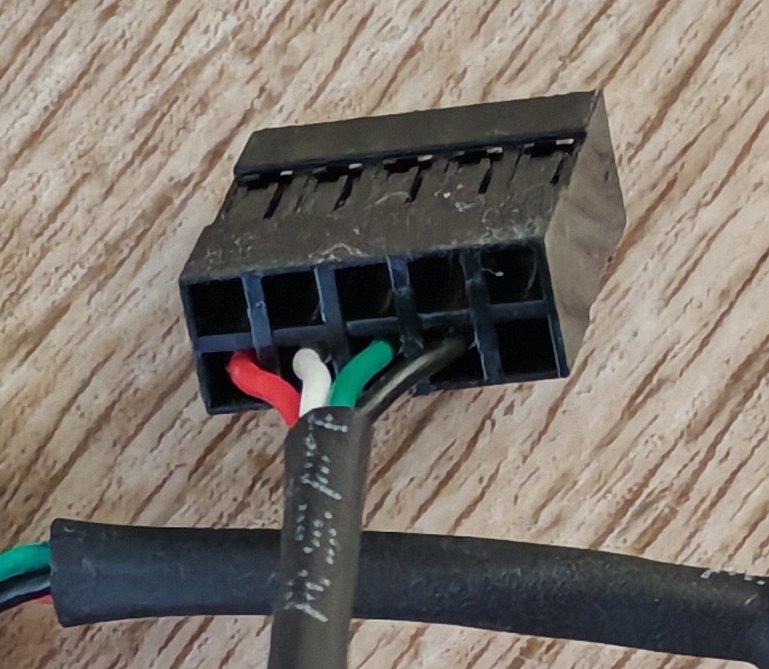
- Copy Link
- Report Inappropriate Content
Hello @NoName_2002 ,
Thanks for contacting our community.
The investigation shows that Windows Update automatically pushed and installed driver version 1030.52.731.2025.
You previously mentioned 'T4U Plus drops 5GHz connection'. Did this start after Windows automatic updates?
If possible, you can try rolling back the Windows driver to the previous version.
Here is a quick method:
If Windows has just automatically updated the driver, you can usually roll it back to the previous working version.
- Right-click the Windows Start menu and select Device Manager.
- Expand the Network adapters list.
- Find and right-click on the corresponding TP-Link Wireless MU-MIMO USB adapter or similar, then select Properties.
- Switch to the Driver tab.
- Check if the Roll Back Driver button is available (not grayed out):
- If available: Click the button, select a reason for rolling back in the pop-up dialog (e.g., "Previous version of the driver performed better"), and click "Yes". The system will automatically restore the old driver.
- If unavailable (grayed out): This means the system has not retained a backup of the old driver.
quickest method. If Windows has just automatically updated the driver, you can usually roll it back to the previous working version.
- Copy Link
- Report Inappropriate Content
@NoName_2002 , We have released solutions that may help you, please click here.
Joseph-TP wrote
Hello @NoName_2002 ,
Thanks for contacting our community.
The investigation shows that Windows Update automatically pushed and installed driver version 1030.52.731.2025.
You previously mentioned 'T4U Plus drops 5GHz connection'. Did this start after Windows automatic updates?
If possible, you can try rolling back the Windows driver to the previous version.
Here is a quick method:
If Windows has just automatically updated the driver, you can usually roll it back to the previous working version.
- Right-click the Windows Start menu and select Device Manager.
- Expand the Network adapters list.
- Find and right-click on the corresponding TP-Link Wireless MU-MIMO USB adapter or similar, then select Properties.
- Switch to the Driver tab.
- Check if the Roll Back Driver button is available (not grayed out):
- If available: Click the button, select a reason for rolling back in the pop-up dialog (e.g., "Previous version of the driver performed better"), and click "Yes". The system will automatically restore the old driver.
- If unavailable (grayed out): This means the system has not retained a backup of the old driver.
quickest method. If Windows has just automatically updated the driver, you can usually roll it back to the previous working version.
- Copy Link
- Report Inappropriate Content
@Joseph-TP Thank you for help. I've install drivers on fresh copy of Windows and my old Archer works again.
- Copy Link
- Report Inappropriate Content
Thanks for getting back to me.
It is good news that the adapter can work again.
Do you mean you have installed the adapter's original driver? Or the original driver for the Windows system? Also, could you tell me which driver you have installed?
As we need to confirm additional details to prepare for a long-term solution, any feedback or additional information you can provide will be very helpful.
Thank you for your understanding and support!
- Copy Link
- Report Inappropriate Content
Information
Helpful: 0
Views: 1549
Replies: 10
Voters 0
No one has voted for it yet.