
MR200 scheduled WiFi restart

Archer MR200 v5.3 00000001
It is possible to restart scheduled or via webconsole the WiFi Module? Not only with the physical switch at the backfront.
Is there any (secret) API Interface for the device to manage some task without logging in to the webconsole?
Why the question?
If I disconnect the WAN (LTE) interface and reconnect it, the WiFi goes partially stuck.
My TP Link Range Extenders does not work as expected after this. If I stop WiFi with the backfront switch, wait 10 sec., start WiFi again all things go well. Devices behind the Range Extenders are then already visible and reachable.
- Copy Link
- Subscribe
- Bookmark
- Report Inappropriate Content


Hi, thank you very much for the quick reply.
Currently, I don't have any further suggestions.
If you can consistently reproduce this issue, it is recommended to reach out to the local technical support to see whether they have had any other workaround.
https://www.tp-link.com/de/support/contact-technical-support/#Hotline-Support
Thanks a lot.
Best regards.
- Copy Link
- Report Inappropriate Content
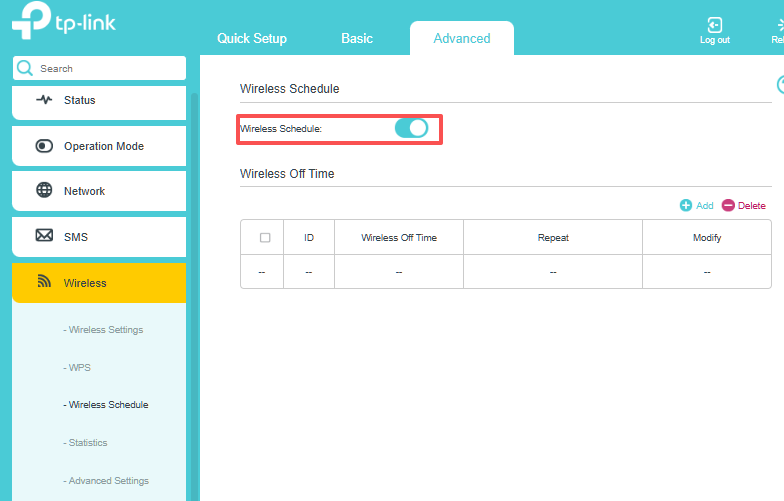
Hi, Archer MR200_V5.3 should support WiFi Schedule. Have you tried to set a Wireless on/off time via the web admin UI to see whether it helps with the reported issue on the range extender?
Best regards.
- Copy Link
- Report Inappropriate Content
Hello David,
thanks for your comment!
I know the menu point in the Wireless Register of the web console.
I observe the problem since many month and found the explanation some days ago randomly, as I manually disconnect and reconnect the WAN/LTE connection. (Sometimes the LTE provider forces a reconnect and the router connects to a LTE band with poor performance. I manually reconnect again and gets a "good" LTE band.) My hope was, If I manually reconnect the LTE connection, I would make also a restart of the routers WiFi module via the web console. So I must not go to the router to use the physical switch at the backfront.
Why I have found the firmware error? (I think it is an error...)
My Home Assistant (HA) installation is connected over the ETH interface of the router. The HA sees every time the devices "behind" the TP Link RE450. My cell phone connected via Wifi cannot connect the devices behind the RE450 after a LTE reconnect; ping returns false. After turning the Wifi Off/On with the backfront switch, all is working as expected.
Regards
- Copy Link
- Report Inappropriate Content
Hi, thank you very much for the update.
May I know how you manually reconnect the LTE connection, by unplugging the SIM cards or restarting the router?
If it is by restarting the router, I think it would restart both the LTE connection and the WiFi connection.
When the devices on the RE450 failed to respond, have you tried restarting the RE450, instead of the WiFi on the MR200, to see if it also helps restore the communication?
Best regards.
- Copy Link
- Report Inappropriate Content
May I know how you manually reconnect the LTE connection, by unplugging the SIM cards or restarting the router?
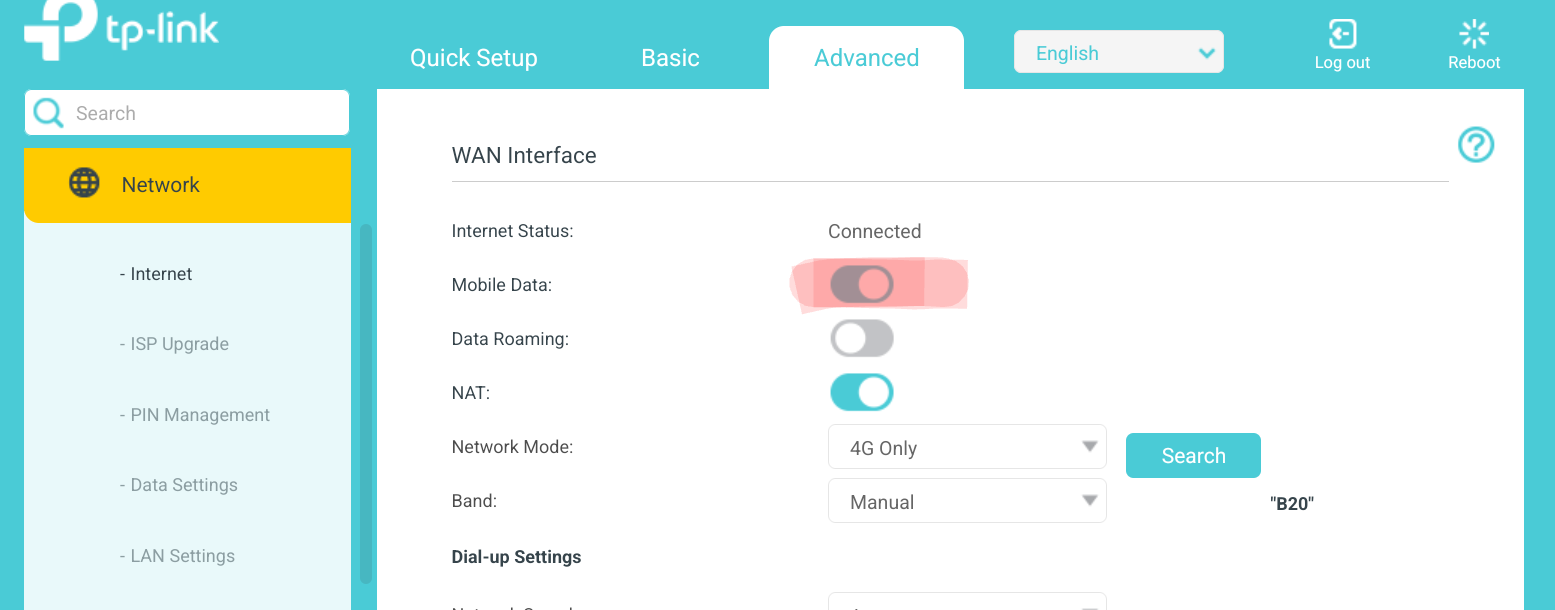
This way.
If it is by restarting the router, I think it would restart both the LTE connection and the WiFi connection.
;-) logically...
When the devices on the RE450 failed to respond, have you tried restarting the RE450, instead of the WiFi on the MR200, to see if it also helps restore the communication?
I wrote devices connected to an ETHERNET interface of the MR200 (my HA box) can normally communicate to the RE450 and devices behind it. Only the "Wifi-connected" devices to the MR200 (for example: my cellphone) have the problem. The connection to the RE450 goes stuck. After switching the Wifi module Off/On all is running fine. So, the cause is the firmware of the MR200 not the RE's.
Regards
- Copy Link
- Report Inappropriate Content
Hi, thank you very much for the quick reply.
Currently, I don't have any further suggestions.
If you can consistently reproduce this issue, it is recommended to reach out to the local technical support to see whether they have had any other workaround.
https://www.tp-link.com/de/support/contact-technical-support/#Hotline-Support
Thanks a lot.
Best regards.
- Copy Link
- Report Inappropriate Content
- Copy Link
- Report Inappropriate Content
Information
Helpful: 1
Views: 409
Replies: 6
Voters 1