
Knowledge Base Unlocking Flexibility: WAN Priority on Archer 5G NR routers


This Article Applies to:
Archer NX200/NX500/NX600
With the launch of the TP-Link Archer 5G NR routers, a significant shift has occurred. Gone are the days of a simple, static "Operation Mode" switch found on older 4G/LTE routers. In its place is a more sophisticated and powerful feature: WAN Priority. This change is more than just a new name; it represents a fundamental improvement in how your router manages its internet connections, offering unparalleled flexibility and reliability for both home and business users.
This article will explore what WAN Priority is, how it differs from the old system, and, most importantly, how you can leverage it to create a robust, fail-safe internet setup tailored to your specific needs.
From Rigid Modes to Intelligent Prioritization: The Philosophy Behind the Change
First, let's understand the legacy approach. Previous 4G routers often had a dedicated "Operation Mode" setting in their web interface. You would typically choose between:
- 3G/4G Router Mode: The device uses only the mobile SIM card for the internet.
- Wireless Router Mode: The device uses only the Ethernet WAN port, connected to a modem from a cable, DSL, or fiber provider.
- Certain models also support Wireless Router Mode with 3G/4G Backup Mode: A basic failover mode where Ethernet WAN is primary, and the 4G connection serves as a backup.
While functional, this system was rigid. Switching modes often required a manual change in the settings. If you wanted to temporarily use your mobile connection as the primary source, you had to log in, change the mode, and wait for the router to reboot. It lacked dynamic intelligence.
The Archer 5G NR routers replace this with a dynamic WAN Priority system. Instead of locking the router into a single "mode," you tell it your preference. The router intelligently manages the connections based on this priority, allowing for seamless automatic switching. This creates a more fluid and responsive network environment.
Decoding the Terminology: MBB vs EWAN
To master WAN Priority, you need to understand its two key options:
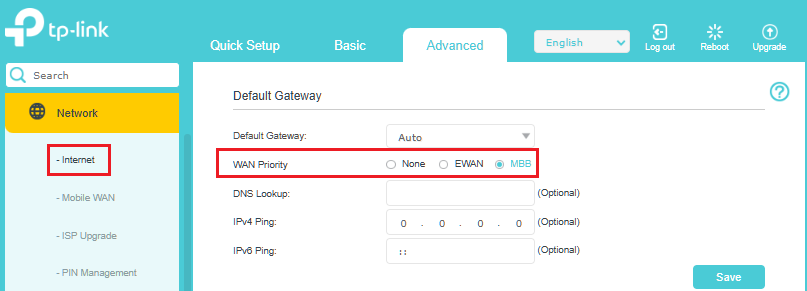
- MBB (Mobile Broadband): This refers to the router's built-in cellular modem. When you insert a SIM card, the router can connect to the internet via 3G, 4G, or 5G networks. This is your wireless WAN connection.
- EWAN (Ethernet WAN): This is a traditional gigabit WAN/LAN port on the router. You plug an Ethernet cable into it, which is connected to a separate modem (for cable, DSL, or fiber service). This is your wired WAN connection.
WAN Priority simply decides which of these two connections the router should prefer when both are active and available.
Scenario 1: MBB Priority-Primary Mobile Broadband with Ethernet Backup
It is the default priority setting on the 5G NR routers, and a powerful configuration for users who rely on the speed and low latency of 5G as their main internet source
Who Benefits Most?
- Gamers and Streamers: In areas with strong 5G, this ensures top-tier performance for latency-sensitive activities.
- Remote Professionals: Guarantees meeting continuity by automatically failing over to Ethernet if the cellular connection dips.
- Users with Unreliable Fixed Lines: Makes 5G the primary workhorse, using the existing fixed line as a dependable backup to maximize uptime.
Scenario 2: EWAN Priority-Primary Ethernet Broadband with 4G/5G Backup
This is the classic failover setup, now made smarter and more integrated.
Who Benefits Most?
- Most Homes and Businesses: Protects unlimited or high-data-cap fixed broadband users against ISP outages.
- Smart Home Users: Ensures security cameras, smart locks, and IoT devices remain online during primary connection failures.
- Business-Critical Operations: Safeguards point-of-sale systems, VoIP phones, and cloud software from costly downtime.
WAN Priority represents a significant leap in network management, replacing a manual, static system with an automated and intelligent one. It provides the essential flexibility and reliability needed today, whether you're maximizing 5G performance or simply ensuring your internet never goes down. Configuring WAN Priority is about building a resilient, self-healing digital lifeline.