Windows System 1030.52.731.2025 May Cause Signal Drop and Instability with WiFi 4/5 USB Adapters

Windows System 1030.52.731.2025 May Cause Signal Drop and Instability with WiFi 4/5 USB Adapters

Windows System 1030.52.731.2025 May Cause Signal Drop and Instability with WiFi 4/5 USB Adapters
2 weeks ago - last edited Thursday

This Article Applied to: 

All WiFi 4/5 USB network adapters


Phenomenon:

Hello! We have received some user feedback that after the Windows Update automatically pushed and installed driver version 1030.52.731.2025, the WiFi 4/5 USB adapter may exhibit the following abnormal behaviors:

  • Abnormal Signal Strength Display: WiFi signal strength drops suddenly from full bars (100%) to approximately 2 bars, indicating a weak signal.
  • Unstable Connection: The wireless connection becomes severely unstable, which may involve frequent disconnections, reduced throughput, or inability to connect to specific bands.


Typically, one of these behaviors might occur after the driver’s Auto Update.


Available Solutions:

Our relevant departments have been working on feasible long-term solutions. They have also provided some temporary solutions for the situations mentioned above. 


1. Check the current driver version

Please follow the steps below to check the current driver version to confirm if the anomaly is caused by the Windows update:

1) Right-click the Start icon on the Windows taskbar and select "Device Manager.

2) Expand the "Network adapters" list.

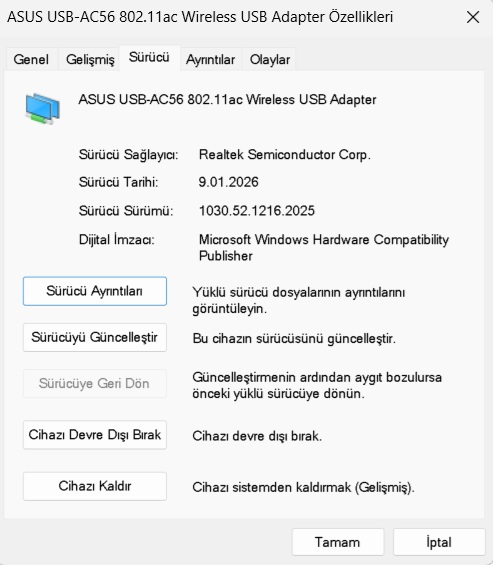
3) Find TP-Link Wireless MU-MIMO USB Adapter (or other names like Realtek 8821CU Wireless LAN 802.11ac USB NIC), right-click it, and select "Properties".

4) Switch to the "Driver" tab and check the "Driver Version":

  • If the version is 1030.52.731.2025: Confirmed as the problematic driver pushed by Windows. Please proceed with the subsequent repair steps.
  • If the version is 1030.44.XXXX.XXXX or other: This is the normal driver. If you still encounter the unexpected behavior described above, other causes need to be investigated.


2. Upgrade Driver

Through the efforts of relevant departments, we have released a universal driver. Here are the detailed steps for downloading and installing the driver:

1) Click the link below to download the updated driver package: https://static.tp-link.com/upload/beta/2026/202601/20260108/RTWlanUSB_WindowsDriver.zip

2) Locate the downloaded zip file, right-click it, and select Extract All to unzip the contents.

3) Open the extracted folder, find the Setup.exe file, and double-click it to run the installation program.

4) Once the installation is complete, restart your computer to apply the changes.

5) Check if the upgraded to 1030.52.1110.2025.


If you encounter other anomalies after automatically updating your Windows system to version 1030.52.731.2025, please provide more details. This includes, but is not limited to:

1) The specific model and hardware version, and the current adapter driver version.

2) Detailed description of the situation.


Any other convenient troubleshooting steps or suggestions are welcome!!

Nice to Meet You in Our TP-Link Community. Check Out the Latest Posts: △New Firmware Update for Archer BE260/Archer BE400 to Support VPN Merge, New ECO Mode, and More △Connect TP-Link Archer BE550 to Germany's DS-Lite (Dual Stack Lite) Internet via WAN △Tether KidShield Test Recruitment - Safeguarding Children's Online Experience If you found the post or response helpful, please click Helpful. If an answer solves your problem, click "Recommended Solution" so that others can benefit from it.
  8      
  8      
#1
Options
5 Reply
Re:Windows System 1030.52.731.2025 May Cause Signal Drop and Instability with WiFi 4/5 USB Adapters
Saturday
Thanks! This fixed it right up!
  1  
  1  
#2
Options
Re:Windows System 1030.52.731.2025 May Cause Signal Drop and Instability with WiFi 4/5 USB Adapters
Yesterday

Hi @TKFU420 ,

Glad to hear that~! wink

Nice to Meet You in Our TP-Link Community. Check Out the Latest Posts: △New Firmware Update for Archer BE260/Archer BE400 to Support VPN Merge, New ECO Mode, and More △Connect TP-Link Archer BE550 to Germany's DS-Lite (Dual Stack Lite) Internet via WAN △Tether KidShield Test Recruitment - Safeguarding Children's Online Experience If you found the post or response helpful, please click Helpful. If an answer solves your problem, click "Recommended Solution" so that others can benefit from it.
  1  
  1  
#3
Options
Re:Windows System 1030.52.731.2025 May Cause Signal Drop and Instability with WiFi 4/5 USB Adapters
22 hours ago

  @Joseph-TP 


1030.52.1110.2025  connects only to high-speed (less than 300 Mbs), USB 3 superspeed is missing

AC1300 Mini - Windows 11 23h2


  0  
  0  
#4
Options
Re:Windows System 1030.52.731.2025 May Cause Signal Drop and Instability with WiFi 4/5 USB Adapters
13 hours ago

Hello @0scar ,

Welcome to our community.


Is it the model of your adapter Archer T3U? Have you tried the driver in this post?

Additionally, could you provide more details about your device's performance? For example, unstable connections, slow speeds, etc.

Nice to Meet You in Our TP-Link Community. Check Out the Latest Posts: △New Firmware Update for Archer BE260/Archer BE400 to Support VPN Merge, New ECO Mode, and More △Connect TP-Link Archer BE550 to Germany's DS-Lite (Dual Stack Lite) Internet via WAN △Tether KidShield Test Recruitment - Safeguarding Children's Online Experience If you found the post or response helpful, please click Helpful. If an answer solves your problem, click "Recommended Solution" so that others can benefit from it.
  0  
  0  
#5
Options
Re:Windows System 1030.52.731.2025 May Cause Signal Drop and Instability with WiFi 4/5 USB Adapters
5 hours ago

  @Joseph-TP 


Yes, it is the Archer T3U AC1300 Mini (neither the Nano nor the Plus)

Yes I have tried the driver in the post, it works fine and stable but it works only in high-speed mode (less than 300 Mbs), the superspeed  does not work with this driver

The only problem with 1030.52.731.2025 is cosmetic, it shows a low fake signal strength because RSSI dBm is -45 as always, the speed is 500 Mbs and stable

  0  
  0  
#6
Options