
The KE100 never lets the radiator get cold

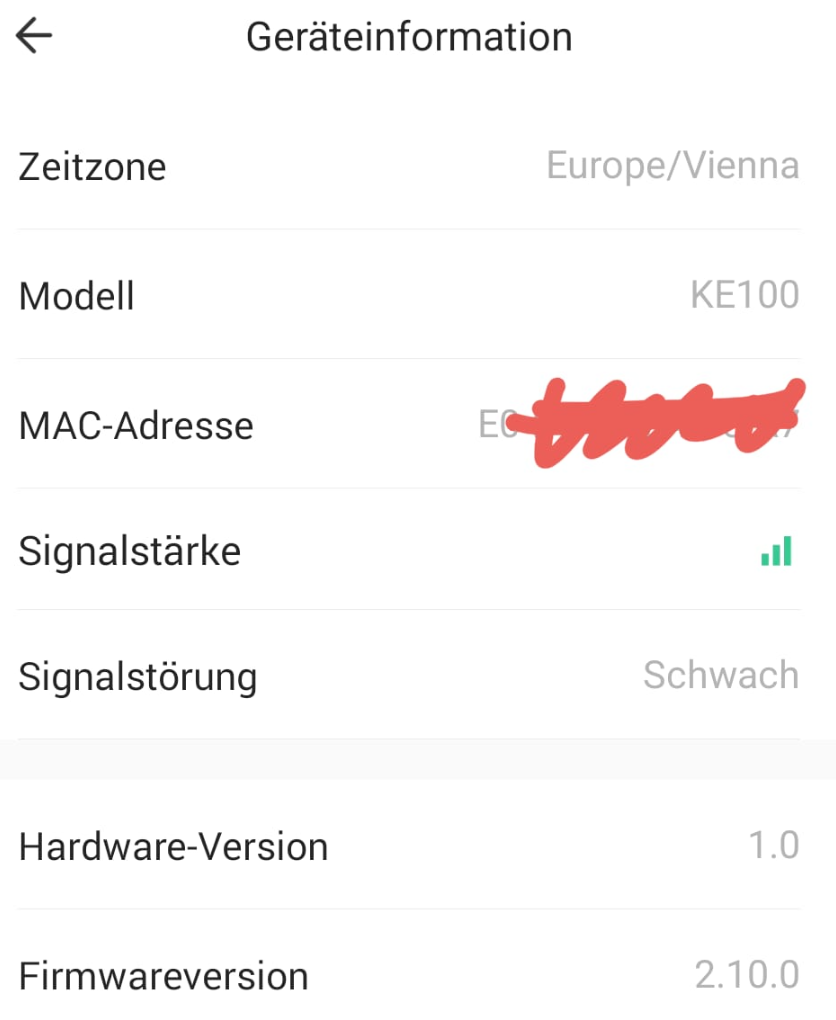
I have been using the KE100 kit since December 6, 2025. It worked fine at first, but since December 22, it has been acting up.
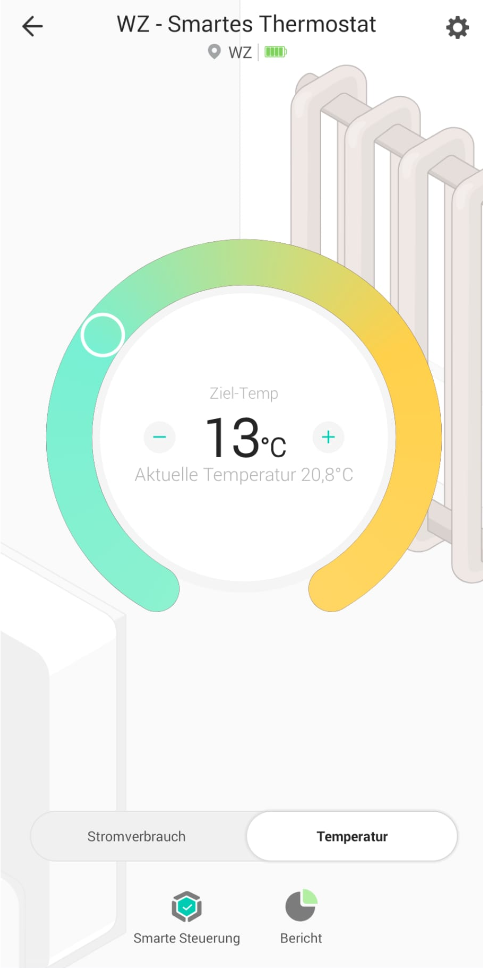
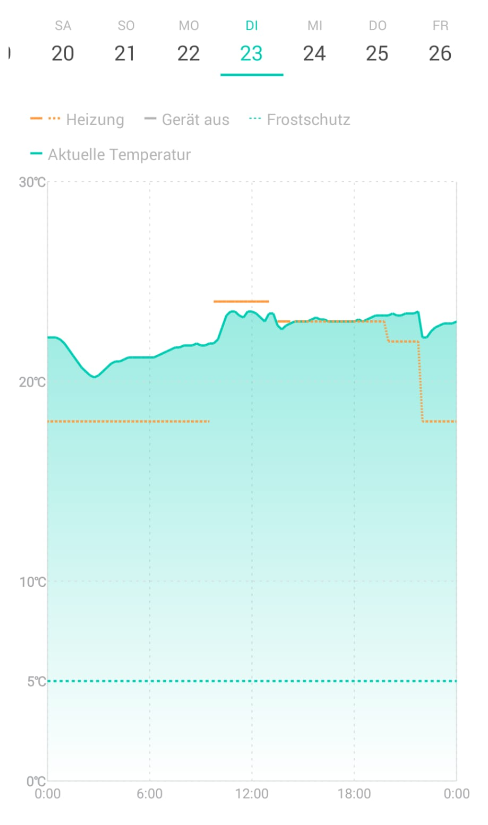
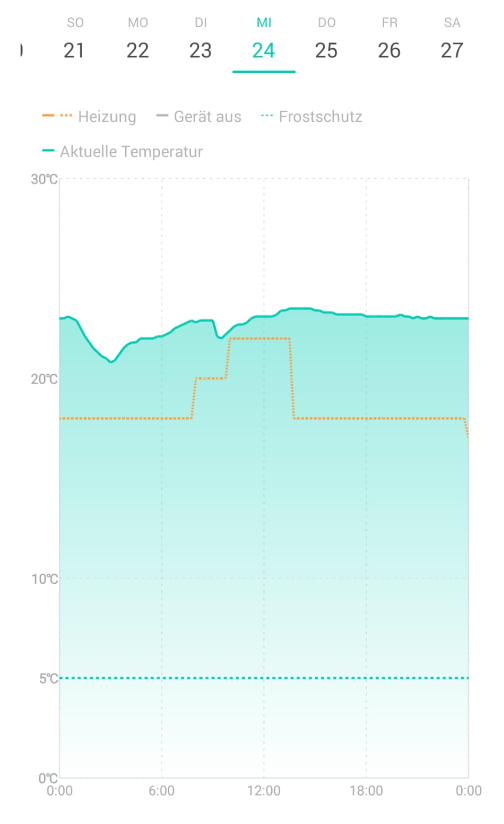
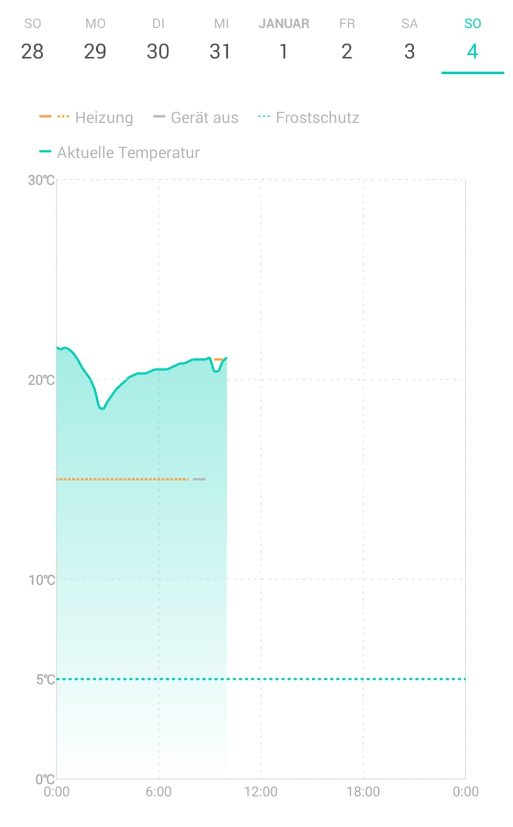
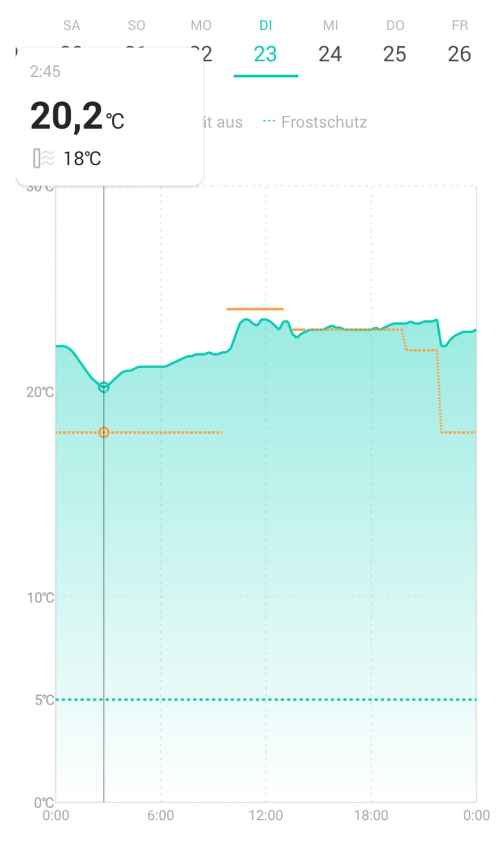
I have reset and recalibrated it several times according to the instructions, but it constantly overheats. The radiator never gets cold, even when the target temperature is set to 13 degrees Celsius. However, it correctly detects that the ambient temperature is already 22 degrees Celsius and above!
The thermostat has the correct batteries installed.

It is noticeable that the temperature drops every day from 12:30 a.m. to 2:45 a.m. and then rises again. EVERY DAY. Without any external influence.
Is this a hardware or software error?
- Copy Link
- Subscribe
- Bookmark
- Report Inappropriate Content
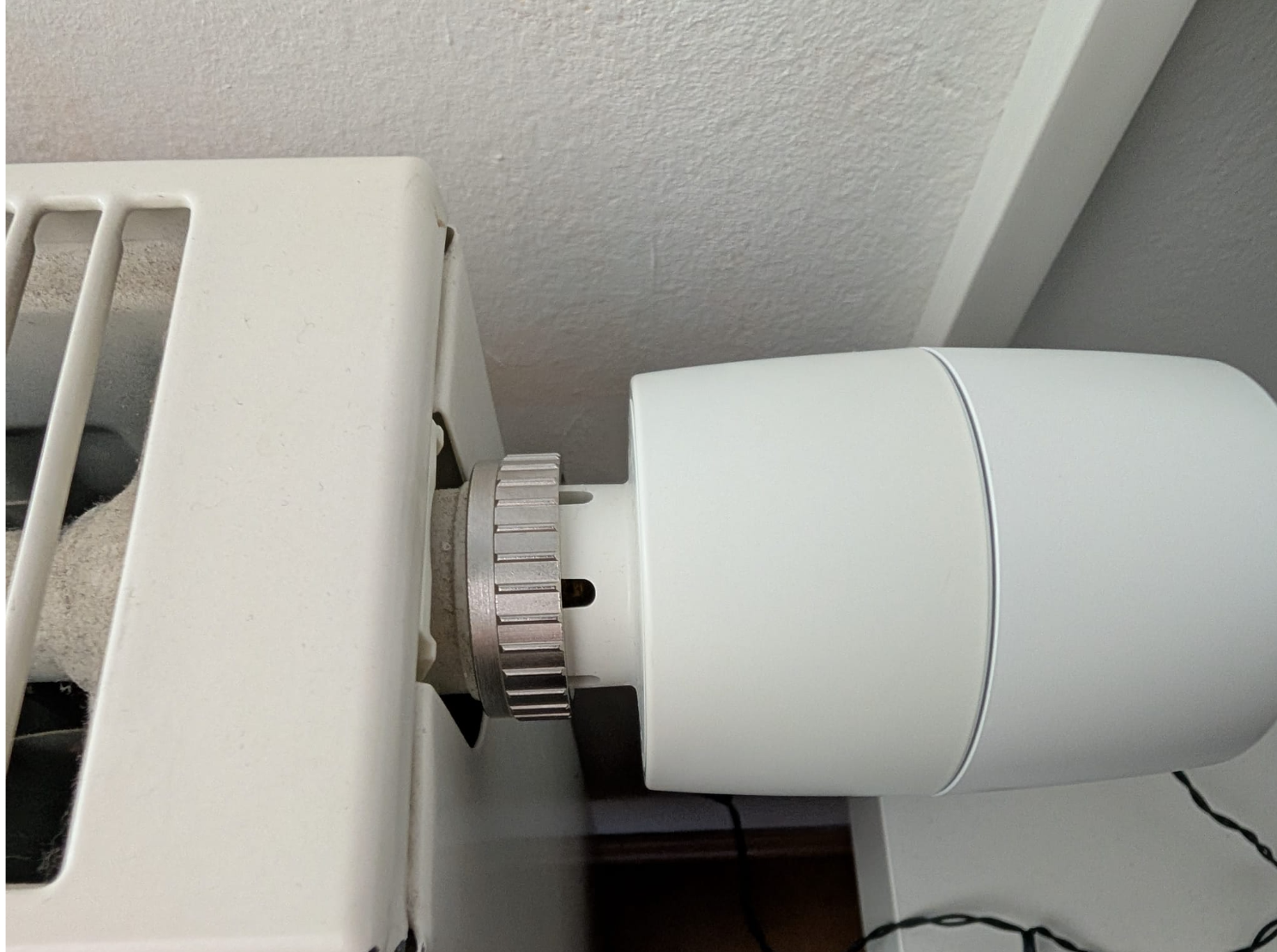
Further information: I don't use an adapter and have reset and recalibrated it several times according to the instructions (Abnormal Heating: What To Do If Kasa KE100 Overheats or Not Heating Up?),
- Copy Link
- Report Inappropriate Content

@ThermoHeat This is happening to me as well and I really don’t know what to do. I have the temperature set to 22°C, it works correctly for a while, but then during the night it somehow turns on and the heating keeps running. In the morning, the room temperature shows around 27°C even though the set temperature is still 22°C. I will probably return or claim the device as faulty. How did it work out for you?
- Copy Link
- Report Inappropriate Content
- Copy Link
- Report Inappropriate Content
- Copy Link
- Report Inappropriate Content


To assist with this case, a specialist will help to follow it up through email. Please check your inbox later to confirm.
If the email you used to register for the TP-Link community is not your contact email or you cannot access it, please send me your contact email through private message.
- Copy Link
- Report Inappropriate Content
Jimiii wrote
@ThermoHeat This is happening to me as well and I really don’t know what to do. I have the temperature set to 22°C, it works correctly for a while, but then during the night it somehow turns on and the heating keeps running. In the morning, the room temperature shows around 27°C even though the set temperature is still 22°C. I will probably return or claim the device as faulty. How did it work out for you?
You may refer to the suggestions here. Abnormal Heating: What To Do If Kasa KE100 Overheats or Not Heating Up?
- Copy Link
- Report Inappropriate Content
Thank you for your suggestions, but they are useless to me. I don’t need suggestions to see that I have the device set to 22 °C while it shows 27 °C, keeps heating, and cannot be turned off even manually.
Do you know what actually helped and made the device work properly? I threw it out of the window for one minute when it was –4 °C outside. After that, it worked without any problems.
So unless you really have a concrete solution to fix this issue, I have no choice but to return the device as defective. If I get it back, I will return it again and again until the manufacturer refunds my money, and I will buy a device that actually works.
I am not the only one on this forum who has the same problem. And if no one at TP-Link is willing to address this properly, for example with a firmware update, then my only option is to return the device and leave a very negative review.
Thank you for your help, I really appreciate it, but you are probably not a software engineer or the developer who designed this device, so you most likely cannot help me further.
- Copy Link
- Report Inappropriate Content
Bug Report: Temperature-Dependent Control Failure in Thermostatic Radiator Valve
Product Type
Smart Thermostatic Radiator Valve
Issue Summary
The device exhibits a systematic, temperature-dependent control failure where heating continues despite the measured temperature being significantly above the configured setpoint. The failure occurs under normal operating conditions and renders the device unreliable for its intended purpose.
Observed Behavior
-
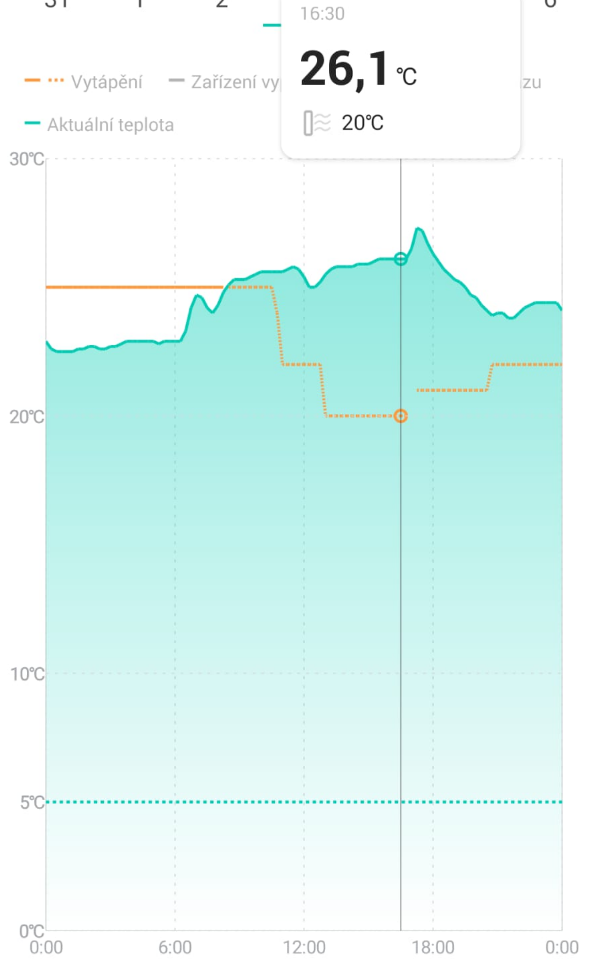
Device reports measured temperature significantly above setpoint (example: 26.1 °C measured vs. 20 °C setpoint).
-
Heating continues despite a +6.1 °C control error.
-
Valve does not fully close when the setpoint is exceeded.
-
Manual override does not reliably stop heating.
-
Behavior repeats consistently once the device warms up during operation.
Expected Behavior
-
When the measured temperature exceeds the setpoint, the valve should be fully closed.
-
Heating output should be strictly inhibited beyond any reasonable hysteresis range.
-
Control loop should remain stable and deterministic regardless of device self-heating.
Reproduction Steps
-
Install the valve on a radiator and operate it under normal heating conditions.
-
Allow the device to warm up during regular operation.
-
Observe temperature readings and valve behavior once the setpoint is exceeded.
-
Note continued heating despite a large positive temperature error.
-
Actively cool the device (external cooling) and perform manual calibration.
-
Observe that regulation temporarily returns to normal behavior.
Technical Analysis
-
The failure is not random and is directly correlated with device self-heating.
-
After cooling and recalibration, correct behavior temporarily resumes.
-
This strongly indicates:
-
thermal drift of the temperature sensor,
-
missing or incorrect self-heating compensation in firmware,
-
improper handling of sensor offset at elevated internal temperatures,
-
or incorrect mapping between control output and physical valve position.
-
-
The observed behavior violates basic ON/OFF control logic, PI/PID control principles, and expected saturation behavior of the control loop.
Design Consideration
This is a thermostatic radiator valve mounted directly on a heat source by design. Device heating is therefore a normal operating condition, not an edge case. Any firmware or control algorithm that fails under these conditions is fundamentally unfit for purpose.
Impact
-
Severe temperature overshoot.
-
Loss of heating control.
-
Unreliable and potentially unsafe operation.
-
Multiple users report identical behavior, indicating a systemic issue rather than isolated defective units.
Requested Action
-
Acknowledge this issue as a firmware / control design defect.
-
Confirm whether internal temperature compensation is implemented.
-
Provide a firmware fix addressing sensor drift, temperature compensation, and control saturation behavior.
-
If not fixable in firmware, clearly state the hardware limitation.
Conclusion
Until this issue is resolved at the firmware or design level, the device cannot be considered reliable for heating control. Warranty return is therefore justified.
- Copy Link
- Report Inappropriate Content
For issues that cannot be resolved by common suggestions, technical intervention may be required for further investigation. You can reach out to the support team here: Contact Technical Support. Or if you prefer, I can help create a support ticket on your behalf. Let me know what you think.
- Copy Link
- Report Inappropriate Content
Information
Helpful: 0
Views: 683
Replies: 9
Voters 0
No one has voted for it yet.