X50 Outdoor - Constant eth1.591 errors when connected via cable

X50 Outdoor - Constant eth1.591 errors when connected via cable

X50 Outdoor - Constant eth1.591 errors when connected via cable
a week ago - last edited a week ago
Model: Deco X50-Outdoor  
Hardware Version: V1
Firmware Version: 1.3.1 Build 20251030 Rel. 41614

Hello everyone,


I am experiencing a persistent issue with my Deco X50 Outdoor whenever it is connected via cable (Ethernet Backhaul) to my main Deco unit. The system log is flooded every few seconds with the following error message:


daemon.err /usr/bin/apsd: apsd_check_eth_has_neigh:1432: Error: can't find ifname[eth1.591] in eth_ifname


Troubleshooting Performed:

  1. Cables: The error persists using brand new T568B cat6 cables and even when using the original cable provided in the box.

  2. Ports: The error occurs on both Ethernet ports of the X50 Outdoor and when connected to different ports on the main Deco/Switch.

  3. Factory Reset: Performed a full Hard Reset (physical button) and reconfigured the unit from scratch. The eth1.591 error returns as soon as the Ethernet link is established.


  4. Settings: IPTV/VLAN, Guest Network, and IoT Network are all Disabled, yet the system continuously attempts to poll the 591 VLAN interface on the Ethernet port.
  5. Advanced Logs: Upon enabling the Guest Network for testing, the logs showed further ioctl failures (send_mesh_band_steering_ioctl: ioctl failed, cmd: 45) and qca_get_phy_cap_info errors, suggesting a breakdown in communication between the firmware and the network chipset.

  6. Crucial Detail: When the Ethernet cable is disconnected and the Deco operates solely via Wireless Backhaul, the eth1.591 error disappears completely, and the network stabilizes significantly


Can someone help me to understanding if I can ignore this error or if this can cause problems in my network? Or even someone from Deco help me to understand if this can be a defect of my product.


I attached the logs in the post.


Thank you.

File:
log-2026-01-26.zipDownload
  0      
  0      
#1
Options
7 Reply
Re:X50 Outdoor - Constant eth1.591 errors when connected via cable
a week ago

  @Adailto 

Hi, can I have the model number as well as the firmware version of the main Deco?

Did you enable the Guest network on the Deco? VLAN 591 is used to separate the Guest network from the Main WiFi network.

Have you noticed any abnormal performance issues on the Deco X50-outdoor?


Wait for your reply.

Best regards.

  0  
  0  
#2
Options
Re:X50 Outdoor - Constant eth1.591 errors when connected via cable
Thursday

Hi @David-TP!


Regarding the main Deco, it is a X50(1.30) with the latest firmware available, 1.2.10 Build 20241105 Rel. 40010.

My Guest Network is turned off. I tried to turn it on and off again, but the error continues.

About the performance, I am not facing issues regarding the speed, but I feel that it looses track of which Deco it should connect sometimes when getting near the X50 Outdoor.

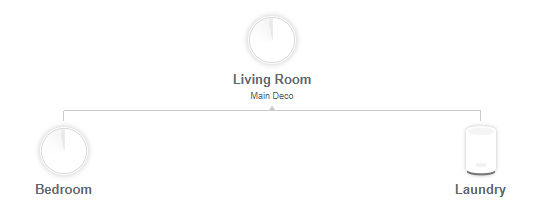
My current map is:


Thank you.

  1  
  1  
#3
Options
Re:X50 Outdoor - Constant eth1.591 errors when connected via cable
Thursday

  @Adailto 

Hi, thank you very much for the update.

There is a newer firmware for Deco X50_V1.30_1.2.10 here:

Deco X50/X55_V1.3_1.3.1 Introduced Channel Selection, WiFi Access Control and WireGuard VPN

It is recommended to install this firmware to see whether it makes any difference.

Best regards.

  0  
  0  
#4
Options
Re:X50 Outdoor - Constant eth1.591 errors when connected via cable
Friday

Hi, @David-TP!


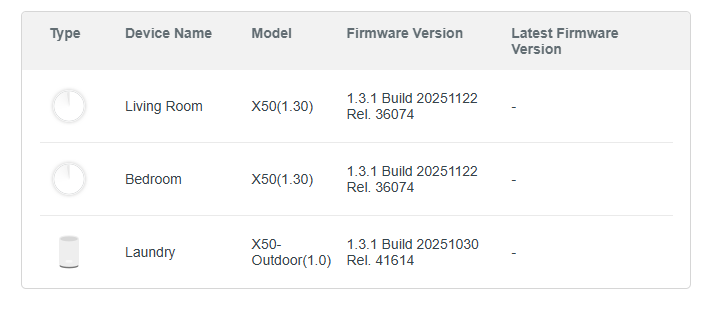
O updated to the firmware version that you sent me:

But, in the log files, the eth1.591 continues.

I attached the new log file (I cleaned all logs after upgrading).


Thank you.

File:
log-2026-01-29.zipDownload
  0  
  0  
#5
Options
Re:X50 Outdoor - Constant eth1.591 errors when connected via cable
Monday

  @Adailto 

Hi, when Deco is using Ethernet Backhaul, an extra entry under the Guest network advanced settings is supposed to show up on the Deco App. But as you haven't enabled the Guest network, the Deco hardware would refuse the commands sent from the Deco App and report an error.

https://www.tp-link.com/en/support/faq/2317/


  0  
  0  
#6
Options
Re:X50 Outdoor - Constant eth1.591 errors when connected via cable
Yesterday

Hi @David-TP!


This error only occurs when the X50 Outdoor is configured with Ethernet Backhaul. Interestingly, the issue does not persist over Wifi Backhaul.

Additionally, the setup works perfectly (on both Ethernet and Wi-Fi) if I use only the two X50 units. The error only triggers when adding the X50 Outdoor wired network.

  1  
  1  
#7
Options
Re:X50 Outdoor - Constant eth1.591 errors when connected via cable
Yesterday - last edited Yesterday

  @Adailto 

Hi, the Guest VLAN configuration will only show up when the Deco App detected a certain Deco is using the Ethernet Backhaul.

If there is no wired Deco, the Deco App doesn't list these settings, as no extra Guest VLAN configuration is needed for WiFi Backhaul.

Because Deco X50-outdoor is detected using Ethernet Backhaul, but you actually didn't enable the Guest network, so the Guest VLAN request sent from the Deco App was refused by the hardware.

Best regards.

  0  
  0  
#8
Options