
Deco BE65 and Sonos App issue

Hello,
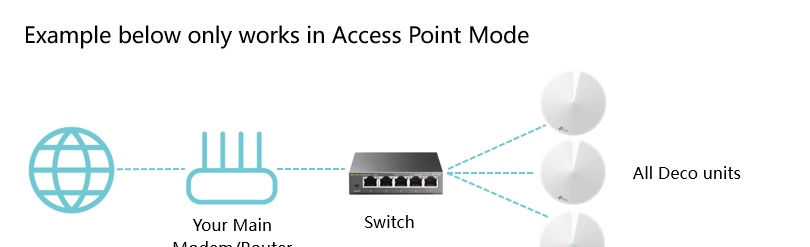
I have 2 x BE65 working in Access Point Mode connected wired as shown in the attached image.
Main deco 'Gelijkvloers' and satellite 'Boven'.
When my iPhone is connected to the main deco I experience no problems at all with the Sonos app
When I am connected to the satellite it usually happens that the Sonos app freezes and the internet connection on my iPhone drops
To be clear, all Sonos devices will remain connected and will continue playing. The problem only occurs on my iPhone.
I have also noticed that the problem does not occur when I work with a wireless backhaul.
How can I solve this problem? I still want to use the wired backhaul because it provides much better speeds.
Could it be a topological problem?
My system works perfectly otherwise, only when opening the Sonos app I may have problems. I previously had the Deco PX50 and never noticed that problem.
Thanks in advance for the help.
Gr.
Frederik
- Copy Link
- Subscribe
- Bookmark
- Report Inappropriate Content


Hi, nice to see you again.
"When I am connected to the satellite it usually happens that the Sonos app freezes and the internet connection on my iPhone drops
My system works perfectly otherwise, only when opening the Sonos app I may have problems."
-Did the iPhone only drop out when the Sonos app is running or active in the background?
-Was the iPhone also disconnected from Deco BE65? Or was the WiFi still connected under WLAN, but there was no internet access?
-Can you consistently reproduce this issue?
-How about the model number of the iPhone?
By the way, can I have the model number of the network switch here?
Wait for your reply.
Best regards.
- Copy Link
- Report Inappropriate Content
Hello David,
Thanks for your message.
-Did the iPhone only drop out when the Sonos app is running or active in the background?
My iPhone drop out when te Sonos app is running
-Was the iPhone also disconnected from Deco BE65? Or was the WiFi still connected under WLAN, but there was no internet access?
The iPhone was not disconnected from Deco BE65 but there was no internet access.
-Can you consistently reproduce this issue?
Yes, I experience the problem with most of my attempts.
-How about the model number of the iPhone?
iPhone 16
By the way, can I have the model number of the network switch here?
Switch is a Netgear unmanaged switch GS316.
I didn't experience this problem with the PX50.
Gr,
Frederik
- Copy Link
- Report Inappropriate Content
Thank you very much for the update.
I'd like to follow up on your case via email and forward the case to the senior engineer for further assistance.
Please check whether you've received my email.
Best regards.
- Copy Link
- Report Inappropriate Content
- Copy Link
- Report Inappropriate Content
I am in contact with the senior engineer but the problem is still there.
It's strange that the problem does not occur when the satellite is connected wirelessly to the main deco.
The problem only occurs if the satellite is connected wired to the main deco.
Meanwhile I bought an extra BE65 that is connected directly to the router (main deco).
2 satellites are directly connected wired to this deco but the problem persists.
Hopefully there will be a solution.
Best regards,
Frederik
- Copy Link
- Report Inappropriate Content
Hi, thank you very much for the update.
I can't figure it out either . Please also keep the support ticket updated so the engineer can be informed of the latest change.
Best regards.
- Copy Link
- Report Inappropriate Content
After two remote sessions with the engineer, there's still no solution to my problem.
I'm starting to get a little discouraged.
- Copy Link
- Report Inappropriate Content

@FrederikDS I have Sonos One and was having connection issues also after upgrading to the new Deco.
I spend 2-3 hours and managed to get it to work by connecting with a RJ45 cable and obviously resetting the Sonos device.
Also another idea; if you still have your old router, connect it back up and configure it, making sure Sonos works first.
Then change the SSID and password to match the new Deco and obviously re-connect the Sonos.
Once done, you should re-connect the Deco and I expect it'll work.
- Copy Link
- Report Inappropriate Content
Changing the main deco solved my problem.
However, these decos are connected via the same switch.
After many hours of research and frustration, I am glad that my issue is finally resolved.
- Copy Link
- Report Inappropriate Content
Information
Helpful: 1
Views: 680
Replies: 9
Voters 1