
Issues accessing Microsoft Azure resources, Fortnite occasionaly freezing and dropping out of game

I have a Virgin Media Hub 5, currently with both wifi frequencies turned off and the X55 main Deco connected via cable.
The Decos are in WIFI-Router mode. There are 3 X55s and one S7, I don't know the hardware verspon
I have had problems working were my laptop is connected to a satellite deco via cable, after a while I start to lose connection to azure portal or other microsoft services.
I found I can unplug the cable from the laptop so it switches to wifi and I can carry on for a bit but then that fails too.
Not sure if related but when playing fortnite with my son on two Xboxes we often find one of us freezes and may come back but often get booted from the game.
I have looked into possible issues with double NAT and was advised to switch the Decos to Access Point, I tried this many times but it always fails to save the config.
Any ideas?
- Copy Link
- Subscribe
- Bookmark
- Report Inappropriate Content


Hi, Nice to see you again.
When you're available, it is recommended to reset one of the satellite Deco X55s and set it as a new Mesh network.
(This time, we can choose "Access Point" mode directly in the setup to see whether AP mode helps stabilize the network connection.)
By the way, a new 1.8.0 has been uploaded to the local official site. It is also suggested to update to the latest 1.8.0 to see whether it helps.
https://www.tp-link.com/uk/support/download/deco-x55/v1/#Firmware
Otherwise, I don't have further suggestions. Can you consistently reproduce the reported issues? If you'd like to spend a little more time, I'd like to forward your case to the senior engineer for further assistance.
Can you provide a detailed layout of your network topology, such as how the Deco units are connected, to which Deco units the two Xboxes are connected, etcs?
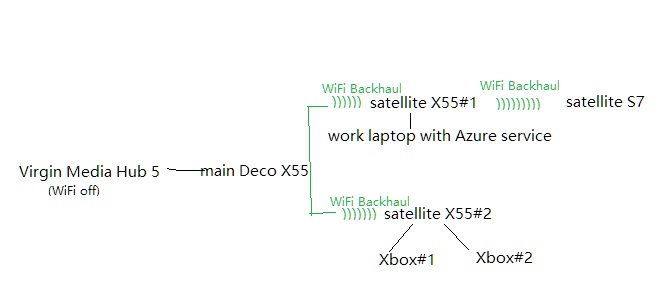
Wait for your reply.
Best regards.
- Copy Link
- Report Inappropriate Content
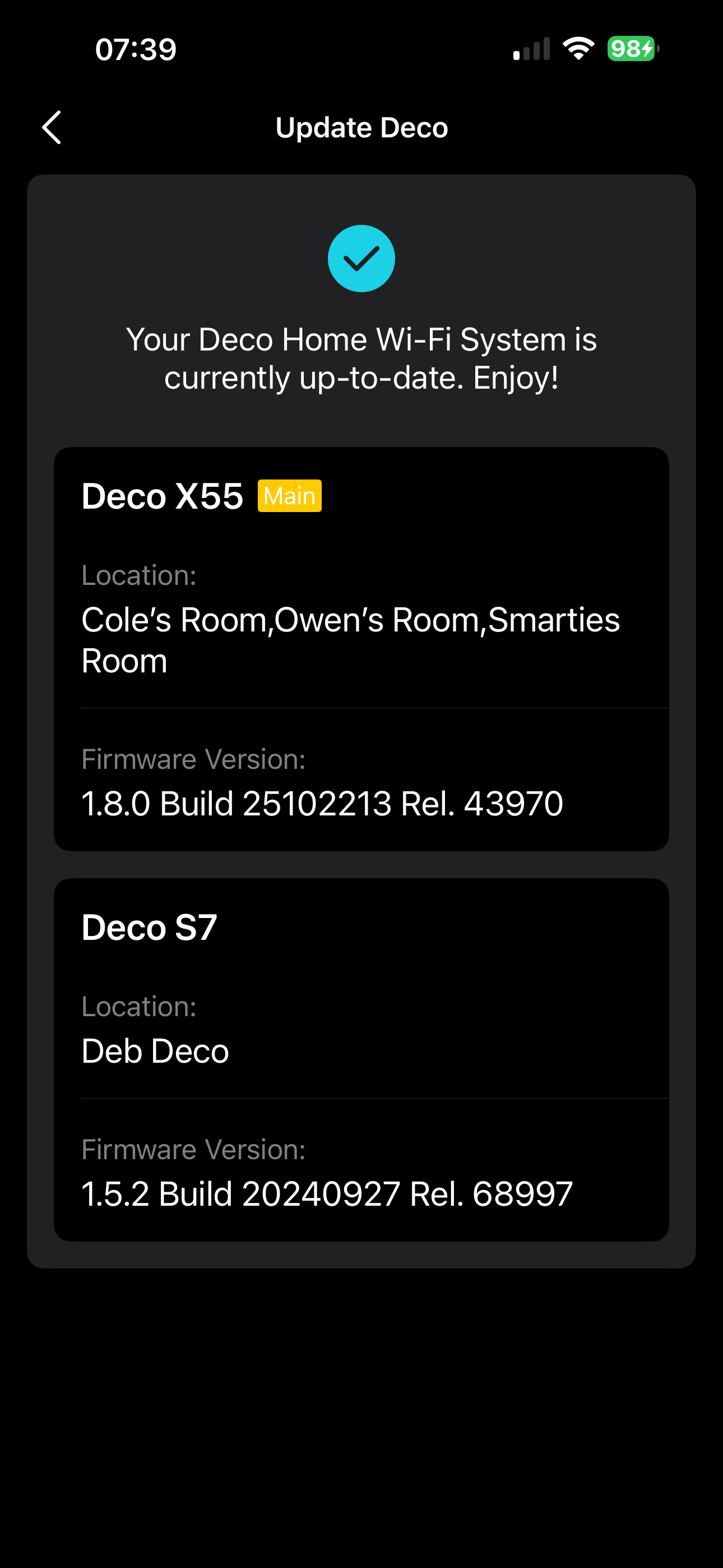
Thank you for the reply.I did manage to update the system yesterday and it now says it is on the latest builds:
Here is a more accurate diagram of the network:
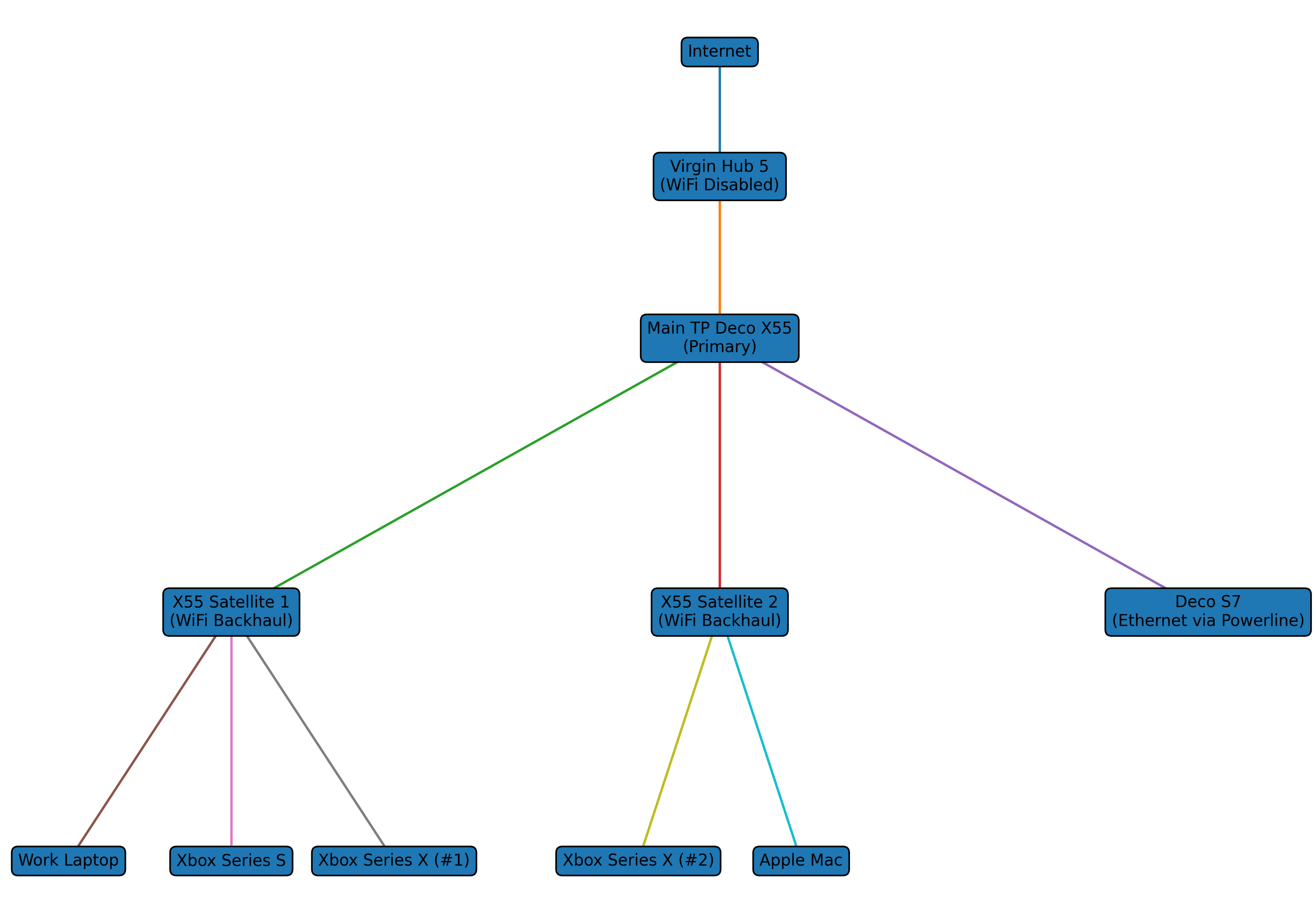 I will try to perform your suggestion, at the moment I have to balance working to improve the network with work time etc.
With regards to the Virgin hub that is set as a DHCP server but currently only serves the main Deco an IP address. I have reserved 4 addresses for the units for when they do switch to access point. One thing to note is in the app the main deco shows one Mac address but in the Virgin hub it is slightly different. Is this the Wifi and ethernet mac addresses? Should I reserve 2 addressses per deco in virgin?
- Copy Link
- Report Inappropriate Content
- Copy Link
- Report Inappropriate Content
Thanks for the update.
The WAN MAC address of Deco displayed in the Virgin hub is indeed slightly different from the LAN label MAC on Deco.
(The WAN MAC is LAN MAC+1 in Hexadecimal)
Would it be possible that holding the WiFi connection for a longer period might reach the Azure Resource requests limit:
Best regards.
- Copy Link
- Report Inappropriate Content
@RolyPolyMacaron Hi, I'm not sure I really understand the last suggestion, sorry.
Also I do plan to try the Setup satellite as new Access point network, but will wait until next week to find the right time to try.
- Copy Link
- Report Inappropriate Content

I had something really similar with my Deco setup and it turned out to be double NAT with the ISP hub still doing routing. If your Virgin Hub 5 isn’t in modem mode, that could explain the Azure dropouts and the Fortnite or download Freezes.try putting the hub in modem mode and then running the Decos in router mode, or switch the Decos to AP mode and make sure the change actually applies. Also worth checking all Deco units are on the same firmware and rebooting the whole network fresh.
- Copy Link
- Report Inappropriate Content
@RolyPolyMacaron My Virgin Hub 5 doesn't have modem mode and I haven't been able to set the Deco system to switch to AP mode, it won't save the setting.
I plan to follow the advice of setting a satellite up as a new network in AP mode but am struggling to find a good time to do it! The plan is to do it tomorrow.
- Copy Link
- Report Inappropriate Content
@RolyPolyMacaron Ok this is strange, this morning I tried to switch to Access Point mode again (tried many many times over the last week), it appeared to fail then I found a new version of the app and updated. The Decos went down for a bit and came back and in the new app version it shows as Access Point!
I've tested and the double NAT seems to be resolved. Happy days! Lots of testing today...
- Copy Link
- Report Inappropriate Content
A final note to say that switching to Access Point mode has fixed all my issues, so I am super happy. Thanks everyone for all the help and suggestions.
- Copy Link
- Report Inappropriate Content
Information
Helpful: 1
Views: 147
Replies: 9
Voters 1