
mDNS issue?

Hello there,
I've did make a huge jump of the Omada Controller version, I've forgotten the older version. Now i'm getting some issues that i didn't before.
My network has 3 VLANs:
- vlan 1 (omada devices)
- vlan 20 (Service devices: NAS, network printer)
- vlan 30 (edge devices)
I used to be able to connect to any computer or NAS through vlan 1 or through the edge network used to access the vlan 20 services.and from vlan 30 to access vlan 20.
Now I can't unless i connect to the same vlan to reach anything I need. my ACLs didn't change, I removed the mdns and created a new one, but unfortunately nothing chnaged.
Any ideas?
- Copy Link
- Subscribe
- Bookmark
- Report Inappropriate Content


Hi @Setlec
Thanks for posting here.
The ACL rules are prioritized in descending order from top to bottom. This means that when different ACL rules conflict, the rule with higher priority will override the one with lower priority.
Below is a guide on how to configure ACL rules for your reference:
- Copy Link
- Report Inappropriate Content
ACLs are problematic...
I've got 4 rules:
- VLAN 20 & 30 are denied to reach vlan 1.
- vlan 1 is allowed to reach vlan 20 & 30.
- vlan 20 is allowed to reach vlan 30
- vlan 30 is allowed to reach vlan 20
I've disabled all of them, because my PC is connected to vlan 1 and i should be able to access vlan 20 and vlan 30 due to rule 2. if i leave rule 2 on and turn off rule 1, 3 & 4, i can't connect to anything nor ping vlan 20 ( oc 200 controller can't too ping vlan 20 only vlan 1).
[EDIT] RULE 1 & 2 (turned ON) don't allow me to reach vlan 20 and vlan 30. Rule 1 (turned ON) also doesn't me allow me to reach vlan 20 and 30.
- Copy Link
- Report Inappropriate Content
Hi @Setlec
Thanks for posting here.
The ACL rules are prioritized in descending order from top to bottom. This means that when different ACL rules conflict, the rule with higher priority will override the one with lower priority.
Below is a guide on how to configure ACL rules for your reference:
- Copy Link
- Report Inappropriate Content
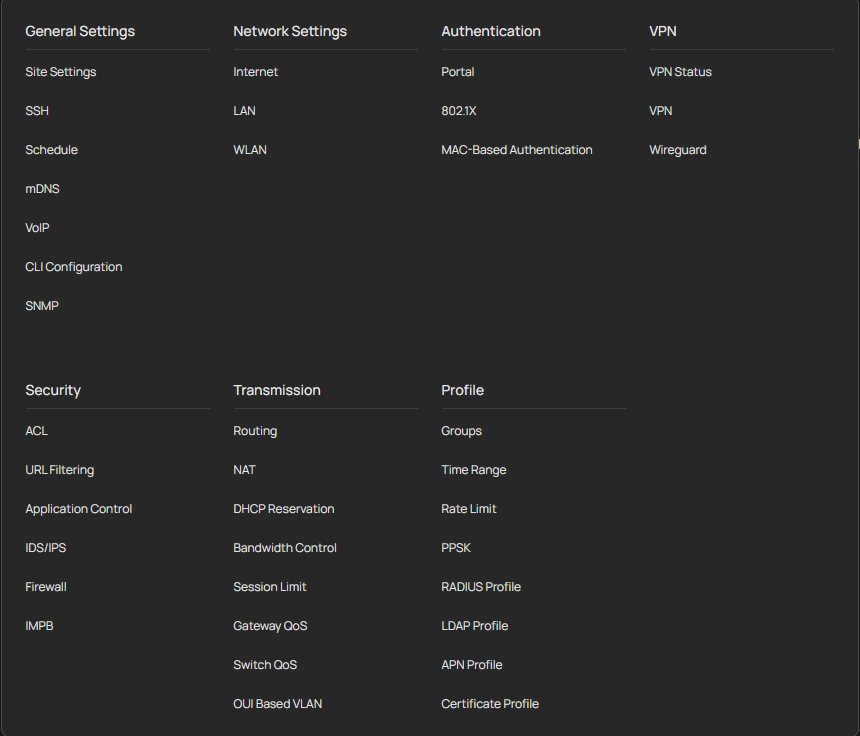
Hello, thank you for the reply and i do apologise for the my late reply. Due to the new UI, the articles are fine but i can't find for instance Settings > Wired Networks > LAN > Profiles the equivalent in Network Config > Profile, If I search for tag it shows some result in QoS. If I search tagged there is no results.
Now here is a question: Is it possible that I've migrated from a very old version of the controller prior version 1.27 and skipping some versions to 1.38.10 might kinda noit showing up some features?
- Copy Link
- Report Inappropriate Content
Hi @Setlec
Thanks for the reply.
Is it possible that I've migrated from a very old version of the controller prior version 1.27 and skipping some versions to 1.38.10 might kinda noit showing up some features?
>>>No, it's not the case. as long as the upgrade is successful, all the features of the latest version will display normally. The reason you can’t find the options mentioned in the article is because the guide is based on some older versions. Starting from Controller V6, the controller version has undergone significant changes, including the one you mentioned. You may need some time to get used to the latest version’s UI.
Below is a guide for your reference:
What changes are there in Omada Controller v6 compared to v5?
- Copy Link
- Report Inappropriate Content
Information
Helpful: 0
Views: 629
Replies: 4
Voters 0
No one has voted for it yet.