
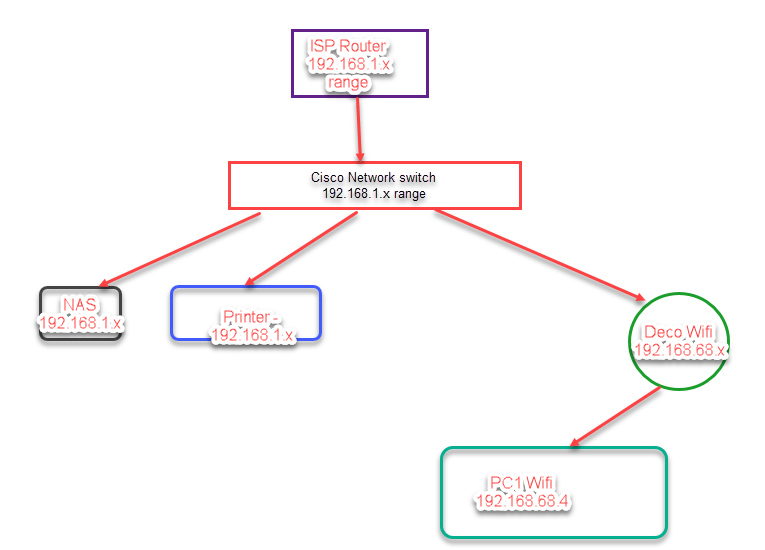
NAT and different IP address range. Please see diagram

Hi Everyone,
Please excuse my limited network experience. I have a setup which is as follows. What I have currently is that if PC1 is on the wifi and connected via the Deco, I cannot use the printer, NAS etc as they are on the 192.168.1.x range and Deco doesnt understand that IP range. I am using the Deco in router mode, worked well, some niggles along the way, but I think we have overcome them now. I use the app to control settings etc, I would be grateful if anyone can explain to me what I need to do so as to be able to use devices on the 192.168.1.x range.
- Copy Link
- Subscribe
- Bookmark
- Report Inappropriate Content
David-TP wrote
Hi, thanks for the update. AP Mode is the simplest solution. As for the difference between Access Point and Router modes, you could refer to
What’s the difference between Access Point mode and Router mode on the Deco?
Or you can adjust the network layout a little bit:
Best regards.
Thanks for this, I read on a site via google that there is another way to do this without going into AP mode something along the lines of configuring DMZ on the ISP router, I would like to explore the use of the router for parental control, going into AP mode means its no longer an option.
Another reason why the proposed configuration might be difficult for me is that I have 2 backhaul connections to the main deco point onto 2 other satellite deco points. This then leaves only 1 port free, and that is required for the connection coming from the ISP router, i am one port short for the cisco network switch, the main deco is in thesame location as the cisco switch, right next to it, and I have another spare cabled connection from the main ISP router which goes into the cisco switch, this is why we have 2 network addresses.
I am physically limited because of the location of the cables, they are buried in the wall and the deco points are spread in different places some as far as 20 metres away, so a cabled connection is required for good connectivity.
- Copy Link
- Report Inappropriate Content


Hi, you can set Deco X55 into "Access Point" mode:
How to set up Deco to work in Access Point mode
Best regards.
- Copy Link
- Report Inappropriate Content
David-TP wrote
Hi, you can set Deco X55 into "Access Point" mode:
How to set up Deco to work in Access Point mode
Best regards.
@David-TP Thanks for the response, is AP mode the only solution and what functionalities will I loose by running in AP mode ?
Thanks in advance.
- Copy Link
- Report Inappropriate Content
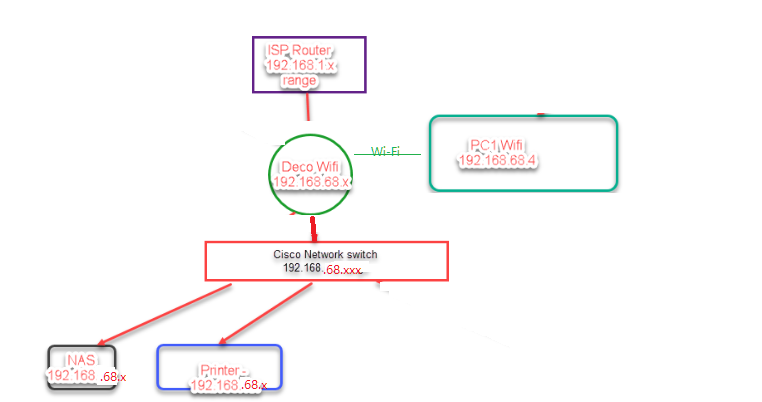
Hi, thanks for the update. AP Mode is the simplest solution. As for the difference between Access Point and Router modes, you could refer to
What’s the difference between Access Point mode and Router mode on the Deco?
Or you can adjust the network layout a little bit:
Best regards.
- Copy Link
- Report Inappropriate Content
David-TP wrote
Hi, thanks for the update. AP Mode is the simplest solution. As for the difference between Access Point and Router modes, you could refer to
What’s the difference between Access Point mode and Router mode on the Deco?
Or you can adjust the network layout a little bit:
Best regards.
Thanks for this, I read on a site via google that there is another way to do this without going into AP mode something along the lines of configuring DMZ on the ISP router, I would like to explore the use of the router for parental control, going into AP mode means its no longer an option.
Another reason why the proposed configuration might be difficult for me is that I have 2 backhaul connections to the main deco point onto 2 other satellite deco points. This then leaves only 1 port free, and that is required for the connection coming from the ISP router, i am one port short for the cisco network switch, the main deco is in thesame location as the cisco switch, right next to it, and I have another spare cabled connection from the main ISP router which goes into the cisco switch, this is why we have 2 network addresses.
I am physically limited because of the location of the cables, they are buried in the wall and the deco points are spread in different places some as far as 20 metres away, so a cabled connection is required for good connectivity.
- Copy Link
- Report Inappropriate Content
Information
Helpful: 0
Views: 260
Replies: 4
Voters 0
No one has voted for it yet.