
wired backhaul troubleshooting and support

Recently purchased DECO BE 63 3 units and then setup my mesh network. Wired backhaul still not working despite changing Ethernet cords and rearranging units. BEWARE the chatbot on TP-link. It will direct you to JustAnswer. DO NOT USE. Internet search will show why with a simple search.
- Subscription Trap: Users frequently complain about being charged monthly subscription fees ($28–$125+) after paying a small ($1–$5) upfront fee.
- Hidden Terms: Complaints allege that the membership terms are buried in fine print or not clearly disclosed during the initial sign-up, say users on Reddit www.reddit.com/r/Scams/comments/18cd8tw/justanswer_scam_and_solution/.
- Refund Difficulty: Many consumers report extreme difficulty canceling the subscription and obtaining refunds for charges they did not authorize.
- Questionable Advice:
If anyone can provide suggestions to get wired backhaul working, it would be greatly appreciated.
- Copy Link
- Subscribe
- Bookmark
- Report Inappropriate Content


Thank you very much for the update.
The email has been received, and I've escalated the case to the senior engineer for further assistance.
Please check the email later for more suggestions.
Best regards.
- Copy Link
- Report Inappropriate Content
Hi, welcome to the community.
I think you might be offered the wrong chatbot entry by Google Search. There is no way for the Official TP-Link chatbot to direct users to JustAnswer.
It would be very helpful if you could share more details about the Chatbot you're using so that we can check further.
Back to the Ethernet Backhaul, do you use any network switch for the Ethernet Backhaul? Can you share some screenshots of the current network layout, such as:
Main Deco BE63---network switch---satellite BE63#1
\----satellite BE63#2
If there is a switch, can I have the model number of the switch?
Wait for your reply.
Best regards.
- Copy Link
- Report Inappropriate Content
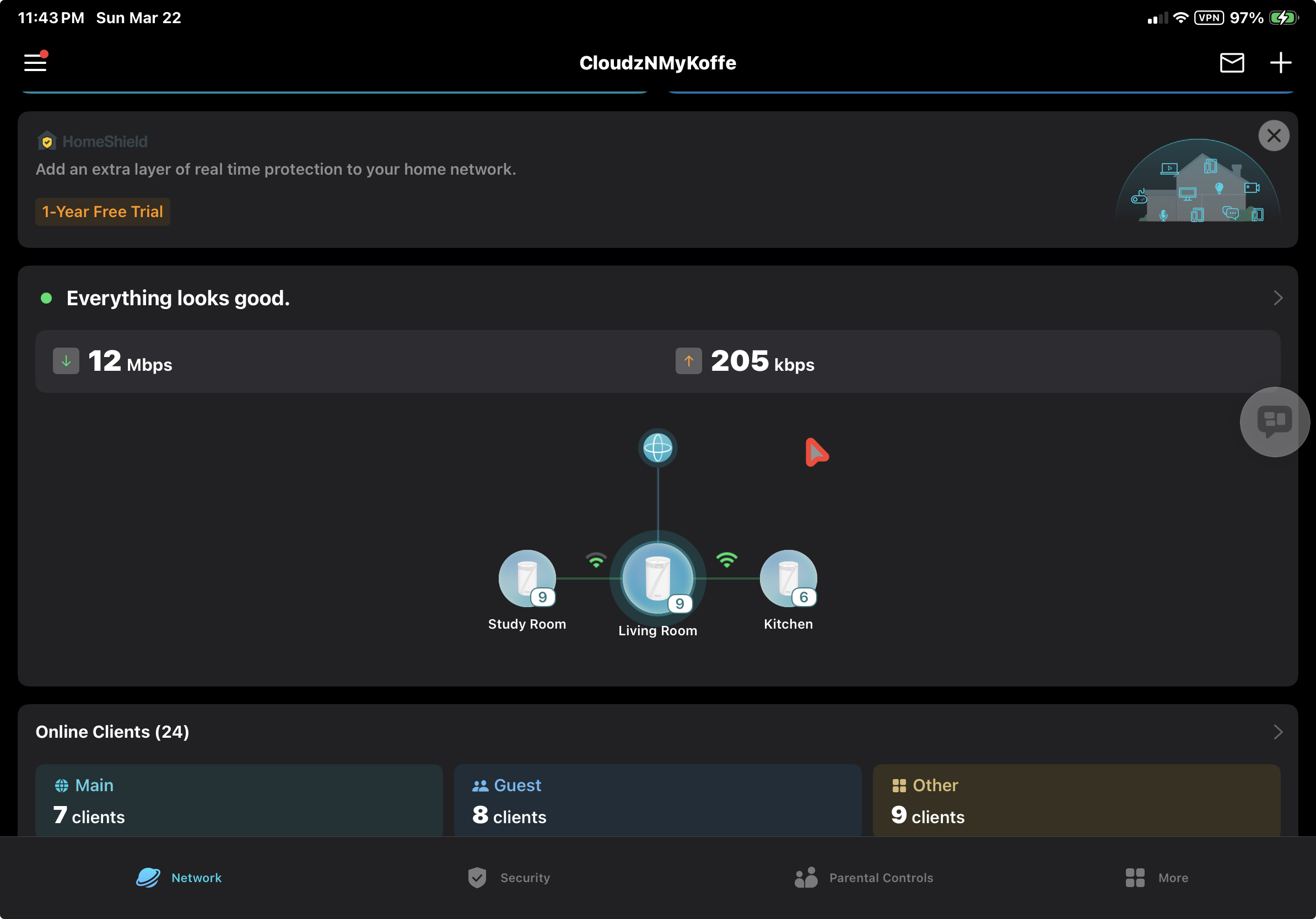
Hello. Apologies for delayed response as I do not check this regularly. I am trying to recall where the chat was establish. It is possible I followed a improper link.
As to the backhaul. I have a TP links with wired after the modem and main Deco unit. It is a Tp link TL-SG108S 8 port
attached is overview of my mesh system
- Copy Link
- Report Inappropriate Content
Hi, thank you very much for the update.
avantyard wrote
As to the backhaul. I have a TP Link switch wired after the modem and the main Deco unit. It is a Tp link TL-SG108S 8-port
attached is overview of my mesh system
So the actual network structure is like:
ISP modem---main Deco BE63(living room)---TL-SG108S---satellite#1(kitchen BE63)
\---satellite#2(Study room BE63)
Are the Ethernet cables in different rooms connected via the wall jack, rather than running long cables directly from the switch to each satellite BE65?
If possible, could you please help me run a simple test:
- Temporarily put the Kitchen Deco BE63 next to the main Deco BE63 and connect via a short cable.
- Test whether the Kitchen satellite could establish Ethernet Backhaul with the main Deco.
Besides, there is a new 1.3.0 beta firmware for Deco BE63 that is open for testing in the forum:
Deco BE65/BE63/BE11000_V2_1.3.0 Added DoH & DoT, Speed Limit and Internet Backup
It is also recommended to test whether this beta version helps.
Thanks a lot.
Best regards.
- Copy Link
- Report Inappropriate Content
The main living room and study room are wired via Ethernet cat 6 within the walls. I have already brought the study unit next to the main and used a new shorter Ethernet cable to test wired connectivity. The unit still connects only wirelessly. Yes you have the setup correct.
- Copy Link
- Report Inappropriate Content
Hi, thank you very much for the quick reply.
Could you please send an email to support.forum@tp-link.com so that I can forward your case to the senior engineer for further assistance?
Please add the forum ID #859964 to the subject. Thank you in advance.
Wait for your reply.
Best regards.
- Copy Link
- Report Inappropriate Content
I have just sent an email as directed. Looking forward to the additional assistance.
- Copy Link
- Report Inappropriate Content
Thank you very much for the update.
The email has been received, and I've escalated the case to the senior engineer for further assistance.
Please check the email later for more suggestions.
Best regards.
- Copy Link
- Report Inappropriate Content
Information
Helpful: 1
Views: 1097
Replies: 7
Voters 1