Deco BE65_V2_1.3.0 Added DoH & DoT, Speed Limit and Internet Backup

Deco BE65_V2_1.3.0 Added DoH & DoT, Speed Limit and Internet Backup

Deco BE65_V2_1.3.0 Added DoH & DoT, Speed Limit and Internet Backup
Yesterday - last edited Yesterday

This Article Applies to:

Deco BE65(EU/US/AU/CA/UK)_V2.0
Deco BE63(US)_V2.6
Deco BE11000(US)_V2.6


Hey Everyone!
We are excited to announce a pre-release firmware update introducing DoH & DoT, Speed Limit, and Internet Backup, as well as other advanced features for Deco BE65/63/BE11000. We encourage users to install this firmware and share their feedback with us.


Firmware Modifications

New Features/Enhancements:

Bug Fixes:

  • Fixed the issue where the Online List doesn't show IP addresses of connected clients when Deco is in AP mode.
  • Resolved the issue where the Qos Total Bandwidth doesn't take effect as expected under certain circumstances.
  • Addressed the issue where the Deco may restart automatically under certain circumstances. 


Download Link:

Deco BE65/BE63/BE11000_V2.0/V2.6

1.3.0_build_26012212_Beta

Update Notice:


As always, we value your feedback. If you happen to encounter any concerns during or after the router firmware upgrade, please feel free to comment below with the following information. Your input helps us continue to improve and provide the best possible products and support.

  • Provide a detailed network layout, including how the devices are connected, especially if there are EasyMesh satellite devices.
  • Include a detailed description of the behavior and as much information as possible regarding the specific conditions that seem to trigger it.


Thank you for your continued support and for being part of our community.

  0      
  0      
#1
Options
10 Reply
Re:Deco BE65_V2_1.3.0 Added DoH & DoT, Speed Limit and Internet Backup
Yesterday

  @David-TP Hello, Is there any update for BE65-5G?

  3  
  3  
#2
Options
Re:Deco BE65_V2_1.3.0 Added DoH & DoT, Speed Limit and Internet Backup
Yesterday - last edited Yesterday

  @David-TP 
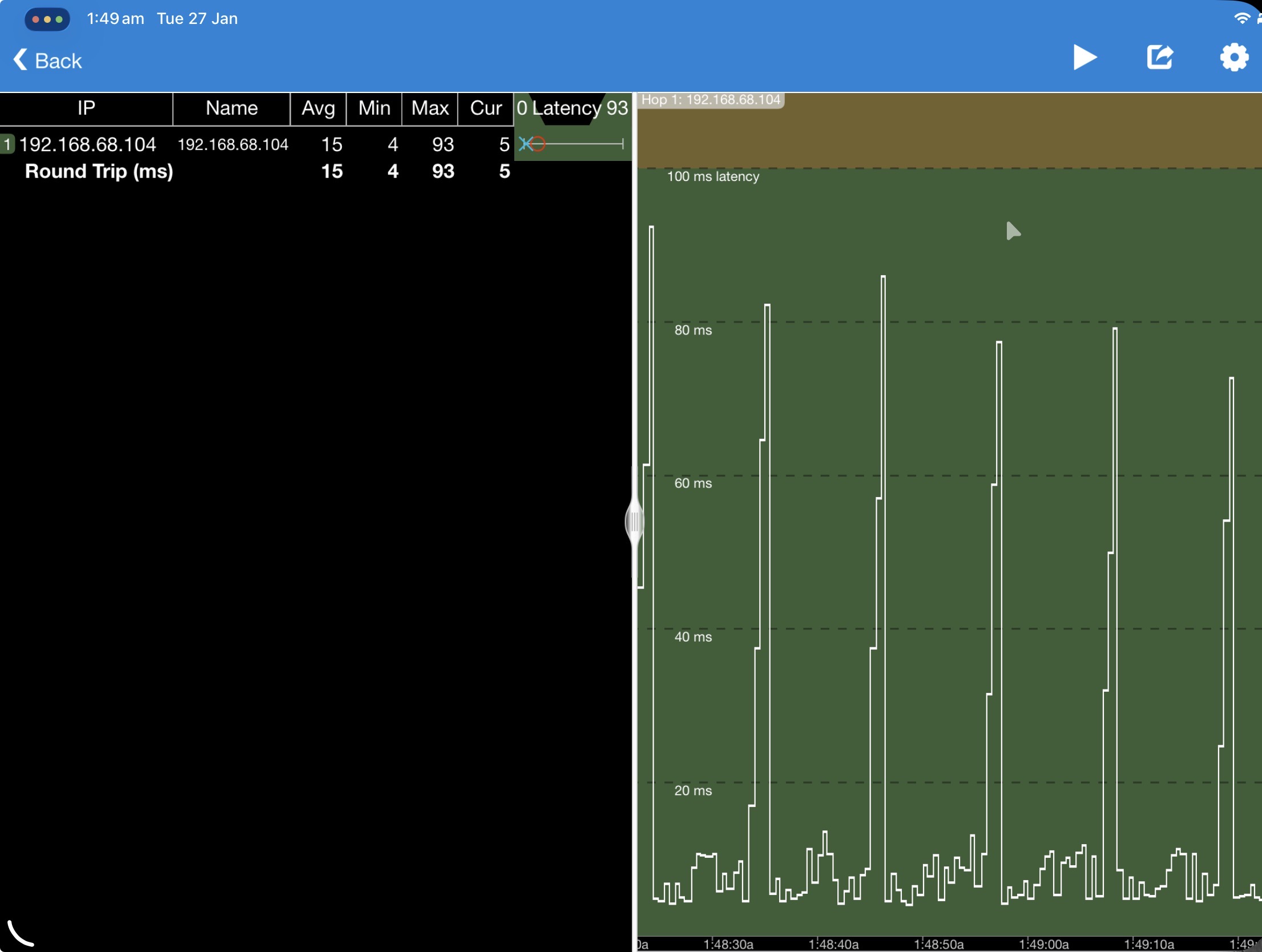
Hi, getting a network jitter issue still, despite updating from the stable release.

Here's some of the recent logs, I'm guessing some iot cameras or devices are disconnecting and rejoining, but not on a scale of causing an 80ms spike every 8-9 seconds. MLO, beam forming, 5ghs connection, 20hz for 2.4 band etc didn't have any affect. Unplugging Ethernet cables didn't have any affect, may try removing the meshed router to see if a device connected to that router or that router itself is causing the spike.

Tue Jan 27 01:43:53 2026 daemon.notice hostapd: wpa_driver_nl80211_set_key: ifindex=28 (ath0) alg=0 addr=0x7fa45a9ac0 key_idx=0 set_tx=1 seq_len=0 key_len=0 key_flag=0x20 link_id=-1
Tue Jan 27 01:43:53 2026 daemon.notice nrd[26808]: wlanifLinkEventsCmnGenerateDisassocEvent: Client B0:4A:39:B7:11:B8 disassociated on APId 255 ChanId 5 ESSId 0 
Tue Jan 27 01:43:53 2026 daemon.err nrd[26808]: wlanif_deleteWdsEntry: ifname: ath12, wds delete sta mac:B0:4A:39:B7:11:B8
Tue Jan 27 01:43:53 2026 daemon.err nrd[26808]: wlanif_deleteWdsEntry: ifname: ath22, wds delete sta mac:B0:4A:39:B7:11:B8
Tue Jan 27 01:43:53 2026 daemon.notice nrd[26808]: wlanifLinkEventsCmnGenerateDisassocEvent: Client B0:4A:39:B7:11:B8 disassociated on APId 255 ChanId 5 ESSId 0
Tue Jan 27 01:43:53 2026 daemon.err nrd[26808]: wlanif_deleteWdsEntry: ifname: ath12, wds delete sta mac:B0:4A:39:B7:11:B8
Tue Jan 27 01:43:53 2026 daemon.err nrd[26808]: wlanif_deleteWdsEntry: ifname: ath22, wds delete sta mac:B0:4A:39:B7:11:B8
Tue Jan 27 01:43:53 2026 daemon.notice nrd[26808]: wlanifLinkEventsCmnGenerateDisassocEvent: Client B0:4A:39:B7:11:B8 disassociated on APId 255 ChanId 5 ESSId 0 
Tue Jan 27 01:43:53 2026 daemon.err nrd[26808]: wlanif_deleteWdsEntry: ifname: ath12, wds delete sta mac:B0:4A:39:B7:11:B8
Tue Jan 27 01:43:53 2026 daemon.err nrd[26808]: wlanif_deleteWdsEntry: ifname: ath22, wds delete sta mac:B0:4A:39:B7:11:B8
Tue Jan 27 01:43:53 2026 daemon.err udhcpd[29364]: Received DISCOVER
Tue Jan 27 01:43:54 2026 daemon.err udhcpd[29364]: Sending OFFER of 192.168.68.121
Tue Jan 27 01:43:54 2026 daemon.err udhcpd[29364]: Sending ACK to 192.168.68.121
Tue Jan 27 01:43:54 2026 daemon.err udhcpd[29364]: clear ip 7944a8c0
Tue Jan 27 01:43:54 2026 daemon.err tipc-server: tipc_config_request
Tue Jan 27 01:43:54 2026 daemon.err wandetect3: fopen /tmp/access_mode failed.
Tue Jan 27 01:43:54 2026 user.err IMPROXY: ERROR[imp_group_print@420]: interface br-lan:192.168.68.1
Tue Jan 27 01:43:54 2026 user.err IMPROXY: ERROR[imp_group_print@424]: group 224.0.1.187 exclude mode
Tue Jan 27 01:43:54 2026 user.err IMPROXY: ERROR[imp_group_print@427]: group time 260
Tue Jan 27 01:43:54 2026 user.err IMPROXY: ERROR[imp_group_print@428]: version: 2
Tue Jan 27 01:43:54 2026 daemon.notice nrd[26808]: wlanifLinkEventsCmnGenerateDisassocEvent: Client 16:67:86:39:15:B5 disassociated on APId 255 ChanId 5 ESSId 0 
Tue Jan 27 01:43:54 2026 daemon.err nrd[26808]: wlanif_deleteWdsEntry: ifname: ath12, wds delete sta mac:16:67:86:39:15:B5
Tue Jan 27 01:43:54 2026 daemon.err nrd[26808]: wlanif_deleteWdsEntry: ifname: ath22, wds delete sta mac:16:67:86:39:15:B5
Tue Jan 27 01:43:54 2026 daemon.err nrd[26808]: send ioctl failed
Tue Jan 27 01:43:55 2026 daemon.err udhcpd[29364]: Received DISCOVER
Tue Jan 27 01:43:55 2026 daemon.err udhcpd[29364]: find_free_or_expired_nip

Edit:
I’ll try to get you the full log if you share your email, hopefully you can find the errant issue that occurs every 9 seconds, and update: still occurs when other satellites are disconnected. lmk what else I can try.


  2  
  2  
#3
Options
Re:Deco BE65_V2_1.3.0 Added DoH & DoT, Speed Limit and Internet Backup
20 hours ago

  @CharlesDay 

Hi, welcome to the community.

I've sent you an email, and you can update the email with the full log.

By the way, what is the device with the IP address 192.168.68.104?

How did you run the ping latency test?

Can I also have the model numbers of the smart cameras and other smart devices?

Wait for your reply.

Best regards.


  0  
  0  
#5
Options
Re:Deco BE65_V2_1.3.0 Added DoH & DoT, Speed Limit and Internet Backup
15 hours ago

  @David-TP 

My main Deco is a BE85, and I have 3 x BE65 and a BE25- Outdoor as points. If I update my 3 BE65 Decos to FW1.3, can I enable DoH for my network? Are the BE85 and BE25-Outdoor compatible with DoH?

  1  
  1  
#6
Options
Re:Deco BE65_V2_1.3.0 Added DoH & DoT, Speed Limit and Internet Backup
15 hours ago
They haven’t been releasing new software updates for their premium be85 so probably not. I don’t understand why. You will have to use be65 as your main router.
  1  
  1  
#7
Options
Re:Deco BE65_V2_1.3.0 Added DoH & DoT, Speed Limit and Internet Backup
14 hours ago
Ok thanks.
  0  
  0  
#8
Options
Re:Deco BE65_V2_1.3.0 Added DoH & DoT, Speed Limit and Internet Backup
13 hours ago

  @BPCS 

Hi, Deco BE85 and Deco BE25-outdoor are also planned to support DOH/DOT.

If you can switch the Deco BE65_V2_1.3.0 as the main Deco, I think you can see the DOH/DOT entry on the Deco App, as this feature should depend on the main Deco/DHCP server only. It would be highly appreciated if you could help me test it.

Thank you very much.

Best regards.


  1  
  1  
#9
Options
Re:Deco BE65_V2_1.3.0 Added DoH & DoT, Speed Limit and Internet Backup
9 hours ago

  @David-TP 

Thanks David. 

I hope to get some time this weekend to test it. I don't want to fiddle with the network during the week as it is necessary for working from home.

Cheers.

  0  
  0  
#10
Options
Re:Deco BE65_V2_1.3.0 Added DoH & DoT, Speed Limit and Internet Backup
8 hours ago - last edited 8 hours ago

  @David-TP 

Good news! I was using an iPad and a M4 Mac for ping testing, turns out AWDL (Apple Wireless Direct Link) or BT was a partial culprit (after hours of troubleshooting) causing annoying microstutter/jitter with sunshine/remote software and virtual mice (Synergy 3).

Disabling AWDL with sudo ifconfig awdl0 down, turing off location services, BT, may fix for some issues, but the 3-9 second latency spikes are still unknown though it coincides with the notice: Wed Jan 28 00:01:45 2026 daemon.notice nrd[19825]: ar_apinfo_collect[line 1765]: AP sync timer expires! to the exact second for multiple of these notices. (Mac's BT off, fastroaming and beamforming disabled) I'll send the logs with timestamped ping logs. Thanks!

Edit:
Sidenote: I wonder why Apple's service is so disruptive, and why its implemented in such a way. I wonder if there's a compatibility issue/if Deco can support AWDL somehow, or at least mitigate its latency issues.

E.g. Saw a reddit comment: (https://www.reddit.com/r/Steam_Link/comments/1p3zir5/comment/nq8g0lm/?utm_source=share&utm_medium=web3x&utm_name=web3xcss&utm_term=1&utm_content=share_button)

"Probably related to AWDL. You can switch your WiFi channel to 149 to temporarily fix this issue. Apple has provide a new low latency streaming API. To prevent AWDL spikes, but steam link maybe haven't adopted this API. You can try other solutions like moonlight."
Not sure if it applies but interesting.

Or this post: https://discussions.apple.com/thread/254594055

"This issue regards the fact that awdl uses specific wifi channels when scanning for/connecting to/communicating with local devices (e.g., for AirDrop or Sidecar). If your wifi isn't running on these channels, your Mac will switch channels for these services, which leads to wifi latency.

I've been struggling with this issue for months before I came across a number of posts that discuss the issue and provide a workaround - you can change the wifi channel of your WAP to the same channel used by awdl to remove your Macs need to switch channels.


For 2.4 Ghz wifi, that would be channel 6. It's slightly more complicated for 5 Ghz wifi, as there are different preferred channels - 149 is the main preferred, but at least in Europe and UK, it's channel 44."

And searching "AWDL latency" shows quite a few posts that the incredible engineers/programmers at TP-Link would benefit many users in solving!

I'm sure some techy users will be able to find these solutions but having an in-built fix or information for Apple users would be nice for general users (if these fixes do work). Great for marketing too.

Secondary issue (I'll add this to the ticket):
Not sure the cause, (likely I'm too far from my phone and handoff/continuity is based also on BT) but I'm getting calls on my mac that drop when I try to answer them. Is this purely an Apple issue or can I change any Deco settings to better support handoff over wifi? I think the main issue is that the call appears but fails on my apple watch too, as it tries to rely on wifi for the call, but fails when it should try its own cellular instead, sigh.

  0  
  0  
#11
Options
Re:Deco BE65_V2_1.3.0 Added DoH & DoT, Speed Limit and Internet Backup
2 hours ago

  @David-TP 

is this Firmware applicable to be65pro?

  0  
  0  
#12
Options