IoT device connected to X55 IoT net on manufacturer's app but connected to X55 main net on Deco app

IoT device connected to X55 IoT net on manufacturer's app but connected to X55 main net on Deco app

IoT device connected to X55 IoT net on manufacturer's app but connected to X55 main net on Deco app
Yesterday
Model: Deco X55  
Hardware Version: V1
Firmware Version: 25102213

I would like clarification on two situations I am experiencing with a device connected to my WiFi network created with TP-Link Deco X55 units (2 units).

The device is a Cosori air fryer, model CS318-AF, which has WiFi connectivity at 2.4 GHz and integration with Amazon Alexa. This equipment uses the VeSync app for its configuration and operation. When I first integrated it into the Deco X55 network, I had not activated the IoT network, so the air fryer was connected to the main Deco X55 network at 2.4 GHz (which I named EdWiFi01). The air fryer operated correctly and without issues on that main network. However, since this is an IoT device, after I activated the IoT network of the Deco x55 (which I named EdWiFi01_IoT), I wanted connected to this network. So I transferred the air fryer from the main network to the IoT network, changing the WiFi configuration through a function in the VeSync app.

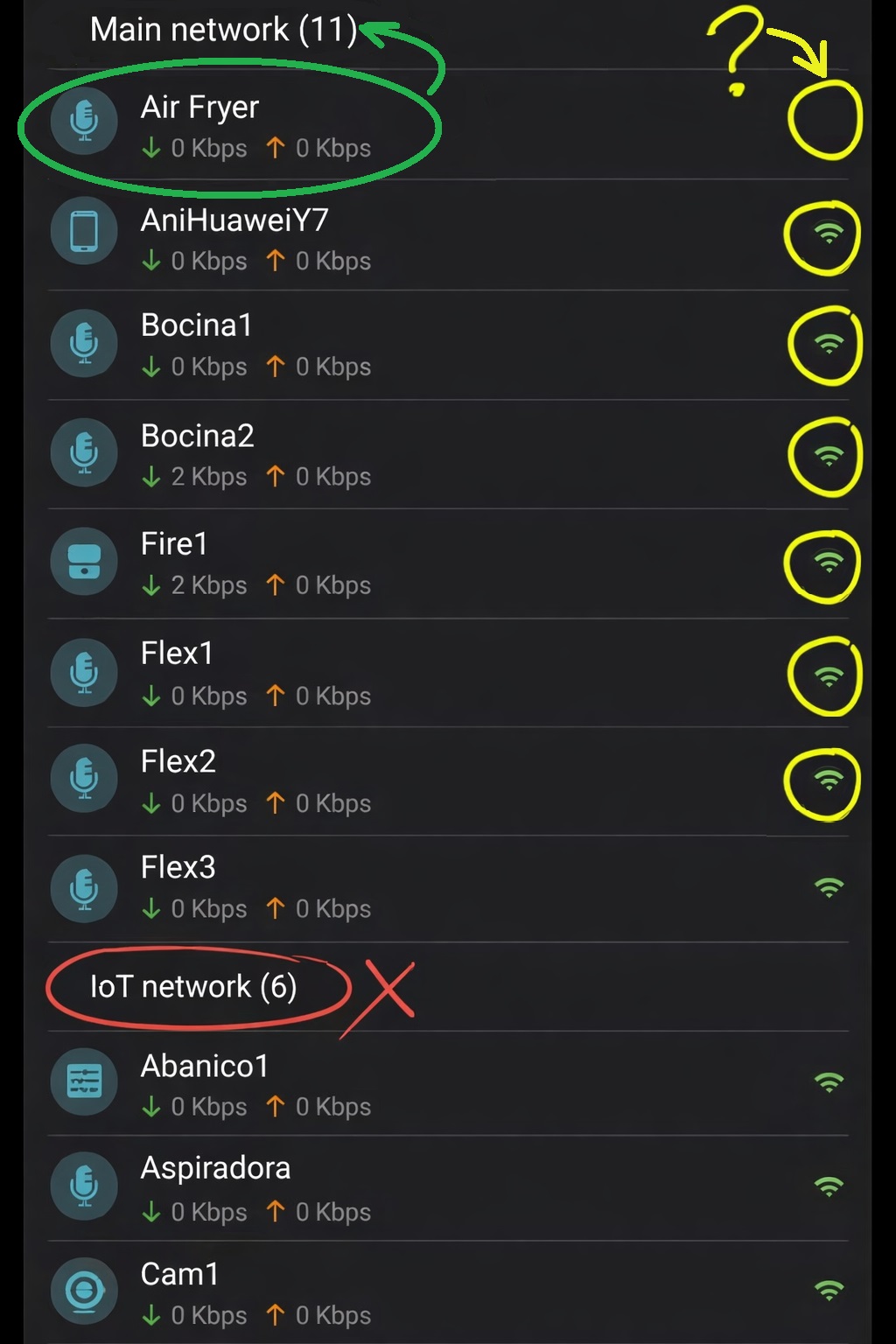
After connecting it to the IoT network (EdWiFi01_IoT), the air fryer is also operating correctly and without major problems. However, although the VeSync app shows that the air fryer is connected to the IoT network (Image 1), in the Deco app it appears connected to the main network (Image 2), not to the IoT network.
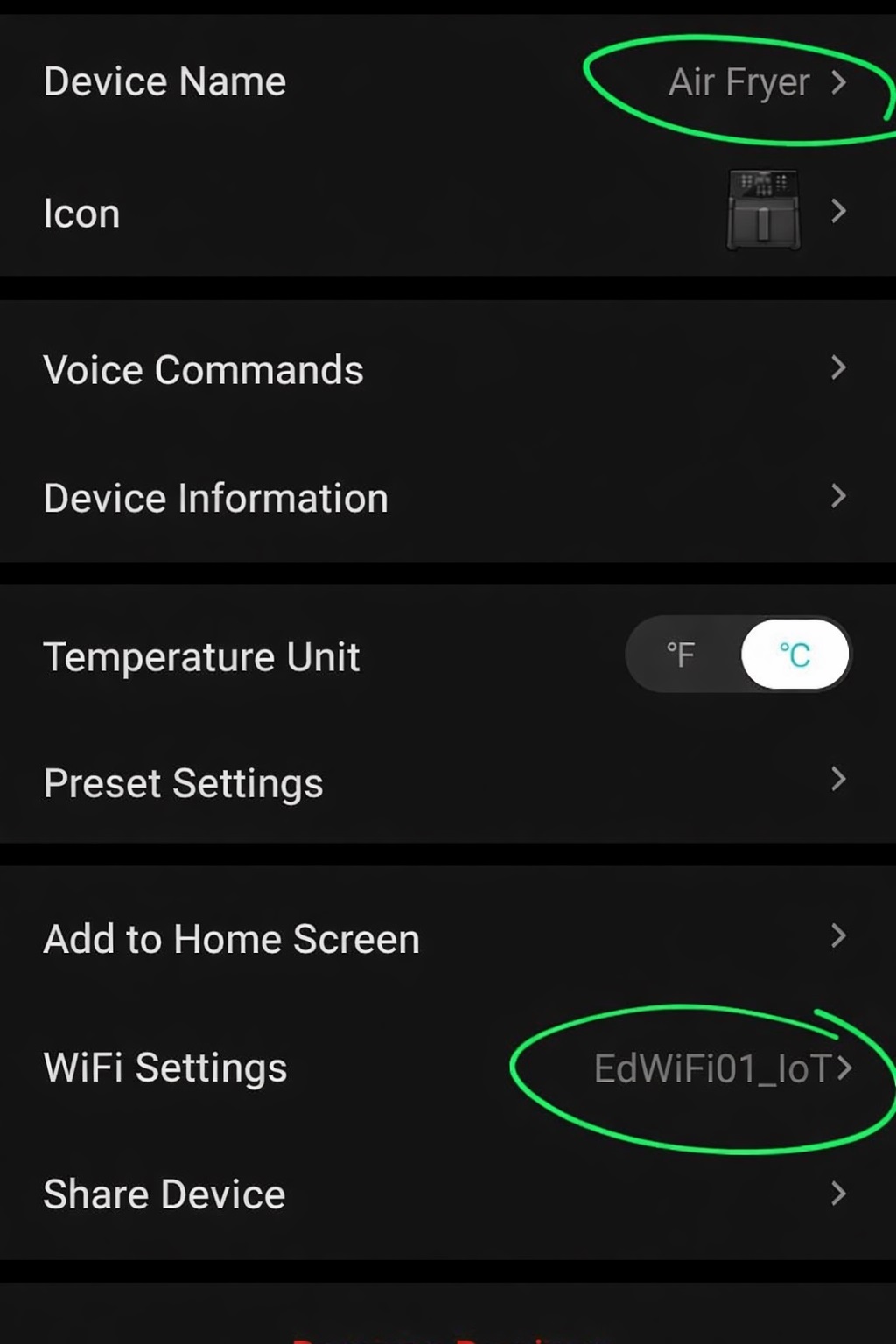
 

Image 1

       Image 2
Image 1                                                             Image 2


In addition, in the Deco app, the air fryer does not display the green WiFi icon to the right of the name, unlike other devices (Image 2). I do not know what it means that this icon does not appear as it does for the other devices.

Although the air fryer is operating correctly, I would like to know why it is not connected to the IoT network instead of the main network. I would also like to know why the green WiFi icon does not appear and what this situation implies. Why is there a difference to the rest of devices?

I appreciate your kind and prompt response.

  1      
  1      
#1
Options
3 Reply
Re:IoT device connected to X55 IoT net on manufacturer's app but connected to X55 main net on Deco app
Yesterday

  @Guayo08 

Hi, could you please refer to this link to help me submit the Deco App log:

How to submit Deco APP log


By the way, have you tried to power-restart the Cosori air fryer as well as the Deco to see whether it helps?

Wait for your reply.

Best regards.


  1  
  1  
#2
Options
Re:IoT device connected to X55 IoT net on manufacturer's app but connected to X55 main net on Deco app
14 hours ago - last edited 14 hours ago

  @David-TP tks for your answer. I already sent the Deco App log as requested. Regarding the power-restar, if you mean to unplug the X55 units an the Cosori air fryer, my answer is no, I haven’t tried. But I can not try it right now, since I am at the office, so I have to go back home.


Best regards...

  1  
  1  
#3
Options
Re:IoT device connected to X55 IoT net on manufacturer's app but connected to X55 main net on Deco app
55 minutes ago

  @David-TP 

Hi. I tried to power‑restart the devices in the following order, and here are the results:


Cosori air fryer: I unplugged it from the wall and plugged it back in a few minutes later. No changes.

  1. Deco X55: I restarted both units. Now the Cosori air fryer shows as connected to the IoT network. Thanks for the advice.


Regarding the green WiFi icon next to the device name, it still does not appear after I power‑restarted all three devices. Even worse, I have now realized that the icons of some other devices have also disappeared (two cameras and an Amazon Echo Flex). Previously, all the icons appeared except for the air fryer. Now a total of four icons do not appear. Could you clarify what it means when a device’s WiFi icon does not appear? And why don’t the icons show up for these four devices?


Best regards.

  0  
  0  
#4
Options