
cannot update firmware - get error code 4503

hi guys,
is there a possibility to update/flash to (possibly) stock firmware on tp-link mr600 v2 (eu) ? whatever i try i get error code 4503
hardware: Archer MR600 v2.0 00000002
i bought it from a private person in austria but i do not know from which isp it comes.
appreciate any help
- Copy Link
- Subscribe
- Bookmark
- Report Inappropriate Content


Hi, thanks for the quick update.
Archer MR600 isn't officially announced as openWRT software compatible. If anything unexpected occurred, it might break the hardware.
Moreover, it can't downgrade to an older version directly when these two versions are crossing firmware platforms, such as from 1.7.0 to 1.6.0 or 1.5.0.
It would be better to stay on the current latest firmware version.
Best regards.
- Copy Link
- Report Inappropriate Content
Hi, welcome to the community.
Which stock firmware did you want to install?
Would there be any specific reason that you want to downgrade the firmware?
Wait for your reply.
Best regards.
- Copy Link
- Report Inappropriate Content
hi,
it is not the urge to downgrade but i would like try another firmware like openwrt. a lot of people say that it is worth a try. so that is the reason.
- Copy Link
- Report Inappropriate Content
Hi, thanks for the quick update.
Archer MR600 isn't officially announced as openWRT software compatible. If anything unexpected occurred, it might break the hardware.
Moreover, it can't downgrade to an older version directly when these two versions are crossing firmware platforms, such as from 1.7.0 to 1.6.0 or 1.5.0.
It would be better to stay on the current latest firmware version.
Best regards.
- Copy Link
- Report Inappropriate Content
but according to openwrt.org archer mr600 is supported in version 24.10.5
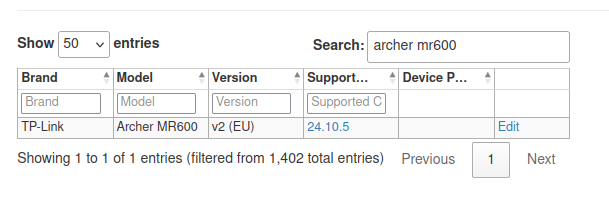
i thought there might be some firmware version which removes a possible region lock. i got the info from the previous owner that the router was indeed in the "drei" network in austria.
- Copy Link
- Report Inappropriate Content

I was running into the same error 4503 with a different TP-Link while trying to update the firmware and the solution is simpler than i thought...
Turns out you can't just download the .rar firmware and upload it directly into the router, you have to extract the .bin first and then upload it.
Took me a while to figure that out because even the chat support didn't warn me about about that during the troubleshooting.
I was only able to figure that out because as a last resort i decide to read that page https://www.tp-link.com/br/support/faq/5053/
They should have that info about extracting the .bin file in the firmware download page aswell.
So for anyone reading this in the future, if you see another thread complaining about ERROR 4503, try suggesting them to extract the .bin out of the .rar
This might solve the problem 
- Copy Link
- Report Inappropriate Content
@GreenLobo , have you successfully installed openWRT on your MR600 v2? How well is the 4G+ working (DL/UL speeds, connectivity)?
Thanks
- Copy Link
- Report Inappropriate Content
Information
Helpful: 0
Views: 507
Replies: 6
Voters 0
No one has voted for it yet.