
MacBook Air M4 Packet Loss
MacBook Air M4 Packet Loss

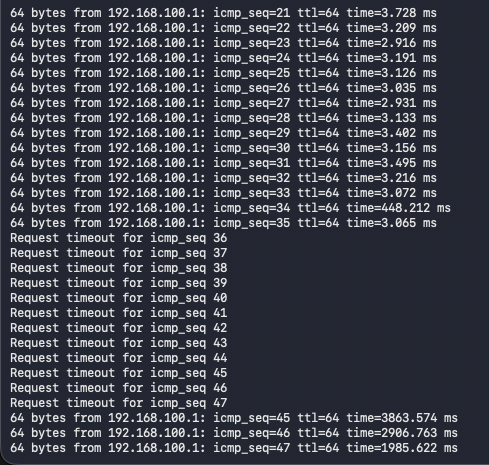
Have a problem with packet loss from my MacBook Air M4 to Deco BE68.
I've got two Deco BE68 units one downstairs living room at the front of the house connected to my ONT seconds upstairs in read office\bedroom. Deco units are connected via Ethernet backhall 10G (house is wired with Cat6 from office to living room).
Networks configured are:
IOT - 2.4Ghz
Primary network - 2.4Ghz, 5Ghz, 6Ghz
Second Network - MLO only 5Ghz and 6Ghz
I've multiple devices in my house, Asus PC's, MacBook Pro M1, iPhone 17 pros etc and they all connect to either the Primary or Secondary network fine with no issue, not packet loss. Speed tests show 500Mb (max internet speed) on speeds tests.
Just my Mac Book Air drops packets no matter which AP its connected to or which network its connected to.
I've tried an unsecured guest network, connecting to the IOT 2.4Ghz network, turning off Mac Privacy mode, disabling QoS, Enabled and Disabled Fast Roaming just still getting this problem.
Mac works fine on other Wifi networks (at my companies office, Tethered etc).
I've upgraded Deco's to most recent firmeware on the support pages and then on the automated update online option from the Deco App.
Any ideas as just struggling to work out what the problem is.
- Copy Link
- Subscribe
- Bookmark
- Report Inappropriate Content

@marksmith85 Hello, I'm having the same problema with my Macbook Air M4, and M4R Tp link. At home my device is the only one with problems. every 20 minutes more or less i have some packet loss. At the office It works OK.
Tell me if I can add more debug info to the case, and how to do it. Thanks
- Copy Link
- Report Inappropriate Content

@rs001 Hi, Not sure if there is a way to add onto the Ticket I have with TP Link Support but I'll pass on your also having a problem as does add its not a one off case of something not working right.
There currently trying to replicate the error to find a fix for the problem was my last update from Support.
Thanks for the info.
- Copy Link
- Report Inappropriate Content


Hi,
Please provide more details about the reported phenomenon for analysis.
1. How many Deco nodes do you have? What are Deco's hardware and firmware versions?
2. Please describe your network diagram. Does the MacBook Air M4 have the same phenomenon when connected to each Deco node?
3. Please provide us with your MacBook's detailed model information.
Best Regards
- Copy Link
- Report Inappropriate Content
Hi,
I've got 3 Deco nodes. All of them are M4R at 1.8.2 Build 20251027. I updated them last week to try to solve the problem, but It still remains.
I've also tried to isolate the problem, modifying the wifi settings at Deco app:
* Just 5Ghz wifi
* Fast roaming disabled, previously It was enabled.
* Beamforming disabled, previously It was enabled.
*My device setting, at Deco app: Mesh tecnológy -> disabled, previously enabled
Nothing improve the result.
I've got the main deco and also the other two connected to the Ethernet switch.
The problem is the same in any of the secondary deco, the main one is not close to my usual working area.
Macbook is, Macbook Air, Apple M4. macOS Thaoe 26.4.1, 24GB.
The usual failure patter is like this:
64 bytes from 192.168.1.1: icmp_seq=33025 ttl=64 time=3.036 ms
64 bytes from 192.168.1.1: icmp_seq=33026 ttl=64 time=3.231 ms
64 bytes from 192.168.1.1: icmp_seq=33027 ttl=64 time=4.631 ms
64 bytes from 192.168.1.1: icmp_seq=33028 ttl=64 time=3.253 ms
64 bytes from 192.168.1.1: icmp_seq=33029 ttl=64 time=3.923 ms
64 bytes from 192.168.1.1: icmp_seq=33030 ttl=64 time=3.314 ms
Request timeout for icmp_seq 33031
64 bytes from 192.168.1.1: icmp_seq=33032 ttl=64 time=3.711 ms
64 bytes from 192.168.1.1: icmp_seq=33033 ttl=64 time=3.650 ms
64 bytes from 192.168.1.1: icmp_seq=33034 ttl=64 time=3.103 ms
64 bytes from 192.168.1.1: icmp_seq=33035 ttl=64 time=4.062 ms
64 bytes from 192.168.1.1: icmp_seq=33036 ttl=64 time=3.438 ms
64 bytes from 192.168.1.1: icmp_seq=33037 ttl=64 time=6.196 ms
64 bytes from 192.168.1.1: icmp_seq=33038 ttl=64 time=3.447 ms
64 bytes from 192.168.1.1: icmp_seq=33039 ttl=64 time=7.341 ms
64 bytes from 192.168.1.1: icmp_seq=33040 ttl=64 time=3.044 ms
Request timeout for icmp_seq 33041
Request timeout for icmp_seq 33042
64 bytes from 192.168.1.1: icmp_seq=33043 ttl=64 time=8.030 ms
64 bytes from 192.168.1.1: icmp_seq=33044 ttl=64 time=2.983 ms
64 bytes from 192.168.1.1: icmp_seq=33045 ttl=64 time=530774.013 ms
64 bytes from 192.168.1.1: icmp_seq=33046 ttl=64 time=2.738 ms
64 bytes from 192.168.1.1: icmp_seq=33047 ttl=64 time=18.272 ms
64 bytes from 192.168.1.1: icmp_seq=33048 ttl=64 time=94.160 ms
64 bytes from 192.168.1.1: icmp_seq=33049 ttl=64 time=3.232 ms
64 bytes from 192.168.1.1: icmp_seq=33050 ttl=64 time=13.391 ms
64 bytes from 192.168.1.1: icmp_seq=33051 ttl=64 time=57.281 ms
64 bytes from 192.168.1.1: icmp_seq=33052 ttl=64 time=4.372 ms
64 bytes from 192.168.1.1: icmp_seq=33053 ttl=64 time=2.999 ms
64 bytes from 192.168.1.1: icmp_seq=33054 ttl=64 time=3.792 ms
ping: sendto: No route to host
Request timeout for icmp_seq 33055
Request timeout for icmp_seq 33056
Request timeout for icmp_seq 33057
Request timeout for icmp_seq 33058
64 bytes from 192.168.1.1: icmp_seq=33059 ttl=64 time=97.492 ms
64 bytes from 192.168.1.1: icmp_seq=33060 ttl=64 time=123.406 ms
64 bytes from 192.168.1.1: icmp_seq=33061 ttl=64 time=4.012 ms
- Copy Link
- Report Inappropriate Content
- Copy Link
- Report Inappropriate Content
Hi,
Thank you for the information provided. I have escalated your case to our tech team, and they will contact you via email to assist you further. Please wait patiently.
Best regards.
- Copy Link
- Report Inappropriate Content
Information
Helpful: 2
Views: 1028
Replies: 16
Voters 1
