
Maybe speed issues or wrong VDSL profile with congstar DSL

Maybe speed issues or wrong VDSL profile with congstar DSL

Maybe speed issues or wrong VDSL profile with congstar DSL
2026-03-31 09:28:30 - last edited 2 weeks ago
Model: VX800v  
Hardware Version: V1
Firmware Version: 800.0.18

Hello,


first of all, I like my new vx800v. After years of use of the Fritzbox routers I want to try something new. Several TP-Link Hardware is running at my home, allready.


So, I changed the Fritzbox 7530 against the vx800v. And parallel I switched from Telekom to Congstar. At all everything ist working fine, but I recognized that from the "100Mbit/s" only 67Mbit/s coming throught. It seems that this is enough for my NAS, parallel streams and so on. 


But question is why is it so und is this correct? I don't test my 7530 with the congstar line, but will do so, soon. To compare it.


I'll post the DSL Data output of my vx800v. Maybe someone can wrote me, if everything is correct. I think the DSL profile is not correct?!
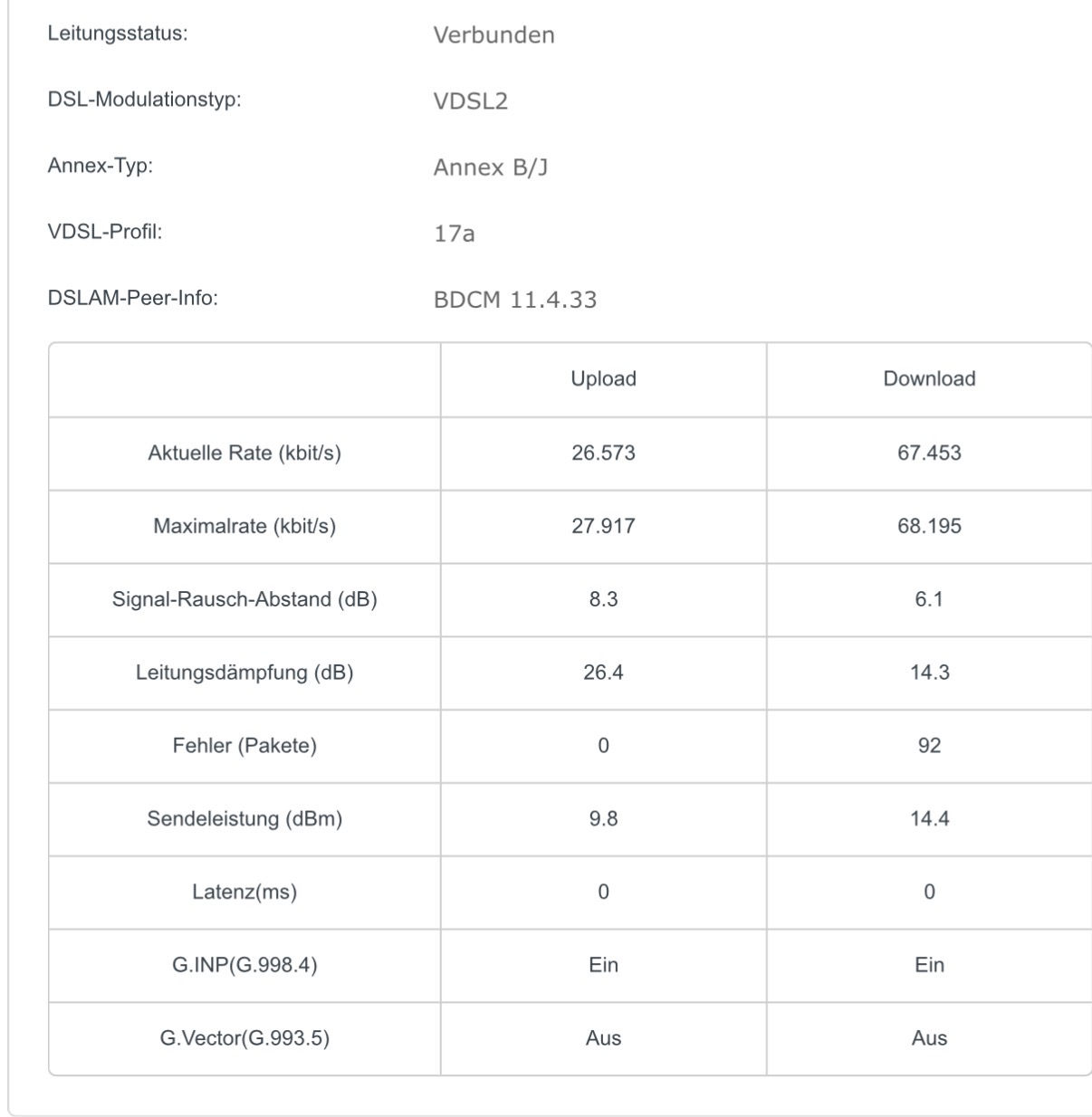


I look forward to any answer or information about this.


Greetz Ramires  



0
0
#1
1 Accepted Solution
Re:Maybe speed issues or wrong VDSL profile with congstar DSL-Solution
2026-04-02 11:19:06 - last edited 2 weeks ago

Hello @Ramires ,

Welcome to our community.


VX800v is a customized device specifically designed for local Service Providers. Its software is tailored to meet the unique requirements of these providers, ensuring alignment with their specific needs. Due to the specialized nature of the firmware on your device, our ability to provide troubleshooting may be limited.

We can certainly offer some troubleshooting tips that may help resolve your issue. Please consider the following:
1. Login to the web-based interface of your VX800v and take a screenshot of the Status page. Also check and capture the DSL Status information.
2. Perform speed tests: Connect only one device to the VX800v via Ethernet cable and run the speed test three times without doing any high-bandwidth activities like P2P downloads. Take screenshots of all three results.
3. Check the wired link speed and take screenshots. You can refer to this FAQ for guidance: How to check the associated/link speed on a wired client

For more detailed information about troubleshooting slow speeds, you can also refer to this FAQ: What should I do if internet connection is slow when the device is connected to the TP-Link DSL Modem?

If the problem persists after trying these steps, we recommend contacting your Service Provider who supplied the device or local support, as they are best suited to provide the necessary assistance for your device.

Welcome to Community! Get the latest posts: △New Firmware for Archer GE550/GE650 V1 Introduces AI-QoS, EasyMesh IoT Expansion, and More! △New Firmware Releases for Archer BE805 V1/BE450 V1 to Support VPN Merge, New ECO Mode, and More! More posts, please see: △ Get the Ongoing Pre-release Firmware for Wi-Fi Routers Here— Subscribe for Updates! Urgent problems with your Wi-Fi Router, Range Extender, or DSL Modem? Please reach out via private Messages or @Joesph-TP in your new thread directly. Click Or ☆Recommended Solution if the post/answer helps.
Recommended Solution
0
0
#2
1 Reply
Re:Maybe speed issues or wrong VDSL profile with congstar DSL-Solution
2026-04-02 11:19:06 - last edited 2 weeks ago

Hello @Ramires ,

Welcome to our community.


VX800v is a customized device specifically designed for local Service Providers. Its software is tailored to meet the unique requirements of these providers, ensuring alignment with their specific needs. Due to the specialized nature of the firmware on your device, our ability to provide troubleshooting may be limited.

We can certainly offer some troubleshooting tips that may help resolve your issue. Please consider the following:
1. Login to the web-based interface of your VX800v and take a screenshot of the Status page. Also check and capture the DSL Status information.
2. Perform speed tests: Connect only one device to the VX800v via Ethernet cable and run the speed test three times without doing any high-bandwidth activities like P2P downloads. Take screenshots of all three results.
3. Check the wired link speed and take screenshots. You can refer to this FAQ for guidance: How to check the associated/link speed on a wired client

For more detailed information about troubleshooting slow speeds, you can also refer to this FAQ: What should I do if internet connection is slow when the device is connected to the TP-Link DSL Modem?

If the problem persists after trying these steps, we recommend contacting your Service Provider who supplied the device or local support, as they are best suited to provide the necessary assistance for your device.

Welcome to Community! Get the latest posts: △New Firmware for Archer GE550/GE650 V1 Introduces AI-QoS, EasyMesh IoT Expansion, and More! △New Firmware Releases for Archer BE805 V1/BE450 V1 to Support VPN Merge, New ECO Mode, and More! More posts, please see: △ Get the Ongoing Pre-release Firmware for Wi-Fi Routers Here— Subscribe for Updates! Urgent problems with your Wi-Fi Router, Range Extender, or DSL Modem? Please reach out via private Messages or @Joesph-TP in your new thread directly. Click Or ☆Recommended Solution if the post/answer helps.
Recommended Solution
0
0
#2