Deco app issues making it difficult to troubleshoot connectivity problems

Deco app issues making it difficult to troubleshoot connectivity problems

Deco app issues making it difficult to troubleshoot connectivity problems
Wednesday
Model: Deco X50  
Hardware Version: V1
Firmware Version: 1.8.0

Hi all. There are a few strange things happening with my Deco system. The connection between my X50s is unstable and drops frequently for a few seconds at a time. I can't tell if this is an app issue or hardware/firmware issue. However, I have some funny things going on in the app so I want to start there in the hope that if I can get that sorted it will be easier to troubleshoot.


Topology: 


  • ISP Modem --CAT6-- Deco X50 (Living Room, Main) --CAT6-- Deco X50 (Office)


The two Deco X50s are connected via ethernet backhaul. Both are hardware v1.0 and updated with the latest firmware (1.8.0 Build 25102213 Rel. 43970). The main Living Room Deco is also connected to an RE550 extender in wireless EasyMesh mode, which works fine.


Issues:


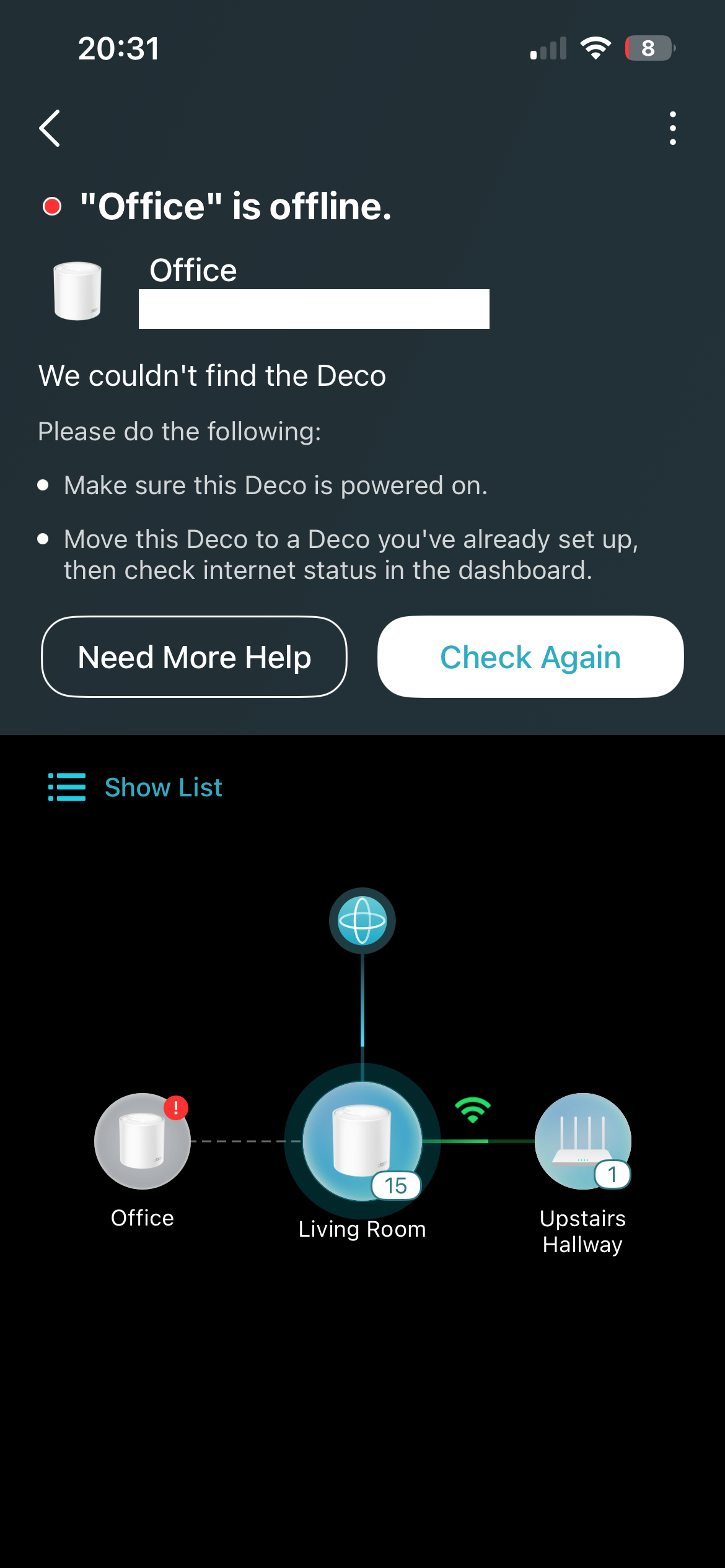
  1. Even when I have a stable, fast connection between the Deco units, the Deco app almost always shows the Office Deco to be offline. The light on the unit itself is green, but I can't manage the device, reboot or troubleshoot via the app. How can I solve this?
  2. When the Decos were connected wirelessly, I had a green wifi symbol above the link. When I first connected via ethernet backhaul, this was replaced with a blue cable symbol, as expected. However, now there is no symbol. When the units show as connected in the app (rarely) there is still a green pulsing line, but nothing to suggest how the Decos are connected. The symbol would be useful to help me see if the backhaul link is having issues and the Decos are falling back to wireless connection. Is there a way to force them to only connect via ethernet?
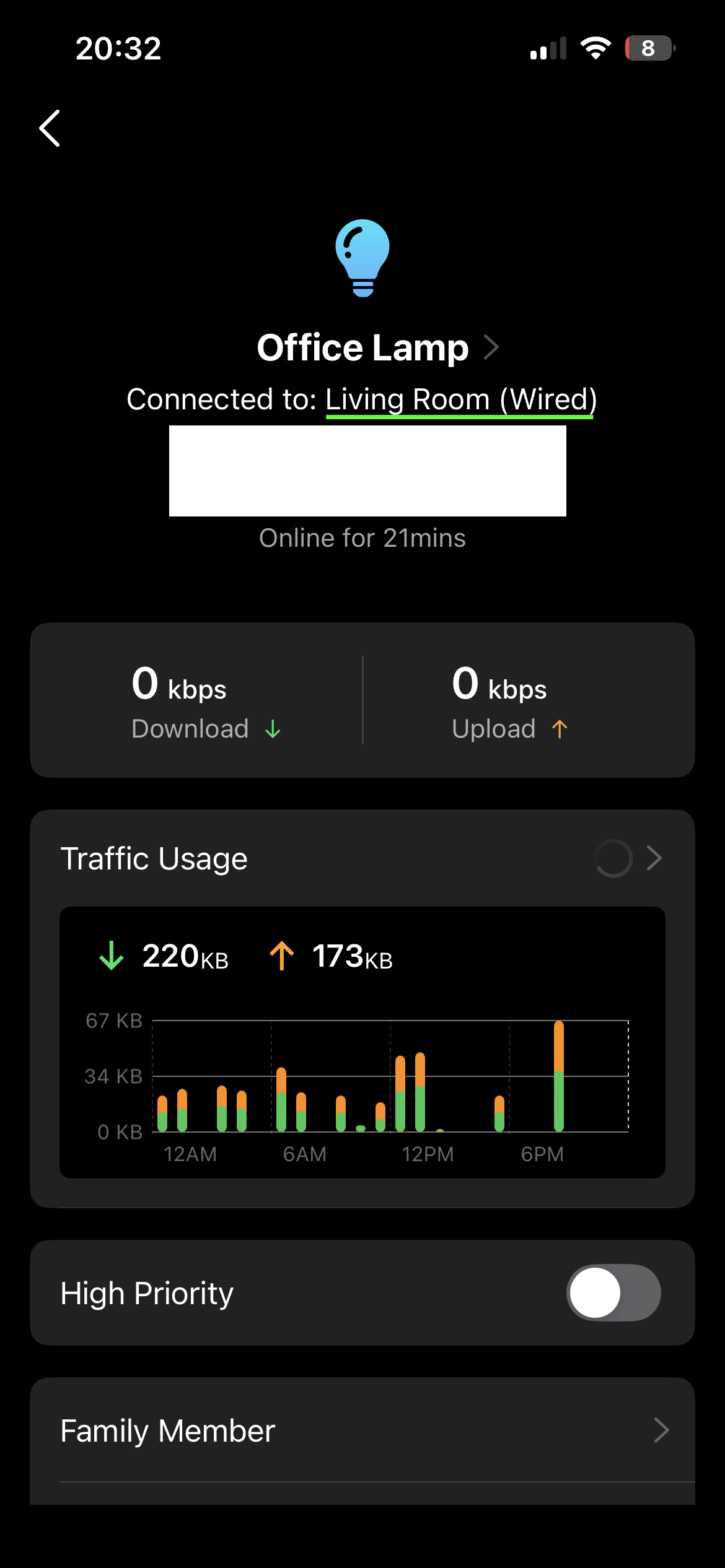
  3. All the devices that are connected wirelessly to the office Deco display in the app as if they are connected (via wired connection) to the Living Room Deco. Even if the two Decos are connected via ethernet backhaul, surely the devices connected to the Office Deco should show as wireless connections to that unit? 


Things I've tried (but didn't work):


  • Downloaded the Beta app via TestFlight
  • Uninstalled and reinstalled the app
  • Rebooted the whole network, in order and in separate parts to try and isolate the issue
  • Updated firmware
  • Moved Decos out of wireless range of each other (to try and force backhaul)
  • Disabled / changed various app settings (fast roaming, beamforming, auto-switch LAN/WAN etc.)


It's difficult to troubleshoot these issues when they all may be connected or causing each other. Advice on how to approach would be appreciated. Thanks!


  0      
  0      
#1
Options
3 Reply
Re:Deco app issues making it difficult to troubleshoot connectivity problems
Friday

  @fbm99 

Hi,
Usually, when the satellite Deco is connected to the main Deco via an Ethernet cable, the two Deco units will communicate continuously over Ethernet if the connection works. However, there is no option to force them to only connect via Ethernet.


There is a pre-release firmware version 1.10.0 for the Deco X50 V1; you can try upgrading the Deco's firmware and see if that helps.
Deco X50/X55 V1/V1.6 Pre-Release Firmware 1.10.0 Enhanced Network Stability & Client Identification
 

If the phenomenon you reported remains consistently reproducible, please refer to the following instructions to collect the Deco app log for analysis.
How to collect system log of the Deco app
 

Best Regards

  0  
  0  
#2
Options
Re:Deco app issues making it difficult to troubleshoot connectivity problems
Friday

  @Solla-topee thanks for your reply.


I have updated the main Deco to the Beta firmware.


The two Decos do seem to have a more stable ethernet connection. I can't upgrade the firmware for the office Deco because it's showing offline in the phone app and the web interface.


Although it's an improvement, it's not the only issue I'm trying to fix. The issues in the app (online Decos showing as offline, connected wireless devices showing as wired, and the lack of symbols to identify connection type) are still happening. Do you have any advice on how I can address these?


Thanks.

  0  
  0  
#3
Options
Re:Deco app issues making it difficult to troubleshoot connectivity problems
Yesterday

  @fbm99 


Try hooking up the office deco to Ethernet and see if it allows you to update it. As for the rest of your issues these are display issues with the app which I am in the process of trying to get them to fix. 


Can you please submit your Deco logs. You can find the directions below 


How to submit Deco APP log


Thanks


@David-TP 


Need help with the Deco app, setup, Ethernet backhaul, network switch or rolling back firmware? Router or AP mode? https://community.tp-link.com/us/home/forum/topic/699816?page=1
  0  
  0  
#4
Options