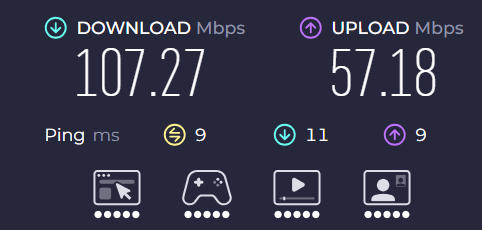
LAN port bug AX 73 v1 keeps dropping frames when watching 4K60FPS or higher youtube video.

I'm Using ax73 for a while I noticed that's it has a
weird Frames dropping issue when using
"LAN port connection"
At first I thought it was my ISP or Lan cable problem but no.
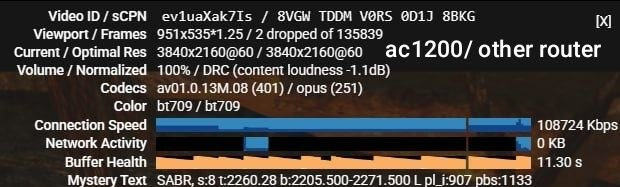
I tested with different router like my old tplink ac1200/deco e4r and the result showed
ax73 had dropped frames like crazy, same video
same ISP, same location, just different router.
I already try different lan port but it still the same.
Qos settings is disabled.
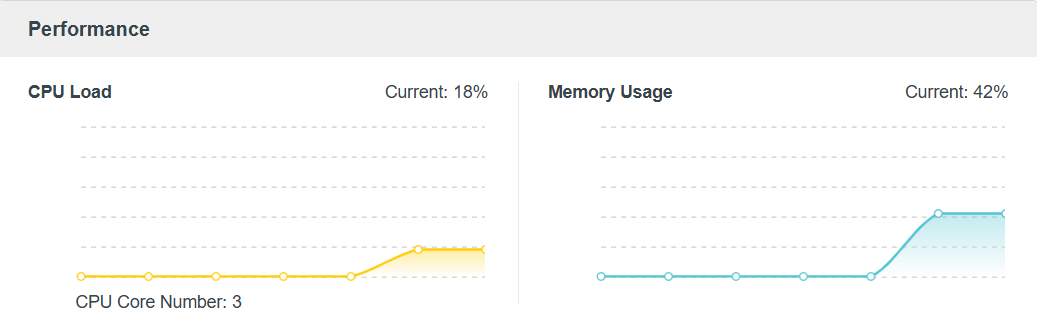
Router CPU and Memory are normal.
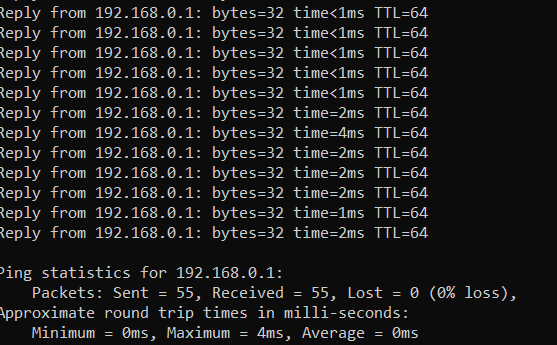
I tested it multiple times and I can confirm that this issue did exists.I even try ping my router but the ping is normal.
I think it's a LAN PORT software issue because when using
"WiFi connection" it didn't have any issues like this
at least I didn't catch it.
Although this router was already eol but can it still getting fix?
Steps to reproduce:
1. Connect PC to AX73 using Ethernet cable
2. Ensure link speed is 1 Gbps
3. Play a YouTube 4K60fps video and full screen it, right click the video and select "stats for nerds"
4. After 5–30 minutes, random stuttering / frame drops
(20/4/26)Update: I set my e4r as access point mode and connected it to my ax 73 LAN port and connect my pc LAN cable to e4r second port,
And the result showed it has NO random drop frames issue.
I suspect that this was a firmware issue.
(28/4/26)Update2:
Uhh after the recent update of Google Chrome the issue is completely GONE, Now I'm not sure if the problem is still exist... cause I can't reproduce it anymore, I will update if the problem show up again.
If need more information or something please let me know!
I would try to giving anything that will help !
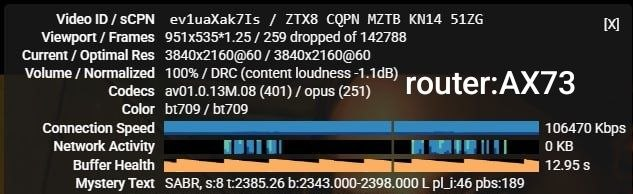
Ax73 Performance:
Ax73 ping result:
Ax73 Internet speed result: