
Parental Controls and Days
Parental Controls and Days

We have parental controls set so that Weekdays have an earlier time of 9pm rather than 10.30pm. We have set these to be Sunday to Thursday, as those are the days that he has school the next day.
However, despite today being a Saturday, the controls went off at 9.00 and the fix was to add Sunday as a weekend, it seems the Deco is a day ahead of the real date in the UK.
Anyone else having this problem?
- Copy Link
- Subscribe
- Bookmark
- Report Inappropriate Content


MAC750 wrote
We have parental controls set so that Weekdays have an earlier time of 9pm rather than 10.30pm. We have set these to be Sunday to Thursday, as those are the days that he has school the next day.
However, despite today being a Saturday, the controls went off at 9.00 and the fix was to add Sunday as a weekend, it seems the Deco is a day ahead of the real date in the UK.
Anyone else having this problem?
Hi,
Based on your "Weekdays" and "Weekends" settings, the behavior of your Deco's Parental Controls > Bedtime feature may be functioning as intended.
If the bedtime settings are from the previous day XX to today XX, and you want the Bedtime to take effect at 10:30 PM on Friday and Saturday nights, and at 9:00 PM on all other days, please set "Weekdays" to Monday to Friday and "Weekends" to Saturday to Sunday.
Best Regards
- Copy Link
- Report Inappropriate Content

This issue is typically caused by incorrect system time settings on your Deco. The system time affects parental controls, and if it's not synchronized correctly, these features may not function properly. Here's how to fix it:
Method 1: Via the Web Interface
1. Ensure that your phone or PC is connected to the Deco network.
2. Access http://tplinkdeco.net and go to Advanced > System > Time Settings.
3. Switch to a different time zone and click SAVE. Then, select your correct time zone (UK time zone) and click SAVE again. This will reapply the system time to match your current time zone.
Method 2: Via the Deco App
1. Open the Deco app, go to More > System > System Time > Time Zone to change the time settings.
2. If you cannot find the time zone option in the app, your Deco model may not support this feature yet. Please use Method 1 instead.
This process will refresh the Daylight Saving Time settings and correct the date/time synchronization on your Deco, which should resolve the issue with your parental control schedules.
If the system time remains incorrect after completing the above steps, please reply to this post.
Thanks
- Copy Link
- Report Inappropriate Content
Can't access method 1, I just get a can't access this site message.
My deco app doesn't have a time setting, so can't use method 2 either.
Any other suggestions?
- Copy Link
- Report Inappropriate Content
- Copy Link
- Report Inappropriate Content
I've managed to get into tplinkdeco.net via a pc, it wouldn't work on my phone.
I've reset the time to Europe and London and it is an hour out so had to set it to a location in mainland Europe as it clearly doesn't know about UK summer time.
Lets hope this helps.
- Copy Link
- Report Inappropriate Content
I'm going to have you submit your logs so they can look into this for you. Please submit your logs using the instructions below.
Once they have been submitted you should get an email with a TKID number please reply to this post with your TKID number.
Thanks
- Copy Link
- Report Inappropriate Content
MAC750 wrote
We have parental controls set so that Weekdays have an earlier time of 9pm rather than 10.30pm. We have set these to be Sunday to Thursday, as those are the days that he has school the next day.
However, despite today being a Saturday, the controls went off at 9.00 and the fix was to add Sunday as a weekend, it seems the Deco is a day ahead of the real date in the UK.
Anyone else having this problem?
Hi,
Based on your "Weekdays" and "Weekends" settings, the behavior of your Deco's Parental Controls > Bedtime feature may be functioning as intended.
If the bedtime settings are from the previous day XX to today XX, and you want the Bedtime to take effect at 10:30 PM on Friday and Saturday nights, and at 9:00 PM on all other days, please set "Weekdays" to Monday to Friday and "Weekends" to Saturday to Sunday.
Best Regards
- Copy Link
- Report Inappropriate Content
I'll try that, though that seems to be counter intuitive as the night he doens't have school the next day are Friday & Saturday, which is what we have set as the weekend days.
Mark
- Copy Link
- Report Inappropriate Content
- Copy Link
- Report Inappropriate Content
Hi,
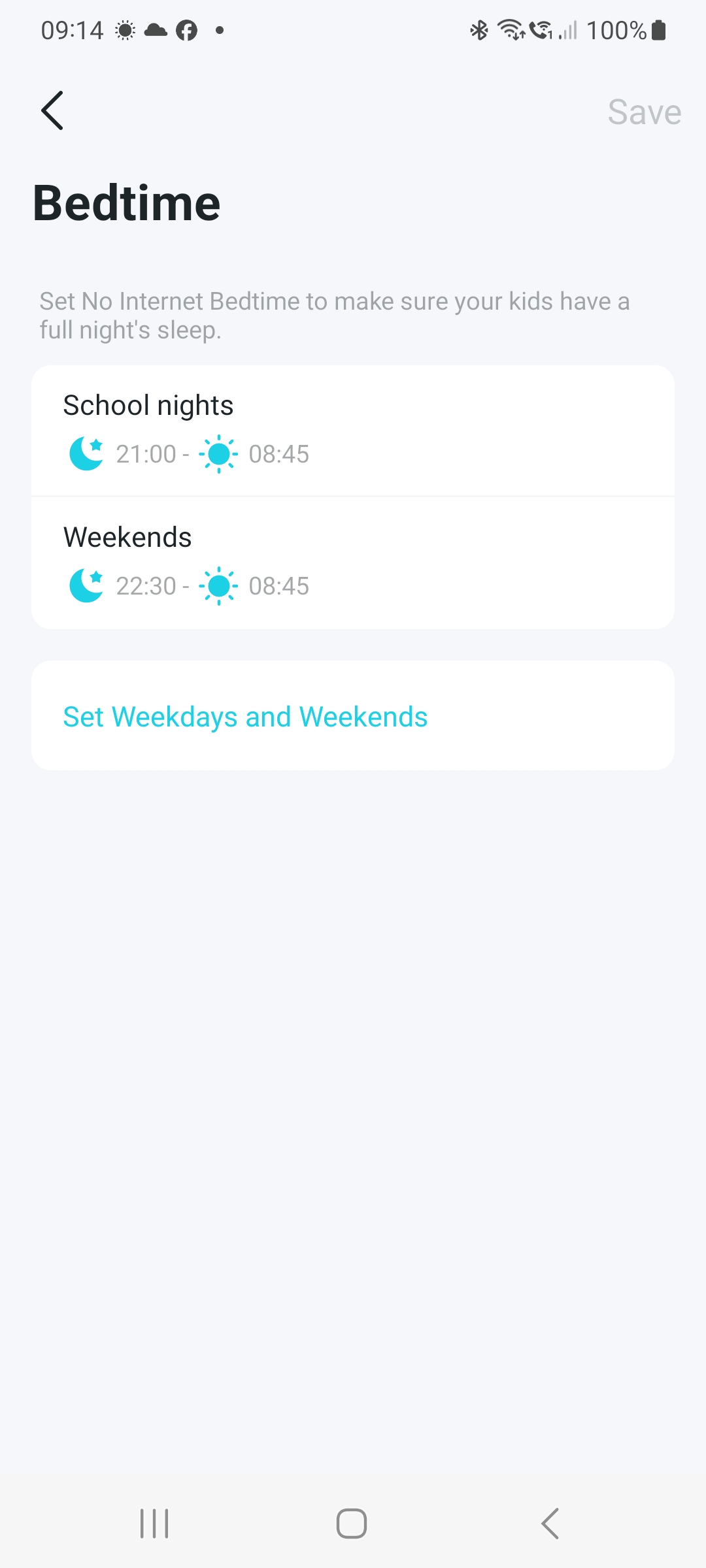
At what time did the client device within the parental control profile lose internet access from your Deco? Would you please send us the screenshots showing your bedtime settings?
Best Regards
- Copy Link
- Report Inappropriate Content
- Copy Link
- Report Inappropriate Content
Information
Helpful: 1
Views: 727
Replies: 11
Voters 0
No one has voted for it yet.