
TP-Link DECO BE25 in AP mode causes loop

Hi!
I have two Deco BE25 in AP mode. As soon as I plug in the second Deco ( the secondary unit ) a loop is created and my wired connections absolutely tank and the icon indicates that it's using WIFI backhaul. The settings don't show a way of disabling this behavior which is absolutely bonkers.
How to proceed?
My setup:
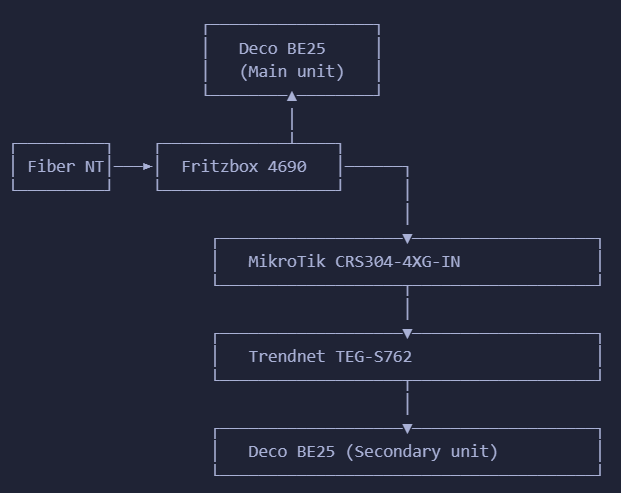
Edit: I have RSTP enabled on my Mikrotik but apparently even that is not enough.
Edit 2: When I disconnect the Trendnet switch from the MikroTik switch, then I still have wired internet for devices on the Trendnet switch via the Deco unit. Should that even be possible when router mode is disabled?!
- Copy Link
- Subscribe
- Bookmark
- Report Inappropriate Content

Hey mate, looks like maybe Zen as ISP?
Have you thought about taking the fritzbox out of the equation and use the be25 as the router, so connect the ethernet direct from the ONT?
Only thing that might prevent it is if your using the Fritzbox for digital voice
- Copy Link
- Report Inappropriate Content
Hey Adam. I'm not sure I follow. Especially the "Zen as ISP" and "s9" bits confuse me.
That being said: why would I use a vastly inferior BE25 for routing purposes? Not to mention that the Fritzbox, Mikrotik and Trendnet all support 10GE networking.
- Copy Link
- Report Inappropriate Content
Sorry for the confusion, fat fingers. I edited my post.
Im in the UK, Fritzbox is standard router with an ISP here called Zen
Bear with me, I've done a lot of Deco AP only setups, there is some extra info that would help diagnose your issue.
Understood if you are using some advanced features of the Fritzbox and have a faster than 2.5Gb Internet connection it makes sense to use it.
If thats the case, how about a couple of suggestions.
1. Make sure the Deco isn't trying to provide dhcp services erroneously, so in Advanced, make sure to disable Smart DHCP mode.
2. Is it possible to connect the main deco to the microtic switch rather than the fritzbox?
3. Once you have the main deco up and working, do the setup of the satellite Deco by temporarily connecting it to the main deco by ethernet directly. Then once all is working, move it to where it needs to go.
- Copy Link
- Report Inappropriate Content

I think it's the MikroTik switch causing the issue. It's a managed switch and tp-link recomends using an unmannged switch for ethernet backhaul.
The Deco Ethernet backhaul feature is based on the standard IEEE 1905.1 protocol. However, we find that some switches, mainly the D-Link switches, will not forward packets based on IEEE 1905.1 protocol, causing all Deco units in a network loop and becoming quite unstable, you might consider changing another switch or contacting switch’s support directly. TP-Link Switches are mostly compatible with our Deco’s Ethernet backhaul.
I did a search for your switch on google and found the following
No, the MikroTik CRS304-4XG-IN (and MikroTik devices in general running RouterOS) does not natively support or implement the IEEE 1905.1 protocol.
- 1905.1 Protocol: This protocol is typically used for consumer-grade mesh systems (like TP-Link Deco) to manage Ethernet backhaul and automatically map network topology
- Alternative Support: While the CRS304 is a robust managed switch that can handle complex VLAN setups, it does not forward or participate in the discovery/communication packets required for IEEE 1905.1-based systems to detect Ethernet backhaul
- Recommendation: If you are trying to set up a wired backhaul for a home mesh system that requires 1905.1, you should use unmanaged switches that explicitly support the standard, as "managed" business-class switches often drop these packets.
I would try removing the MikroTik switch and go from the fritzbox to the trendnet switch then from the switch to the 2nd deco to see if it fixes the loop back issue and the speed issue
- Copy Link
- Report Inappropriate Content
That seems to solve it indeed, but that doesn't solve the issue of the Deco's lackluster or potentially bugged firmware.
According to this megapost https://www.reddit.com/r/TpLink/comments/14o0osg/deco_ethernet_backhaul_megathread/ this issue is far more widespread than your average incompatible managed switch.
Which begs the question: if decos creating loops is even remotely an issue, then why not provide a simple backhaul mode toggle to prevent loops? Worst case scenario you select ethernet backhaul only during initial setup, that drops for whatever reason, and you don't have wifi in a certain location. Big deal, at least it doesn't blow up half your network of wired and most likely far more critical devices.
A device not supporting IEEE 1905.1 should not result in a loop, especially in consumer grade APs. I say especially, because the average consumer will not have the required skill to debug and solve this exotic issue.
- Copy Link
- Report Inappropriate Content
So there are two different issues going on. Deco mesh network loops often happen when using Ethernet backhaul, causing switches to block ports due to detected loops. This frequently occurs when multiple Deco units are connected in a loop (e.g., both Ethernet and Wi-Fi active simultaneously) or when connected through managed switches that block traffic
Most managed switches have an option to turn on Loop Prevention which "might" help stop the loop issue but will do nothing for the packet loss.
If you just purchased your deco units you could return them and try another brand of router or switch out the MikroTik switch for a tp-link switch. You can find a list of switches that work with tp-link ethernet backhaul here
I did send a video about this to my contacts on the us forum to see if anything else can be done but even if they can update the deco firmware it would take time.
- Copy Link
- Report Inappropriate Content
I factory resetted the AP, then created a separate wifi with it ( same SSID as my main deco ), still connected to that same mikrotik switch, problem solved.
Things are starting to make even less sense now
- Copy Link
- Report Inappropriate Content
- Copy Link
- Report Inappropriate Content
Information
Helpful: 0
Views: 170
Replies: 8
Voters 0
No one has voted for it yet.