
New AX72 V1 (EU) firmware - 1.4.6 Build 20260112 rel.66206 - not available for all my AX72

I have three Archer AX72 v1.0 (EU) routers.
Tthey are set up with one as the master and the other two as satellites in an Easymesh over Ethernet Backhaul configuration.
I logged onto my master AX72 V1 this morning and saw a notification for a firmware update.
This update offered is : 1.4.6 Build 20260112 rel.66206
The current firmware is: 1.4.5 Build 20251030 rel.56870
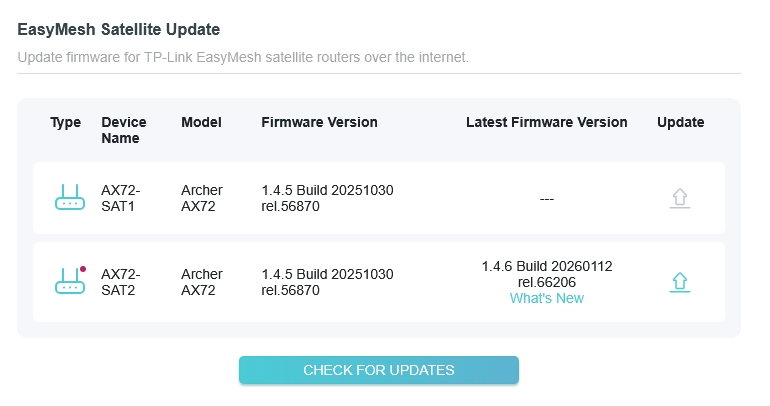
My issue is that the update is only offered for 1 of my 3 Archer AX72 v1.0 (EU) routers even though all my AX72 routers are the same HW Revision and are on identical firmware.
Why is this update only offered for one of the AX72 V1.0 routers?
I do not want to update one and have their firmwares out of sync.
Should I wait and expect the other identical HW routers to be offered the update shortly?
The attached picture shows what I am seeing on my master AX72 when I look at the Easymesh satellite AX72's.
- Copy Link
- Subscribe
- Bookmark
- Report Inappropriate Content

The new FW release most probably should appear in your other two AX72s WebGUI very soon.
If you're keen to update the FW sooner, you can do that manually using this file.
For that purpose, you have to reset the satellite, update it's FW, reset it again and add back into the mesh.
- Copy Link
- Report Inappropriate Content
The new FW release most probably should appear in your other two AX72s WebGUI very soon.
If you're keen to update the FW sooner, you can do that manually using this file.
For that purpose, you have to reset the satellite, update it's FW, reset it again and add back into the mesh.
- Copy Link
- Report Inappropriate Content
Thanks - but its probably best that I wait. I did check that file but its for the US region and I have an EU region AX72.
There is major differences reflected in the firmware, like which 5ghz wifi channels are legal, which require DFS scanning and also the max transmission strength plus a risk of bricking the router.
- Copy Link
- Report Inappropriate Content
Recently, TP-Link uses the same FW release files for US and EU regions. The specific regional information you're referring to is stored elsewhere.
If a device doesn't like the FW file you're trying to upload, it will give you an error message and cancel the procedure.
But in the end, you're correct, it's always better to wait till you get those files through the official channels, than do that manually.
- Copy Link
- Report Inappropriate Content


If you are willing to follow terziyski's suggestion—accessing the Satellite router's management interface, then manually check for new firmware—you might receive a push notification for the update.
Afterward, reset the router and configure it as a Satellite router once again.
terziyski wrote
The new FW release most probably should appear in your other two AX72s WebGUI very soon.
If you're keen to update the FW sooner, you can do that manually using this file.
For that purpose, you have to reset the satellite, update it's FW, reset it again and add back into the mesh.
- Copy Link
- Report Inappropriate Content
Manual checks using the satellites management interface do not trigger a push notification. Its the same for the master router as well.
FYI - its is the youngest of the three AX72 V1.0 (EU) routers that has been offered the update so maybe TP-Link is doing a staggered rollout?
- Copy Link
- Report Inappropriate Content
- Copy Link
- Report Inappropriate Content
Thank you for the link to the firmware Zip you posted earlier in this thread. I had some time tonight so I used it to update my other AX72 satellite. That worked perfectly, so I then updated the AX72 master. That went fine too. Everything is stable.
Thanks again for taking the time to post that link, it is appreciated. I have marked your answer as the solution.
- Copy Link
- Report Inappropriate Content
Information
Helpful: 0
Views: 478
Replies: 7
Voters 0
No one has voted for it yet.