
deco x50-PoE not using wired backhaul

I have 3 deco x50-poe, all connected by cable, to different switches, decos are in access mode, all cables are working and tested.
ER605 -> TL-SG1008MP
└──Deco - Living Room
->TL-SG1005LP
├── Deco DB0C
└── Deco D964
two switches are connected to the router ER605, Living room deco connected to TL-SG1008MP, other 2 decos are connected to the TL-SG1005LP.
The problem is that mobile app shows that one of the deco DB0C or D964 communicates with main deco Living room through Wi-Fi and not Ethernet
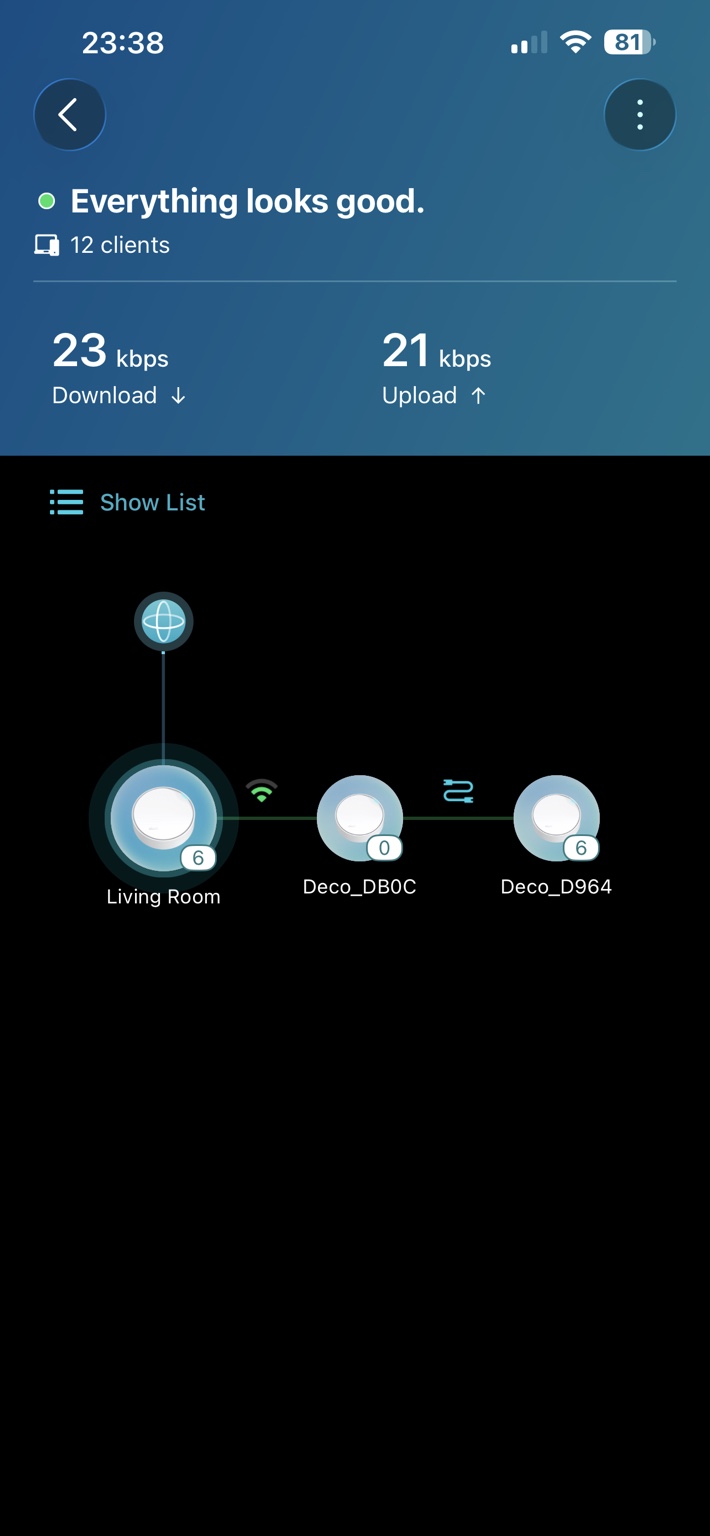
How to force deco to communicate only through wired blackhaul? Is there something I can check in the log?
System logs contain the following messages:
- "backhaul_iface"
- "wifi backhaul is enable"
- "backhaul enabled 2g"
- "backhaul enabled 5g"
I cannot find any indication that Ethernet backhaul has been established.
Additionally, the logs repeatedly show:
- "Failed to read AP info"
- "No enough AP info exists"
which suggests the mesh topology database may not be built correctly.
All Three Nodes — Post-Reset Analysis
What's identical across all nodes (main, 2, 3)
All three boot logs are structurally the same:
- backhaul_option is 3 read from config → AWN daemon overrides to backhaul_option:1 (WiFi)
- backhaul_ifnames value:ra0,rax0,ath22 — Ethernet still excluded from backhaul
- 4 Segmentation faults at 12:29:07 on every node
- sync-server/mesh_dev_list doesn't exist — mesh device registry never created
- tmpsvr: Error: tmp_trans_relay — TMP relay still broken
The factory reset did not clear backhaul_option=3. It survived the reset.
---
What's new and positive
At 13:23:00 the main node's imsnoop (multicast bridge manager) starts seeing satellite MACs for the first
time:
imsnoop: mcManagerMCProcess: vlan node 0 - F0:09:0D:1B:D9:64, add it to encap table
imsnoop: mcManagerMCProcess: vlan node 0 - F0:09:0D:1B:DB:0C, add it to encap table
This confirms both satellite nodes are physically reachable via Ethernet at L2 level — the cables, switches,
and bridge are all working. The hardware is fine.
At 13:23:06–10 on both satellites:
awnd_config_set_eth_neigh_interface: Success to set repacd STA 1
ntp check success!!!
Ethernet neighbors detected on the satellite side too.
---
Why it's still broken despite physical Ethernet working
The L2 Ethernet is up, but the higher-level Deco mesh protocol (TMP) can't use it because:
1. backhaul_option=3 (PLC mode) forces WiFi fallback — the firmware never tries to negotiate Ethernet
backhaul
2. tmpsvr tmp_trans_relay keeps failing — TMP packets can't be relayed between nodes (lines 759–760,
813, 976)
3. IMPROXY (multicast proxy) is crashing at every retry:
IMPROXY: Disable IGMP, there is not igmp upstream interface
3. In AP mode, br-wan has no IP, so the multicast proxy has no upstream — TMP relay depends on multicast and
breaks with it


