I need old version firmware

I need old version firmware

I need old version firmware
Thursday - last edited Yesterday
Model: XC220-G3v  
Hardware Version: V2
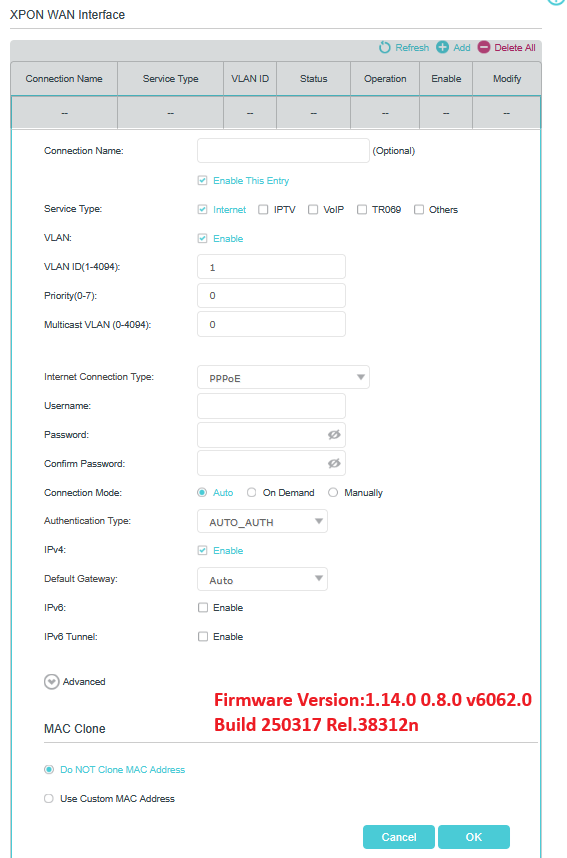
Firmware Version: 1.14

I updated my ont but after updating some of the option are not coming which are I required  please provide firmware

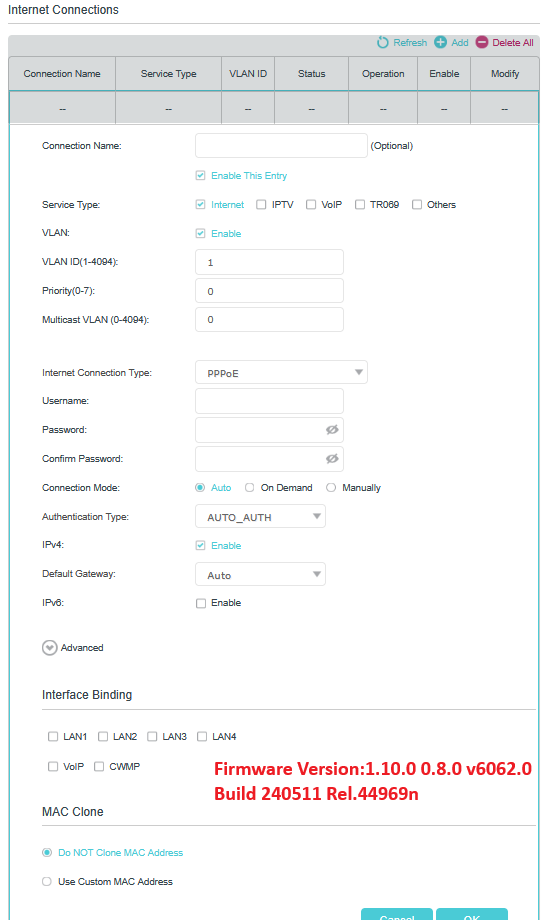
1.10 

  0      
0
#1
Options
8 Reply
Re:I need old version firmware
Yesterday

Hello @punda 


It doesn't allow downgrading from the latest 1.14 to the previous 1.10 directly from the web interface.


Could you please provide more details on 'after updating some of the option are not coming'? Which options are missing?


Or do you mean the configuration is lost after upgrading the firmware?


Please try resetting it to factory defaults to check if the options are back.


Nice to Meet You in Our TP-Link Community. Check Out the Latest Posts: Introducing AI QoS: Elevate Your Gaming Experience on the Archer GE800 Gaming Router! Connect TP-Link Archer BE550 to Germany's DS-Lite (Dual Stack Lite) Internet via WAN Archer GE550 - BE9300 Tri-Band Wi-Fi 7 Gaming Router Archer AX90 New Firmware Added Support for EasyMesh and Ethernet Backhaul If you found a post or response helpful, please click Helpful (arrow pointing upward icon). If you are the author of a topic, remember to mark a helpful reply as the "Recommended Solution" (star icon) so that others can benefit from it.
  1  
1
#2
Options
Re:I need old version firmware
Yesterday

  @Kevin_Z 

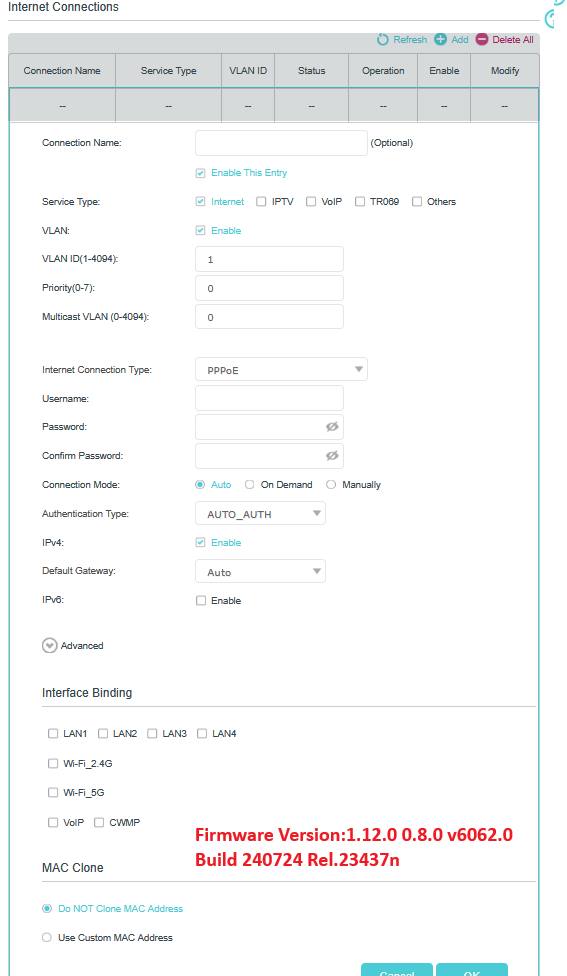
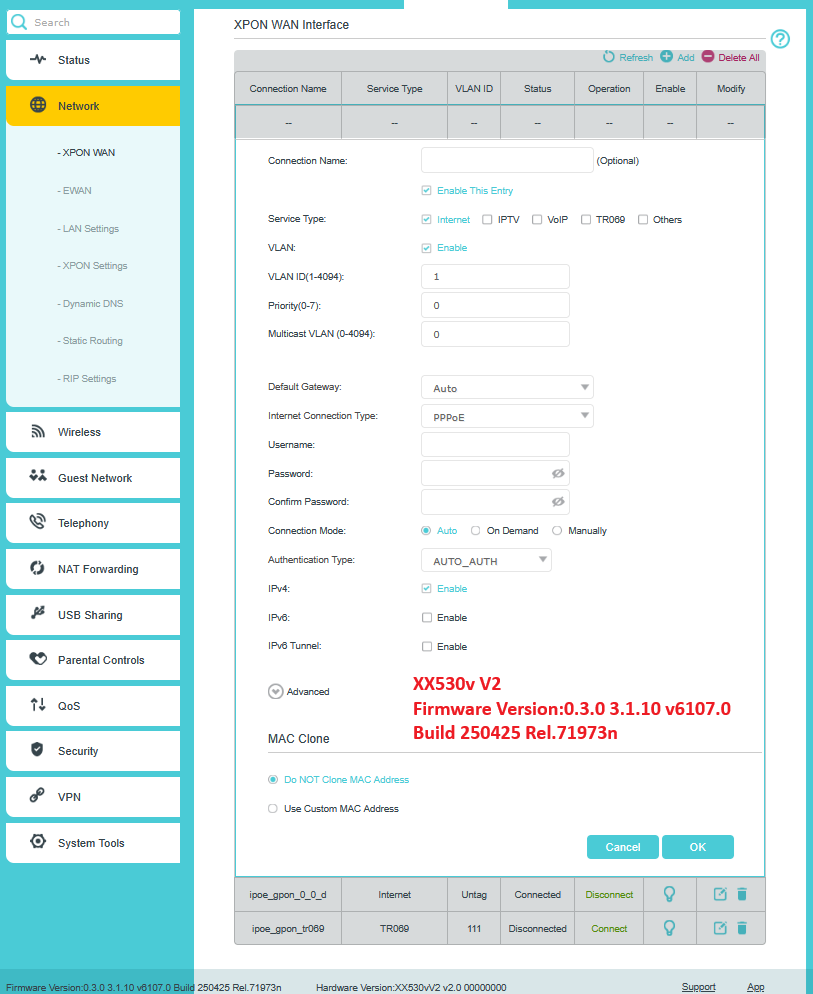
The port binding for wifi  option. Lost

  0  
0
#3
Options
Re:I need old version firmware
Yesterday


punda wrote

  @Kevin_Z 

The port binding for wifi  option. Lost


@punda 


Could you please show me some screenshots?


Please also provide a screenshot when it was available if you have one or remember what it looks like. Thank you.

Nice to Meet You in Our TP-Link Community. Check Out the Latest Posts: Introducing AI QoS: Elevate Your Gaming Experience on the Archer GE800 Gaming Router! Connect TP-Link Archer BE550 to Germany's DS-Lite (Dual Stack Lite) Internet via WAN Archer GE550 - BE9300 Tri-Band Wi-Fi 7 Gaming Router Archer AX90 New Firmware Added Support for EasyMesh and Ethernet Backhaul If you found a post or response helpful, please click Helpful (arrow pointing upward icon). If you are the author of a topic, remember to mark a helpful reply as the "Recommended Solution" (star icon) so that others can benefit from it.
  0  
0
#4
Options
Re:I need old version firmware
Yesterday - last edited Yesterday

  @punda @Kevin_Z 


Correct from firmware 1.14 we are losing Binding interface


Same for:

Firmware Version:1.13.0 0.8.0 v6062.0 Build 240822 Rel.26630n


  1  
1
#5
Options
Re:I need old version firmware
Yesterday

@TomasChott 


Thank you so much for the screenshots.


I saw you're posting the software issues or changes in another thread. I will check and report all of these to the development team for verification.

Nice to Meet You in Our TP-Link Community. Check Out the Latest Posts: Introducing AI QoS: Elevate Your Gaming Experience on the Archer GE800 Gaming Router! Connect TP-Link Archer BE550 to Germany's DS-Lite (Dual Stack Lite) Internet via WAN Archer GE550 - BE9300 Tri-Band Wi-Fi 7 Gaming Router Archer AX90 New Firmware Added Support for EasyMesh and Ethernet Backhaul If you found a post or response helpful, please click Helpful (arrow pointing upward icon). If you are the author of a topic, remember to mark a helpful reply as the "Recommended Solution" (star icon) so that others can benefit from it.
  0  
0
#6
Options
Re:I need old version firmware
Yesterday

@Kevin_Z 


probably DEV team change GUI between XC220G3v since firmware 1.13 from Old version GUI to New version same like for XX530v and from 1.13 missing Interface Binding, same issue for XX530v V2 :D


  @Kevin_Z 

  1  
1
#7
Options
Re:I need old version firmware
Yesterday


TomasChott wrote

@Kevin_Z 


probably DEV team change GUI between XC220G3v since firmware 1.13 from Old version GUI to New version same like for XX530v and from 1.13 missing Interface Binding, same issue for XX530v V2 :D


  @Kevin_Z 


@TomasChott 


I hope they can verify and get back soon. I will keep you informed once there is an update from the team.

Nice to Meet You in Our TP-Link Community. Check Out the Latest Posts: Introducing AI QoS: Elevate Your Gaming Experience on the Archer GE800 Gaming Router! Connect TP-Link Archer BE550 to Germany's DS-Lite (Dual Stack Lite) Internet via WAN Archer GE550 - BE9300 Tri-Band Wi-Fi 7 Gaming Router Archer AX90 New Firmware Added Support for EasyMesh and Ethernet Backhaul If you found a post or response helpful, please click Helpful (arrow pointing upward icon). If you are the author of a topic, remember to mark a helpful reply as the "Recommended Solution" (star icon) so that others can benefit from it.
  0  
0
#8
Options
Re:I need old version firmware
8 hours ago


TomasChott wrote

@Kevin_Z 


probably DEV team change GUI between XC220G3v since firmware 1.13 from Old version GUI to New version same like for XX530v and from 1.13 missing Interface Binding, same issue for XX530v V2 :D

  @Kevin_Z 


@TomasChott 


You're right. The web GUI has been changed to the new UI since 1.13, so some configuration settings have been changed accordingly.


Regarding the Interface Binding specifically, you need to choose the Service Type as IPTV or Others, then you will see the settings there. Please have a check. @punda 

Nice to Meet You in Our TP-Link Community. Check Out the Latest Posts: Introducing AI QoS: Elevate Your Gaming Experience on the Archer GE800 Gaming Router! Connect TP-Link Archer BE550 to Germany's DS-Lite (Dual Stack Lite) Internet via WAN Archer GE550 - BE9300 Tri-Band Wi-Fi 7 Gaming Router Archer AX90 New Firmware Added Support for EasyMesh and Ethernet Backhaul If you found a post or response helpful, please click Helpful (arrow pointing upward icon). If you are the author of a topic, remember to mark a helpful reply as the "Recommended Solution" (star icon) so that others can benefit from it.
  0  
0
#9
Options