
Tapo C500 keeps losing it's bearings

This thread has been locked for further replies. You can start a new thread to share your ideas or ask questions.

Tapo C500 keeps losing it's bearings

This thread has been locked for further replies. You can start a new thread to share your ideas or ask questions.

Tapo C500 keeps losing it's bearings
2025-06-05 15:54:04 - last edited 2025-07-11 05:42:44
Tags: #Live View #Positioning problem
Model: Tapo C500  
Hardware Version:
Firmware Version:

I have been using the Tapo C500 camera for a couple of months now. The first few months the camera workes fine but very soon the camera began to lose it's bearings. What do I mean by that, it sems that the camera gets stuck in a position that's pointing upwards and looking into the camera housing. I can't seem to adjust this through Pan & Tilt or even rebooting it a number of times. I need to go out and manually force the camera into the right position so that it actually captures images. This will hold for a while but the next day it seems to have krept back into it's foetal position. 

I really don't know what to do, as it is now I can't really use this camera. Such a pity. Anyone have an idea?
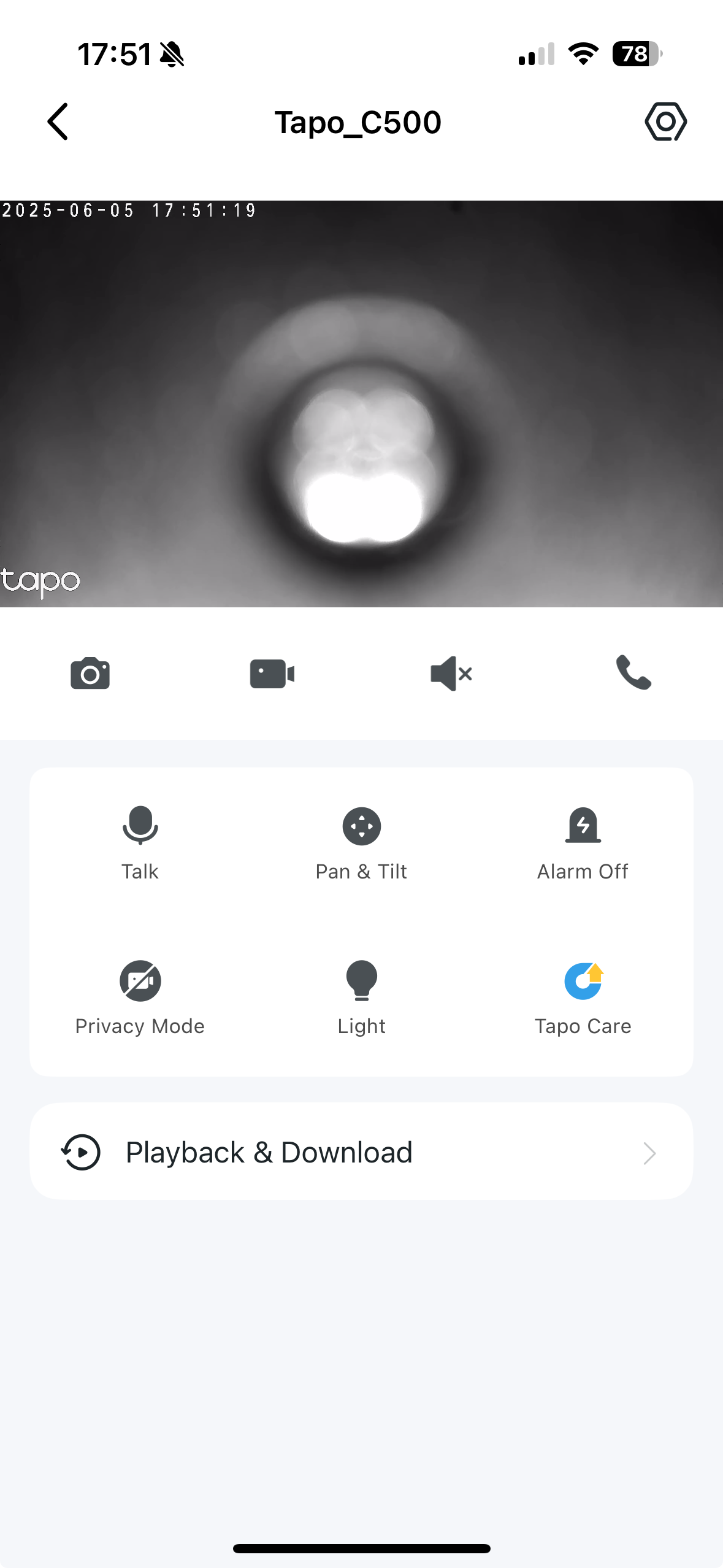
This is what it looks like every time. So frustrating.

  0      
  0      
#1
Options
1 Accepted Solution
Re:Tapo C500 keeps losing it's bearings-Solution
2025-06-09 02:43:00 - last edited 2025-07-11 05:42:44

  @Yrrah 


Did the camera record the moments when it rotates itself automatically? This seems like a hardware problem, we recommend getting a replacement first. You may contact the retailer or local TP-Link support to proceed with the warranty. 

CES 2026 Meet TP-Link AI Assistant and More New Products!
Recommended Solution
  0  
  0  
#2
Options
1 Reply
Re:Tapo C500 keeps losing it's bearings-Solution
2025-06-09 02:43:00 - last edited 2025-07-11 05:42:44

  @Yrrah 


Did the camera record the moments when it rotates itself automatically? This seems like a hardware problem, we recommend getting a replacement first. You may contact the retailer or local TP-Link support to proceed with the warranty. 

CES 2026 Meet TP-Link AI Assistant and More New Products!
Recommended Solution
  0  
  0  
#2
Options