
Bug : Tapo H200 Hub - Wrongly Listing Devices Using Backup Wifi

This thread has been locked for further replies. You can start a new thread to share your ideas or ask questions.

Bug : Tapo H200 Hub - Wrongly Listing Devices Using Backup Wifi

This thread has been locked for further replies. You can start a new thread to share your ideas or ask questions.

Bug : Tapo H200 Hub - Wrongly Listing Devices Using Backup Wifi
2025-06-17 18:43:33 - last edited 2025-07-14 11:40:22
Model: Tapo H200  
Hardware Version: V1
Firmware Version: v1.5.1 Build 20250228 rel.27505


Hi :) 


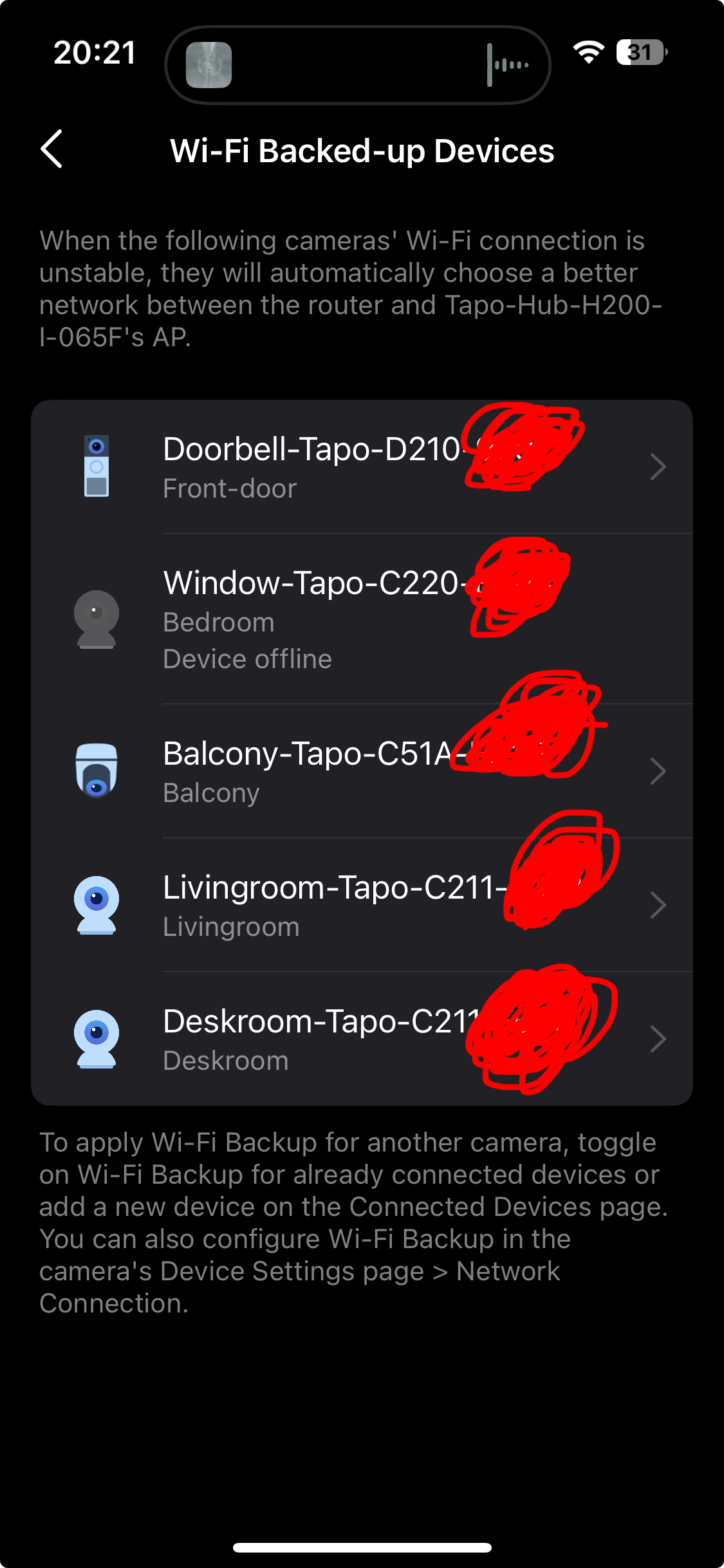
I have 5 cameras (1xD210, 1xC51A, 1xC220, 2xC211) and two H200 Hubs, I am using latest firmwares for all cams and hubs


1. Before getting my second H200 I configured 5 cameras tu use my first hub as wifi backup


2. When I received my second H200 Hub I migrated 2 cameras to the new Hub (for wifi backup)


3. On the first Hub on "Connected devices" I have 5 items even tho I migrated two to the new Hub, more over when I click on the migrated cameras it show that Wifi Backup is disabled while it is enabled or it show wrong hub as backup


4. When entering that setting from the camera settings its correctly configured


>>>


The H200 under "connected devices" > "Wifi backup" should list only devices using its wifi

and I guess wifi backup config should be internally aligned as well (at the level of the hub internal config)


Thanks


  0      
  0      
#1
Options
1 Accepted Solution
Re:Bug : Tapo H200 Hub - Wrongly Listing Devices Using Backup Wifi-Solution
2025-06-19 06:48:54 - last edited 2025-07-14 11:40:22

  @moon-link 


Device migration will not migrate non-SubGHz cameras (the wifi cameras, no hub required). You will need to set up the hub storage and wifi backup feature on the new hub after the migration is done.


As for the information display issue in the app, I'll report it to our relevant department to check it.

CES 2026 Meet TP-Link AI Assistant and More New Products!
Recommended Solution
  0  
  0  
#3
Options
3 Reply
Re:Bug : Tapo H200 Hub - Wrongly Listing Devices Using Backup Wifi
2025-06-17 18:47:49
I can manually install the beta firmware 1.5.2 but I dont want to do that manually as my config works (not extensively tested tho) but I am not against testing an assigned beta firmware if you want me to ;)
  0  
  0  
#2
Options
Re:Bug : Tapo H200 Hub - Wrongly Listing Devices Using Backup Wifi-Solution
2025-06-19 06:48:54 - last edited 2025-07-14 11:40:22

  @moon-link 


Device migration will not migrate non-SubGHz cameras (the wifi cameras, no hub required). You will need to set up the hub storage and wifi backup feature on the new hub after the migration is done.


As for the information display issue in the app, I'll report it to our relevant department to check it.

CES 2026 Meet TP-Link AI Assistant and More New Products!
Recommended Solution
  0  
  0  
#3
Options
Re:Bug : Tapo H200 Hub - Wrongly Listing Devices Using Backup Wifi
2025-06-24 06:07:06

  @moon-link 


Well, I try to do the test myself and don't have the same problem. The camera is removed from the WiFi Backed-up Device list after changing its connected Hub AP. May I know how you 'migrated' the wifi camera to the new hub?


2. When I received my second H200 Hub I migrated 2 cameras to the new Hub (for wifi backup)

CES 2026 Meet TP-Link AI Assistant and More New Products!
  0  
  0  
#4
Options
