D235 wedge

This thread has been locked for further replies. You can start a new thread to share your ideas or ask questions.

D235 wedge

This thread has been locked for further replies. You can start a new thread to share your ideas or ask questions.
D235 wedge
D235 wedge
2025-07-09 19:44:27 - last edited 2025-07-31 11:31:44
Model: Tapo D235  
Hardware Version: V1
Firmware Version: n/a

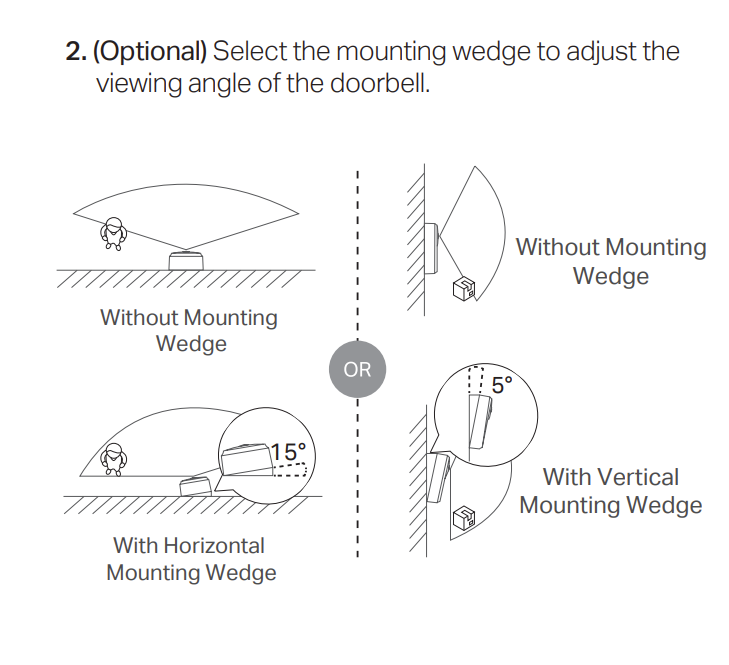
The Tapo D235 doorbell is supplied with a horizontal wedge which is suitable for use only on the left-hand side of the door.


How can I use a horizontal wedge when mounting on the right-hand side of the door (it is needed)?


(and, no, the supplied wedge cannot be flipped upside-down: it can be used only one way up)

0
0
#1
1 Accepted Solution
Re:D235 wedge-Solution
2025-07-10 17:07:32 - last edited 2025-07-31 11:31:44

  @Robin_Walker 


The relevant information can also be found in the Quick Installation Guide. 

CES 2026 Meet TP-Link AI Assistant and More New Products!
Recommended Solution
0
0
#4
4 Reply
Re:D235 wedge
2025-07-10 05:53:02

  @Robin_Walker 

The wedge is two parts to make it left or right. 


See here: https://youtu.be/T32m5lEaF2Q?t=106

2
2
#2
Re:D235 wedge
2025-07-10 07:56:33 - last edited 2025-07-10 08:06:59

gromit4x4 wrote

The wedge is two parts to make it left or right. 


OK. That was not apparent on first inspection, as the two parts are close-fitting and did not come apart by themselves.


There is no reference to this in any of the paperwork.

1
1
#3
Re:D235 wedge-Solution
2025-07-10 17:07:32 - last edited 2025-07-31 11:31:44

  @Robin_Walker 


The relevant information can also be found in the Quick Installation Guide. 

CES 2026 Meet TP-Link AI Assistant and More New Products!
Recommended Solution
0
0
#4
Re:D235 wedge
2025-10-14 15:48:26

  @Robin_Walker Agreed; I've only just found the horizontal wedge INSIDE the mounting bracket.


DOH!

1
1
#6