
Delay is disarming alarm
 This thread has been locked for further replies. You can start a new thread to share your ideas or ask questions.
Hello all,
I built an alarm system with my T100/T110 sensors and S200B smart switch.
I.m very happy with the delay function by arming the alarm via app or smart switch. It gives some time before leaving the house
I would really like to see a delay function by disarming the alarm so that people without the Tapo app entering the house have the time to disarm the alarm with de smart switch without the alarm being triggerd directly by openening the door.
- Copy Link
- Subscribe
- Bookmark
- Report Inappropriate Content

- Copy Link
- Report Inappropriate Content

I remade automation again, after entry delay, no alarm sound??
I think that last time I thought that entry delay was my alarm :D
Here are screenshots.
https://freeimage.host/i/fzP9U6G
https://freeimage.host/i/fzP98nn
https://freeimage.host/i/fzP9SGs
https://freeimage.host/i/fzP9kZX
https://freeimage.host/i/fzP94a4
https://freeimage.host/i/fzP968l
https://freeimage.host/i/fzP9i92
edit. tried to make shortcut "siren" just play sound from hub and added that to replace "Add an “Action” of ring Hub" and it didnt work.
Automation stops after sending message that alarm has been triggered? Also tried to put hub sound before message, but no help, but if I activate outdoor cameras siren, that works??
- Copy Link
- Report Inappropriate Content
Hi Lobo_E,
In regards to the first question around the "When" statement, sorry, that was my mistake, it should have been "IF" “Alarm Entry triggered?” is disabled, and I see that you have worked that out and coded it correctly in your screen shots which is great.
I'll go through the issue in more detail later today and come back to you with some further questions or suggestions...
- Copy Link
- Report Inappropriate Content
Hi @Lobo_E ,
- So to be clear, when you walk into the house, the “Entry delay” sound rings for 20 seconds, then you receive a notification on your phone to say “Alarm has been triggered” but the alarm does not ring on the H500 Hub? Is this correct?
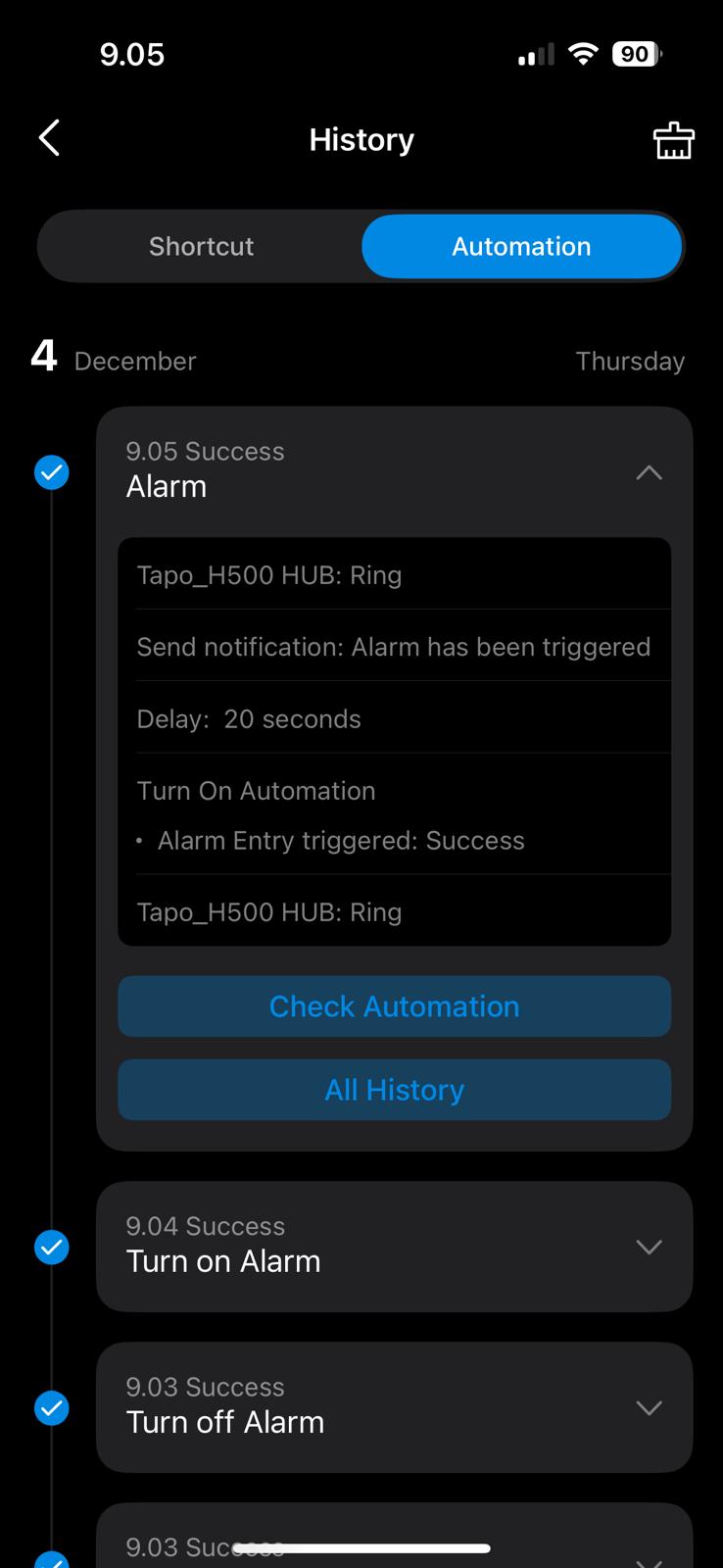
- Can you please check the “Alarm” Automation history log to see if the second Tapo Hub ring action occurs and has no errors. You can find this log by selecting the “Automation page” and then the icon at the top of the page next to the add icon.
- If the log indicates the second Hub ring is successful then double check the action to ensure Sound level, Ring tone and duration are set correctly (I’m sure you have already done that, sorry).
- Have you tried other ring tones, just in case there is something wrong with the one you selected for the “Alarm”?? You can just go into the H500 device and try the different ring tones?
- You said you created a “siren” shortcut. If you execute this shortcut directly from your Tapo app does it ring the H500? If not then try some different tones/settings via this shortcut.
Given other actions work including activating outdoor camera siren then it’s clearly something specific to that H500 Hub ring action…. So if any of the above don’t reveal the problem then I would be surprised… Please let me know what you find.
- Copy Link
- Report Inappropriate Content
Hi,
1. Yes
2. 
3. Done with different sounds and levels, no help.
4. They work, Hub log says "Alarm" triggered the hub to ring, but no sound?
5. This works when I press that shortcut.
Is there way to cut "Alarm" to smaller pieces? If the hub dont like that many Then automation phases?
- Copy Link
- Report Inappropriate Content
Hi Lobo_E,
Cutting the alarm automation into smaller pieces won't help, I have much longer automations and up to 64 actions can be included in a single automation. Also calling a shortcut from an automation really just inserts the short cut steps into the automation behind the scenes so you won't have a different result.
It appears to be specific to the H500 hub... I use a H200 and this scenario works fine so I do not believe it is the automation code at fault here...
I'm thinking it relates to having the two H500 rings one after each other maybe causing problems (a H500 bug?). Can I therefore suggest you try this test:
Create a shortcut which includes the first 4 actions of the "Alarm" automation which will be:
- Ring Hub for 20 seconds
- Enable the “Alarm entry triggered?” automation
- “Delay” for 20 seconds
- Send a notification
- Ring Hub for 10 minutes
This should have the same issue and if not then we will need Tapo technical help which we can then pull in.
If it has the same result as the automation then try these things to see if it helps:
- make the delay between the hub rings longer than 20 seconds (in case the first ring is somehow impacting the second ring)
- if that does not help then add a step after the delay and before the second hub ring to silence the hub so it is inactive before the second hub ring
- if that still does not work then add a short delay between the hub silencing and the second hub ring
- remove the "Send notification action in case this is interfering with the second hub ring.
- lastly remove the first hub ring and see if the second hub ring sounds....
Now none of these should really work but if they do then we can adjust the automation and report the problem back to the Tapo technical team...
Good luck, I'm interested to see the result....
- Copy Link
- Report Inappropriate Content
Hi @Rbuck
I managed to get automation work, thanks to you!!!
I changed first hub ring to 25 and delay to 30, also 20 and 25 works!
If they were same on real automation, like 30, that didnt work.
-On test program both were 30 and it worked.
-Silence method didnt work.
THANKS!!!! :)
- Copy Link
- Report Inappropriate Content
- Copy Link
- Report Inappropriate Content
Hi @Rbuck
Have to ask few things.
Is it possible to add to this automation a feature that if during the entry delay, any of the motion sensors are triggered, alarm is instant overriding the delay?
Are you able to connect extra hub to this H500 to work as extender, and as alarm notification sender if intruder disconnects the main hub?
Thanks
- Copy Link
- Report Inappropriate Content
Is it possible to add to this automation a feature that if during the entry delay, any of the motion sensors are triggered, alarm is instant overriding the delay?
- I expect you include all motion sensors in the "Alarm" autoimation in case the intruder comes through a window. So I assume you want to do this is because you can get to the "Alarm off button" once you open the door and not pass any motion sensors and you don't want to give the intruder 20 seconds before sounding the alarm... Anyway, it is possible, but not sure the effort is worth it. You can always reduce the 20 seconds warning sound.. Anywayy if you really want to do that refer below:
- You can't do that within the "Alarm" Automation routine but you could create another automation to do that which is enabled when the "Alarm entry is triggered" as follows:
- Create a new Automation - called "Instant siren apon movement" or what makes sense to you.
- this automation will have a "When" of the motion sensors detecting motion"
- The "if" will "Alarm has been triggered" automation is enabled
- The action will be to ring the Hub for up to 10 mins
- This will only execute the above action after the "Alarm" automation enables "Alarm Entry Triggered" which is as soon as it is triggered.
- However you will need to enable/disable it when the alarm is turned on/off or else the hub will just keep rining for 10 minutes even if the alarm is diabled. To do this add the "enable" and disable this automation actions to the Alarm On/Off shortcuts.
- One more thing... This will ring the hub and then the "Alarm" automation will also try to ring the Hub. It should not be a problem but gven the issue we found with the 2 hub rings overlapping each other that might be a problem... I can work around it if it does but don't want to add extra actions unless we need to...
- Create a new Automation - called "Instant siren apon movement" or what makes sense to you.
Are you able to connect extra hub to this H500 to work as extender, and as alarm notification sender if intruder disconnects the main hub?
- I believe that will work, I have 3 hubs in my house (1 x H200 and 2 x H100). I expect that they will still operate after the main hub is unplagged but not 100% sure and to be sure you will need to ask the Tapo moderator to confirm.
- You would just add the other Hub ring actions after the H500 Hub ring action.
Hope that all makes sense..
- Copy Link
- Report Inappropriate Content
Information
Helpful: 0
Views: 3838
Replies: 29
Voters 0
No one has voted for it yet.