
Live Stream Paused

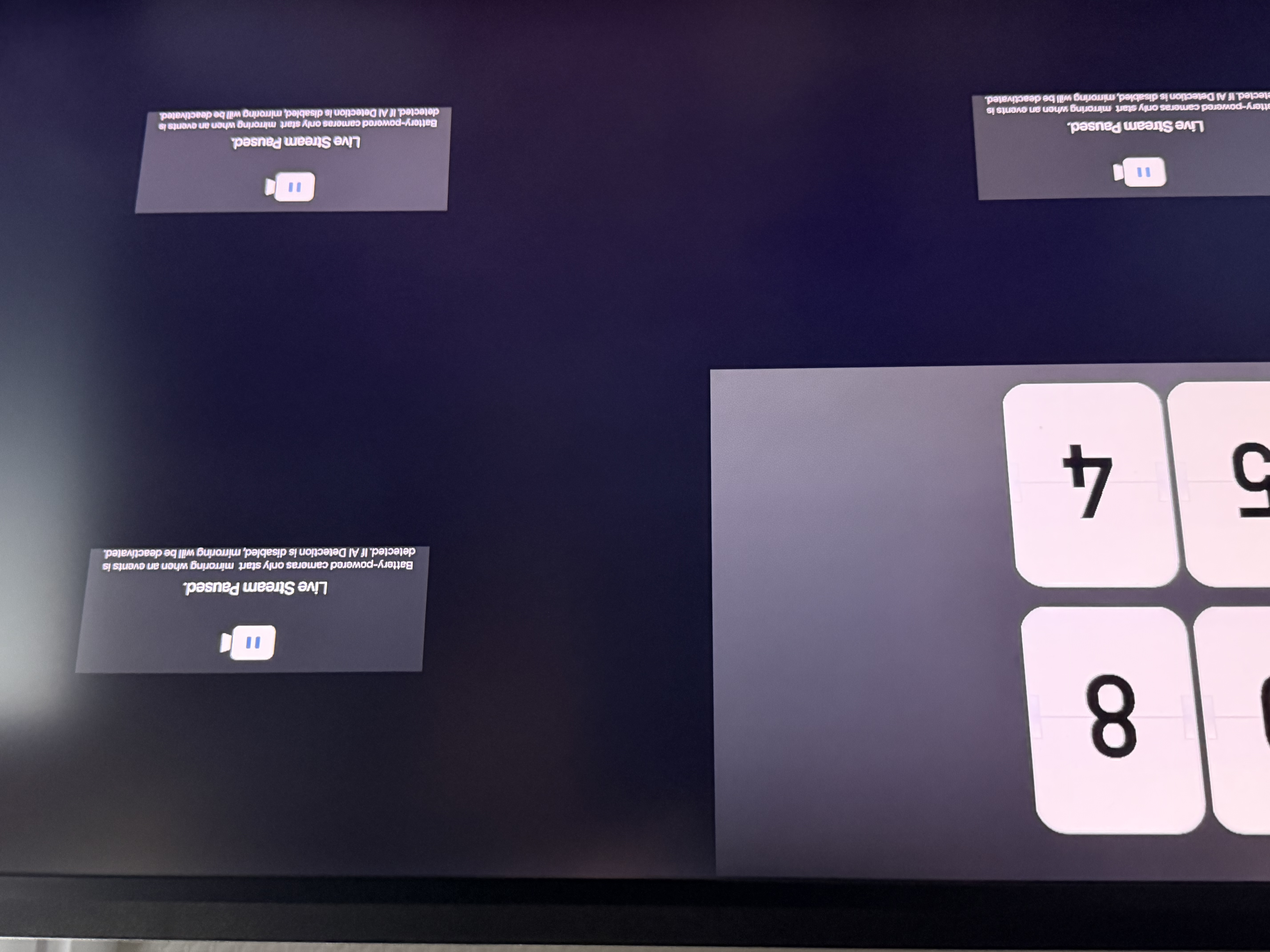
I have 3 x C225 and 1 x C520 cameras connected to my H500. I keep getting this message on all 4 cameras on the HDMI output of the H500:
Live Stream Paused.
Battery-powered cameras only start mirroring when an event is
detected. If AI Detection is disabled, mirroring will be deactivated.
None of the cameras are battery powered - they all run on the supplied AC-DC adapter.
The video stream on the Android app is not interrupted while the H500 is saying it is paused.
I think the duty cycle of off to on is about 50% so the H500 is pretty well unusable which is a pity as I only bought it to monitor my cameras from a spare HDMI monitor. At the moment I spend more time looking at the messages than any useful picture - usually 2 of the 4 are off at any given point in time.
Is this a known issue & will it be fixed with a firmware update?
- Copy Link
- Subscribe
- Bookmark
- Report Inappropriate Content
Signing on to this as well.
H500. 3 continuous stream cameras and 1 doorbell. I output the HDMI on the H500 to an LCD panel. I frequently get video dropoutsd with the "Live stream paused" message. I've reconfigured my network. I've optimized my network. I've moved APs. I've reduced the resolution to 720P. Nothing improves it.
I can always stream a single camera to my phone. It's not stuttery and it doesn't drop out.
TP-Link: You need to fix this.
- Copy Link
- Report Inappropriate Content


Regarding the issue discussed in this thread, please check the suggestions in this article for troubleshooting, specifically, refer to 'Scenario 2: Black Screen or "Live Stream Paused" During Screen Mirroring': How to troubleshoot if Tapo H500 Screen Mirror feature malfunctions
If you still experience trouble in streaming the camera live feed continuously via screen mirroring (HDMI), this solution might be just what you need, check it out! Optimizing HDMI Output for Tapo H500: Better Screen Mirroring for Tapo AC-Powered Cameras/Doorbells
- Copy Link
- Report Inappropriate Content

Ciao @Dave665 la mia sensazione è che se si usano più dashboard al passaggio da una dashboard all'altra causa più frequentemente il problema.
Poi ho notato che alcune telecamere periodicamente iniziano a dare questo problema, ma basta riavviarle e il problema per un po sparisce o si attenua.
Onestamente non ho capito cosa si risolve con il riavvio, non avendo un log.
Sicuramente è un po limitante restare fermo su una dashboard a 4 telecamere se hai più di 4 telecamere.
Forse serebbe utile risolvere il problema del passaggio a nuove dashboard o eventualmente fare in modo di visualizzare più di 4 telecamere.
Grazie
Comunque do un occhiata al link che mi hai passagto
Grazie ancora
- Copy Link
- Report Inappropriate Content
Respectfully, that's not a solution. That is a collection of tips, but none that will resolve this issue.
I moved from the 4 camera display to a carousel setup and only see the occasional paused screen. Seems like a bandwidth issue in the H500 video hardware.
- Copy Link
- Report Inappropriate Content

Dear TP-Link Support Team,
Thank you for providing troubleshooting guidance for the Tapo H500 Screen Mirror feature. However, I must express my concerns regarding the proposed solutions, as they fundamentally contradict the product's advertised capabilities.
Regarding Step 1 (Reduce frame rate/quality): I invested in 4K cameras specifically for their high-quality video output. Asking customers to reduce the frame rate or video quality defeats the entire purpose of purchasing premium equipment. If the H500 cannot handle the advertised camera specifications at their full capacity, this represents a significant design limitation that should have been communicated before purchase.
Regarding Step 2 (Ethernet connection): My H500 has been connected via Ethernet cable since installation. This step does not apply to my situation.
Regarding Step 3 (Reduce number of cameras): The H500 is specifically marketed as a hub capable of supporting multiple cameras with continuous recording. Suggesting that I disable features or reduce the number of connected cameras contradicts the product's core value proposition. If the hardware cannot reliably deliver on its advertised capabilities, customers should have been informed of these limitations upfront.
My concern: I have invested several hundred euros in a complete Tapo camera ecosystem, trusting in the H500's ability to provide reliable Screen Mirror functionality. The current workarounds essentially ask me to compromise the very features I paid for.
My question: Is your development team working on a firmware update to properly address these Screen Mirror stability issues? I would greatly appreciate knowing whether this is being treated as a bug requiring a fix, rather than an expected limitation requiring user compromises.
I remain hopeful that TP-Link will honor the capabilities advertised for this product and provide a proper solution.
Note: I have enabled diagnostic mode on all my cameras and the hub as requested in your troubleshooting guide.
Thank you for your attention to this matter.
Best regards, Matthieu
- Copy Link
- Report Inappropriate Content
Some troubleshooting steps are provided to help identify potential interference factors that may be affecting performance. By temporarily adjusting certain settings, we can better pinpoint the cause and ensure your device operates at its best in the long run.
What Tapo cameras do you have? I recommend trying the beta firmware mentioned in the Recommended Solution section, as it includes optimizations specifically for the screen mirroring feature.
- Copy Link
- Report Inappropriate Content
Hi Wayne,
Thank you for your response. It's reassuring to see that this issue is being taken seriously by the team.
I'm happy to install the beta firmware on my H500 — no problem at all, even if it causes some instability during testing. I've just sent you a private message with my MAC address.
Regarding the cameras, I have a C560WS. I did enable diagnostic logging on it as requested, but unfortunately it caused several issues including unexpected reboots, so I had to disable it. However, the H500 is fully available for beta testing without any concerns on my side.
Please let me know if there's anything else you need from me.
Thanks again for your help, and happy holidays!
- Copy Link
- Report Inappropriate Content

- Copy Link
- Report Inappropriate Content
Wayne-TP wrote
Regarding the issue discussed in this thread, please check the suggestions in this article for troubleshooting, specifically, refer to 'Scenario 2: Black Screen or "Live Stream Paused" During Screen Mirroring': How to troubleshoot if Tapo H500 Screen Mirror feature malfunctions
If you still experience trouble in streaming the camera live feed continuously via screen mirroring (HDMI), this solution might be just what you need, check it out! Optimizing HDMI Output for Tapo H500: Better Screen Mirroring for Tapo AC-Powered Cameras/Doorbells
- Copy Link
- Report Inappropriate Content

@Dave665 I was having the same problem with my H500. Installing the beta version (1.3.8) fixed the problem.
I recently saw that there was an update available to 1.3.9, so I installed it. Big mistake! The problem is back, just as bad as it was before. I would have thought that the fix would have been incorporated into the newest version, but I guess not.
Is there a beta version of 1.3.9 that fixes the Live Steam Paused issue?
- Copy Link
- Report Inappropriate Content
Information
Helpful: 1
Views: 5560
Replies: 43
Voters 0
No one has voted for it yet.