
Tapo T110 contact sensor requiring Internet
 This thread has been locked for further replies. You can start a new thread to share your ideas or ask questions.
I've just gotten some T110 to use as a basic home alarm paired with a H500 hub. Recently I had an Internet disruption for 2 days from the Internet service provider, and that's when I found out, the sensors requires Internet to work. With the Internet down, the sensors were offline eventhough my phone is connected to the same network, because I could still access my cameras in local network mode, but I could not access my sensors.
Automation also would not work without Internet access as I could not enable or disable my alarm automation when my Internet was down.
Could you guys please allow the sensors and alarm automation to work even without Internet as a security system which relies on Internet availability is honestly, pretty dumb.
Regards,
Hong
- Copy Link
- Subscribe
- Bookmark
- Report Inappropriate Content


From what I can tell, your case is more likely relevant to sensor's network connection rather than the automation. If the sensor goes offline -- disconnected from the hub, its associated automation will not run.
Internet disruption should not interfere with the local device's network connection. Have you tried to reproduce the product, check whether it is a one-time accident or a recurring issue?
Do you have another Tapo hub? Is it possible that the sensor is linked to other hubs rather than the H500?
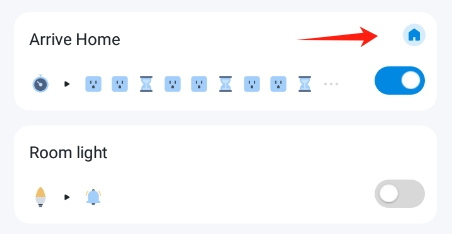
Additionally, please check whether the automation is a local smart rule -- tagged with a Tapo icon. If not, then this rule will not run during the internet outage.
- Copy Link
- Report Inappropriate Content
From what I can tell, your case is more likely relevant to sensor's network connection rather than the automation. If the sensor goes offline -- disconnected from the hub, its associated automation will not run.
Internet disruption should not interfere with the local device's network connection. Have you tried to reproduce the product, check whether it is a one-time accident or a recurring issue?
Do you have another Tapo hub? Is it possible that the sensor is linked to other hubs rather than the H500?
Additionally, please check whether the automation is a local smart rule -- tagged with a Tapo icon. If not, then this rule will not run during the internet outage.
- Copy Link
- Report Inappropriate Content

I'm having a similar issue where a door automation to switch the lights on with T110 is automatically disabled without explanation. Searching on the internet, it says that it's due to T110 losing connection with the hub. This has started happening only in the past 2-3 months. It worked well for a year. I didn't change my internet or router, so I suspect it is some firmware update of T110.
- Copy Link
- Report Inappropriate Content
Drfabius wrote
I'm having a similar issue where a door automation to switch the lights on with T110 is automatically disabled without explanation. Searching on the internet, it says that it's due to T110 losing connection with the hub. This has started happening only in the past 2-3 months. It worked well for a year. I didn't change my internet or router, so I suspect it is some firmware update of T110.
The reason why automation did not run correctly varies. You may refer to this article for troubleshooting: What To Do If Tapo Smart Action (Automation/Shortcut) Doesn't Take Effect or Delay?
- Copy Link
- Report Inappropriate Content
@Wayne-TP I have the exact same issue he described. Literally every other kasa or tapo device on my home network at the very least will give me the device's status through the tapo app even if smart actions are not working. Once I unplug the internet from the router, the sensors stop giving any sort of status update in the app. I specifically purchased this hub for an alarm system to work while internet was disconnected, and that does not seem to work, in fact I'm beginning to wonder if the hub works with any local smart actions at this point. There's no guide, no video, no documentation to show what works and what doesn't, customers are completely in the dark until they get it home and try it for themselves and find out that something very basic doesn't even work.
All I want is for my open contact sensor to trigger the alarm on the hub if my smart tapo door lock happens to be locked. That didn't work, so I tried to make it even more basic, and make it so that an open contact sensor would make the alarm ring. Doesn't work when internet is disconnected, and that doesn't make any sense. I'm pretty sure I specifically read that I should be able to do this locally. I can't, that's just stupid, and the hub is useless.
- Copy Link
- Report Inappropriate Content

@paulrataczak, which hub is it? You need beta firmware for the H100 hub to make it work without internet. Only h100 supports multi triggers, "IF" and ring the hub locally (I didnt test H110 and H500).
If it is H100 hub, ask for that firmware: 1.6.2 Build 251010 Rel. 18544
- Copy Link
- Report Inappropriate Content
@SugarBaby thanks for the reply. It is the h100. So you're saying that if I want to use if statements, I have to use the h100? How do I get the beta firmware?
- Copy Link
- Report Inappropriate Content
@paulrataczak yes h100 for "IF". Send an email to support or ask here https://community.tp-link.com/en/smart-home/forum/topic/841746 but I'm not sure what version of firmware will you get from Wayne.
- Copy Link
- Report Inappropriate Content
@SugarBaby I'm going to go ahead and ask for the beta firmware like you suggested, hope that fixes the problem. But it seems to me that out of the box with up-to-date firmware, the hub is not doing what TP-Link claims that it is able to do. I read in multiple places that the contact sensors are supposed to work offline. That's crucial to me. If a thief happens to be familiar with the home, all they have to do is get the internet wires going in and they are safe breaking and entering.
It's also a little disappointing if the h100 is the only one that can use the if statements. I was already looking into purchasing an h500 for no better reason than 90 decibels is way too quiet for an alarm. I want it to wake up the neighborhood, the 90 decibel limit on the h100 might not even wake me up in the next room.
This tech has so much potential. Just tinkering with it, I think it is badass that I can set up a routine for a user to disable the alarm from the keypad by simply using a thumbprint if they accidentally trigger it. And I have further tests to run, but once my smart plug arrives, I also think it is awesome that I can set up a routine that if the contact sensor is open, all doors are locked, and a smart plug is turned on, that the alarm system is armed, but if they need to keep their doors locked and to open a window, all they have to do is turn off the plug.
It's so close to being everything I need it to be, but the alarm has to be loud, and the if statements in the routine are absolutely necessary for it to function the way I would want it to.
- Copy Link
- Report Inappropriate Content
@paulrataczak you need to ask someone with h500 about "IF", and multiple triggers if they are controlled locally, I didn't test it.
- Copy Link
- Report Inappropriate Content
Information
Helpful: 2
Views: 4243
Replies: 9
Voters 2

