
Tapo P100 turn on for 5 min then wait 20 min every hour

Hello,
I like to set a smart scene for my P100 smart plug to avoid my outside pump from freezing.
I need a 5min run then wait 20min to repeat it all day (24hour).
How can I set it up, because I'm a little bit confused right now.
- Copy Link
- Subscribe
- Bookmark
- Report Inappropriate Content


An automation should help. By setting repeated on/off commands and inserting delays between them, you can achieve continuous cycling of the plug’s power state. How to create Smart Action (Automation or Shortcut) on Tapo app
For example:
[When] Plug A turns on
[Then]
1. Delay 5 minutes *this means when the plug A turns on, it will be turned off (action 2) 5 minutes later.
2. Turn off Plug A
3. Delay 20 minutes
4. Turn on Plug A
5. Delay 5 minutes
[Repeat settings.....]
- Copy Link
- Report Inappropriate Content
Tato169 wrote
Thanks for the reply,
So I have to make a lot of on-off cycle or make one like you said and repeait it 24h daily cycle?
The app said the delay can not be the last action.
Yes, add multiple on, off, and delay actions in one automation. Each automation can include up to 64 actions. If one rule is not enough, create a new one and continue the configurations.
Reminder: The relay in the plug has a limited number of switching cycles over its service life. Frequent and continuous switching may accelerate device aging. If not strictly necessary, we recommend extending the intervals between switching operations or avoiding continuous switching settings during periods when the connected load does not actually need to operate.
- Copy Link
- Report Inappropriate Content
An automation should help. By setting repeated on/off commands and inserting delays between them, you can achieve continuous cycling of the plug’s power state. How to create Smart Action (Automation or Shortcut) on Tapo app
For example:
[When] Plug A turns on
[Then]
1. Delay 5 minutes *this means when the plug A turns on, it will be turned off (action 2) 5 minutes later.
2. Turn off Plug A
3. Delay 20 minutes
4. Turn on Plug A
5. Delay 5 minutes
[Repeat settings.....]
- Copy Link
- Report Inappropriate Content
Thanks for the reply,
So I have to make a lot of on-off cycle or make one like you said and repeait it 24h daily cycle?
The app said the delay can not be the last action.
- Copy Link
- Report Inappropriate Content

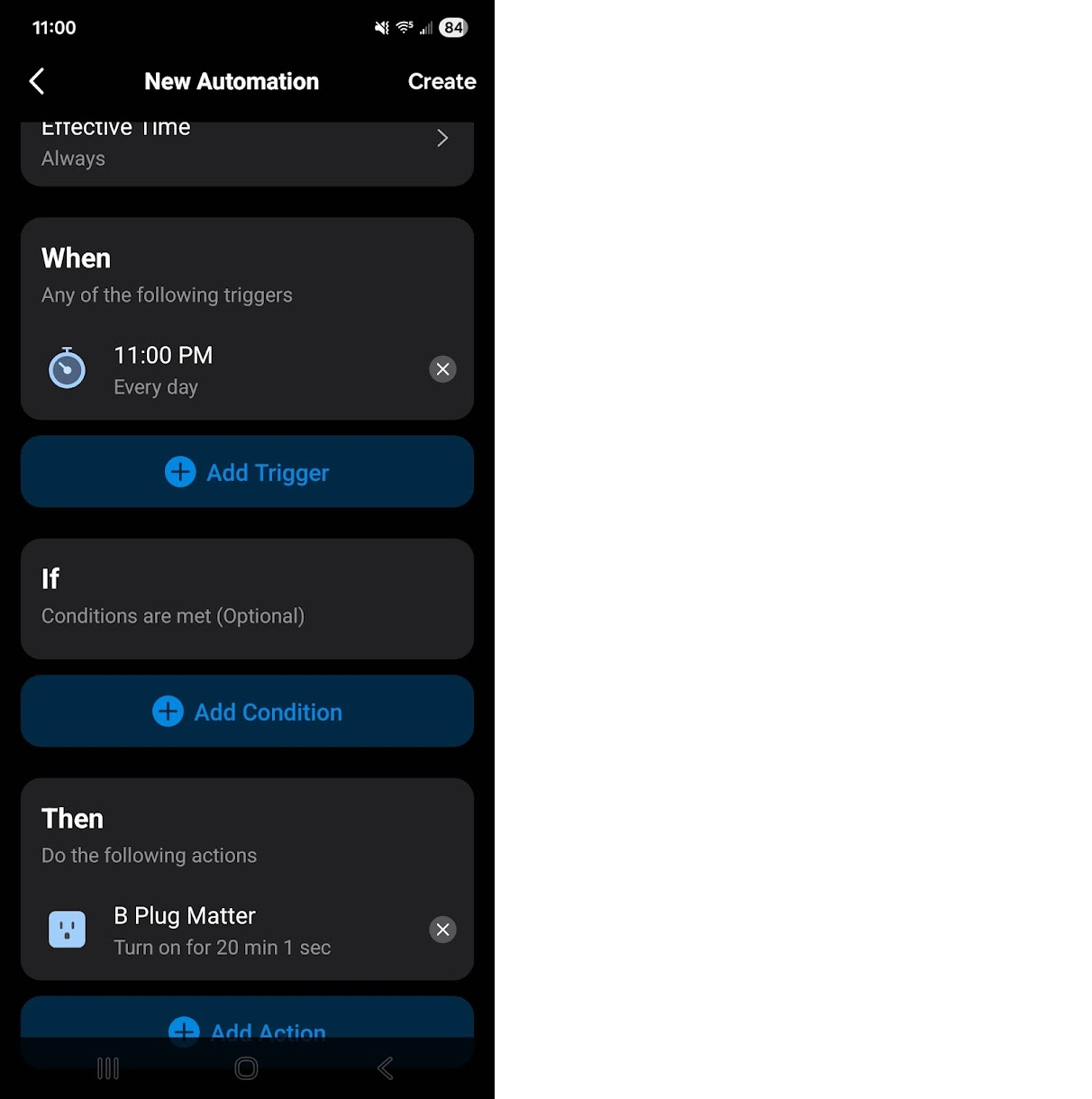
It might be easier to set it up this way. You would set it up as shown below then the 2nd one would start 11:25 pm, Then 11:50 pm ect ect
- Copy Link
- Report Inappropriate Content
Tato169 wrote
Thanks for the reply,
So I have to make a lot of on-off cycle or make one like you said and repeait it 24h daily cycle?
The app said the delay can not be the last action.
Yes, add multiple on, off, and delay actions in one automation. Each automation can include up to 64 actions. If one rule is not enough, create a new one and continue the configurations.
Reminder: The relay in the plug has a limited number of switching cycles over its service life. Frequent and continuous switching may accelerate device aging. If not strictly necessary, we recommend extending the intervals between switching operations or avoiding continuous switching settings during periods when the connected load does not actually need to operate.
- Copy Link
- Report Inappropriate Content
Information
Helpful: 1
Views: 591
Replies: 4
Voters 1