
Solution How to Fix: Tapo Local Smart Action Not Creating or Unexpectedly Inactive


This Article Applies To
Tapo devices and configurations that follow Tapo Local Smart rules.
*Automations under Tapo H110's control aren't affected.
Description
Recently, you may have noticed that some Tapo devices are unable to create Local Smart rules successfully, even when the devices and settings meet the creation requirements. Alternatively, previously created Local Smart rules may have suddenly become inactive, with the house icon no longer displayed.
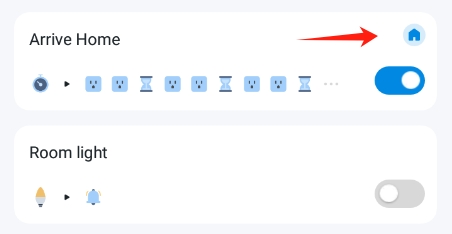
Before you go further, make sure your setup follows the rules for Local Smart. If the devices or rules configured do not comply with the requirements, failure to create the automation is expected behavior.
1. Supported Firmware: The Tapo hub's firmware must support this feature. *The latest firmware for Tapo models H100, H110, H200, and H500 all support local smart automation. Update your Tapo hub if it is not in the latest version. How to update the firmware of the Tapo devices on the Tapo App
2. Compatible Devices & automation skills: The trigger and action devices and the selected skills must be of a supported type for Tapo Local Smart. If you select an unsupported device type or skill, the automation will not qualify for local smart creation.
▷ Check this FAQ to verify your setup: What is Local Smart Action?
3. Same Hub and Network Subnet: All selected devices in the same automation must be sub-devices under the same Tapo hub. Additionally, Wi-Fi devices should be on the same subnet as the hub. Local smart automation cannot be created if you include a device from a different Tapo hub or a Wi-Fi device from a different subnet.
Workaround
Our R&D team has provided beta firmware that can address this issue. If you would like to test it out, refer to the steps below to apply the beta firmware.
How to Apply Beta Firmware
1. Find the Mac address of your Tapo hub: Open the Tapo app and navigate to the smart hub's Device Settings page > Device Info.
2. Send a private message to @Wayne-TP with the following information.
[ID 853096][Tapo Local Smart Creation Failure] + Model & Mac address of the Tapo hub
**For users from the United States, send your request to forumsupport.usa@tp-link.com with:
1. A brief summary of the product issue you encountered, along with your request for beta firmware. *You may also include a link to this community post for the support team’s reference.
2. The Mac address of your Tapo hub.
Before the Upgrade
(1) Please be sure you have read the Beta Test Agreement before upgrading the Pre-release firmware!
(2) How to update the firmware of the Tapo devices on the Tapo App
(3) Firmware downgrade is not supported. When a new official version is released, updating it will overwrite the beta version.
- Copy Link
- Subscribe
- Bookmark
- Report Inappropriate Content
@Ransho it was available with one beta, but it's removed now, it's working with h100 hub yet
- Copy Link
- Report Inappropriate Content

@SugarBaby I checked the linked support page for a list of triggers and actions that qualify for a local smart action: https://www.tp-link.com/pl/support/faq/3807/
And the action list... is missing a hub ring, which may be the cause why my test fails. If the list is complete, it means the Tapo ecosystem has very limited local action capabilities.
- Copy Link
- Report Inappropriate Content
@Ransho yes, that list complete, ring hub is not officially supported
- Copy Link
- Report Inappropriate Content
@SugarBaby the hub which performs local action itself cannot use action with its own ring. This is ridiculous. I hope the ringtone is not streamed over the internet.
- Copy Link
- Report Inappropriate Content

@Wayne-TP Hi Wayne!
Tried to contact support but I'm getting nowhere with getting beta firmware for the H100 hub. The support tech just keeps telling me to check for firmware updates in the app and isn't understanding what I'm referring to. Can you help me?
- Copy Link
- Report Inappropriate Content
Jbjoca wrote
@Wayne-TP Hi Wayne!
Tried to contact support but I'm getting nowhere with getting beta firmware for the H100 hub. The support tech just keeps telling me to check for firmware updates in the app and isn't understanding what I'm referring to. Can you help me?
@Jbjoca Which country are you located in? For users from the US, you will have to apply the beta from the support team. For users from other countries or regions, the requests can be sent to me.
- Copy Link
- Report Inappropriate Content

@Wayne-TP Hey Wayne! Sent you a private message but I'd absolutely love the Beta Firmware! Thanks!
- Copy Link
- Report Inappropriate Content
@Adam10 Beta firmware has been sent to your device, you may check it 30 minutes later in the Tapo app and perform the update.
- Copy Link
- Report Inappropriate Content

Sent a message this morning for upgrade to beta fw in order to gain matter support for T300 water sensors on an H100 hub. How long does a push normally take?
- Copy Link
- Report Inappropriate Content
dgibson9503 wrote
Sent a message this morning for upgrade to beta fw in order to gain matter support for T300 water sensors on an H100 hub. How long does a push normally take?
Matter support? This topic has nothing to do with Matter.
- Copy Link
- Report Inappropriate Content
Information
Helpful: 1
Views: 2965
Replies: 39
Voters 1
