
C246D cannot connect to Hub200

When connecting 246D to H200, It shows grayed out and requires firmware update. However, it seems the firmware is up-to-date. Can I download and install firmware update from different country?
- Copy Link
- Subscribe
- Bookmark
- Report Inappropriate Content


Tapo H200 doesn't support Tapo C246D at the moment. Tapo Smart Hub Compatible Camera List
To learn about the latest updates on a product, follow its new firmware releases, important updates and modifications will be listed in the release note.
- Copy Link
- Report Inappropriate Content
Tapo H200 doesn't support Tapo C246D at the moment. Tapo Smart Hub Compatible Camera List
To learn about the latest updates on a product, follow its new firmware releases, important updates and modifications will be listed in the release note.
- Copy Link
- Report Inappropriate Content
- Copy Link
- Report Inappropriate Content

Hi, i've had the dame problem and realized it by checking the list of devices compatible whit the h200 ; this c246D is listed as compatible hardware . 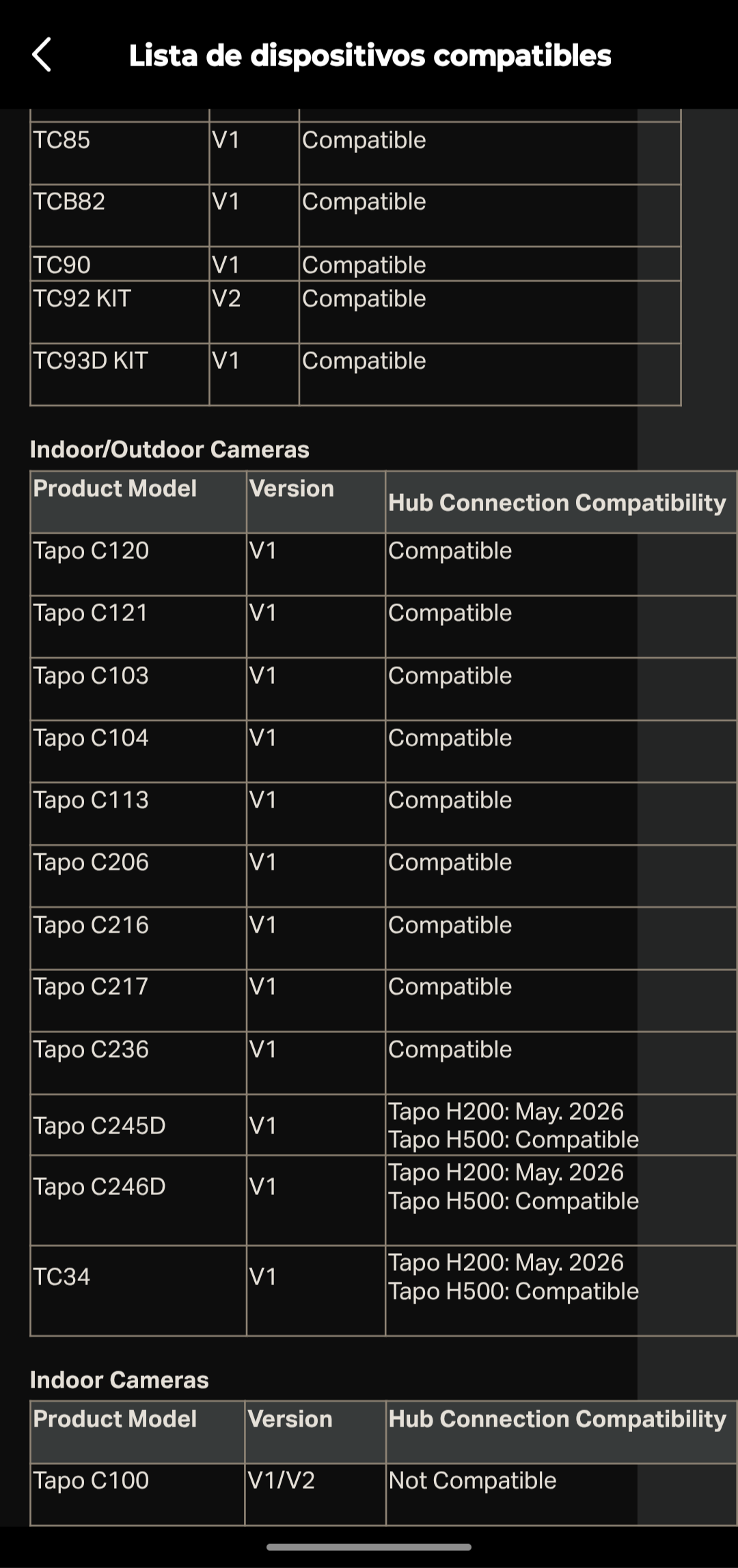
- Copy Link
- Report Inappropriate Content
Upon checking, Tapo H200 doesn't support Tapo C246D, no new firmware has been released for H200 recently.
The planned timeline for new features can sometimes shift due to development and testing results. If you have an urgent need for this functionality, we suggest reaching out to our support team directly, check if they can offer any assistance. Contact Technical Support
- Copy Link
- Report Inappropriate Content

@Wayne-TP hi I have the same set of hardware multiple C246D abd TAPO H200, can suggest solution pls.
- Copy Link
- Report Inappropriate Content

It say in h200 list that c246d supports but mine h200 is grey out even for c100 howto fix this kinda annoying since i bought h200 hub said it would work along with both cameras
- Copy Link
- Report Inappropriate Content
- Copy Link
- Report Inappropriate Content
ARIASG wrote
@wayne any updates from Prdouct team regarding the fix ?
We don't have the exact timeline for new feature releases. But i would recommend keeping an eye on H200's new firmware release.
Normally, when new features are added to a new firmware, the relevant info can be found in the firmware release notes.
For more control over updates, you could consider temporarily turning off automatic updates on your Tapo H200. This way, your device won't be updated unexpectedly without your knowing. You can then check for new firmware manually in the app and review the release notes to understand the changes before installing it.
- Copy Link
- Report Inappropriate Content
@Wayne-TP thought there is no specific timeline, mentioned May26 is already over. Hoping there will be a new firmware out soon
- Copy Link
- Report Inappropriate Content
Information
Helpful: 1
Views: 599
Replies: 9
Voters 0
No one has voted for it yet.