
H200 / S200b Issues
H200 / S200b Issues

I've noticeably had trouble with Tapo since i set it up. Mainly round the buttons used for turning bulbs on and off. I've noticed that some of the buttons (S200b) have a terrible RSSI number, so i thought i'd test trying to reduce it. I've moved the H200 hub 5cm away from the button, yet i have an signal interference RSSI of -123 (strength is -21), which explains why sometimes when pressing the button the bulb goes on AND off immediately. There clearly isn't interference if they're 5cm apart with nothing in-between them.
I also have another button 5ft across the hall which has -0 RSSI and both in direct sight of the H200 hub, which doesn't make any sense.
I've connected my H200 to IoT on my Deco mesh router so ensure it gets the best possible (and prioritized) 2.4gz connection (which it does) and i've tired using Ethernet too, but i get the same results.
All firmware is up to date. Does anyone have any ideas what's going on with this?
- Copy Link
- Subscribe
- Bookmark
- Report Inappropriate Content


This is definitely strange. The button and the hub will communicate using a sub-ghz frequency, which should provide better range and reduced interference compared to Wi-Fi.
The RSSI is concerningly low, with a -123dB usually meaning that the device is essentially unable to connect. Looking at my S200D, which is two rooms away from its connected hub, shows an RSSI of -52
With the devices being that close, I suppose that the button could technically fall in a deadzone of the sub-ghz signal, but it is rare.
Do you have the hub and button setup in a place where electrical interference could be a factor? Such as being on top of a router or surrounded by other wireless devices?
Have you attempted to reset and re-add the device to the hub?
Contact Support or Join our Official Subreddits: r/tapo, r/tplink, r/omada_networks
- Copy Link
- Report Inappropriate Content
In addition to this I've noticed that the RSSI only registers if the button has recently been pressed, so upon further investigation I can see all my buttons have bad RSSI regardless of where the hub is in the house. I've moved it to various locations, close and further away from the buttons.
I've removed a button and added again, but with no improvement.
In a world where many, many devices use 2.4ghz why on earth has Tapo decided to make it's devices useless if there is anything else on the same frequency. It's unrealistic to expect me to remove smart tvs, Bluetooth key boards, mice, etc, etc when they all work fine using this frequency. I've said before, but if i knew how bad Tapo was i would never have invested so much money in to it.
- Copy Link
- Report Inappropriate Content
The RSSI only appears while interacting with the device makes sense, as the device sleeps often and is reliant on its wake-up function to achieve its battery life. I want to say that the device stays awake for only about 15 seconds after interacting with it.
The experience that you are having is not representative of what we expect. I have 4 of these smart buttons in my own home and haven't seen similar. My own network is over 140 devices strong at this point and the sub-g devices have not seen any adverse consequences or issues with connection strength.
Lastly, the sub-g frequency is generally more resilient than other types of communication, including Wi-Fi. I only asked to check for interference in case there is something out of the ordinary, and to try to narrow down any external causes.
For the original behavior though:
- I would be inclined to believe it may be an issue with your hub, especially if it occurs across multiple buttons and removing/readding does not help.
- Or even the Tapo app may not be reporting it correctly and being the result of something else entirely.
- Commands are being sent, but the device does not respond so it receives two of the same command.
I believe that hub-based smart actions are attempted to run at a local (on your network) level, before falling back to a cloud version. Perhaps there is something occurring with the lights that is preventing it from properly or responsively reporting 'Yes I did what you did and turned on' before that fallback command is sent, such as having two routers on your network.
Contact Support or Join our Official Subreddits: r/tapo, r/tplink, r/omada_networks
- Copy Link
- Report Inappropriate Content
Ok. I've ordered a new hub to see if that resolves the issue. Failing that I will take screenshots of each buttons RSSI and location to the hub and update. I have a deco mesh router set up, but wouldn't expect that to cause an issue (especially given they're both TP) and the signal RSSI is good on the buttons. The tapo bulbs are all around -50 RSSI, but the app doesn't state whether that's strength or interference.
Thanks
- Copy Link
- Report Inappropriate Content
@Riley_S New hub made no difference after migrating devices. All buttons still between -118 and -125 RSSI interference. I will provide screenshots and further information.
- Copy Link
- Report Inappropriate Content
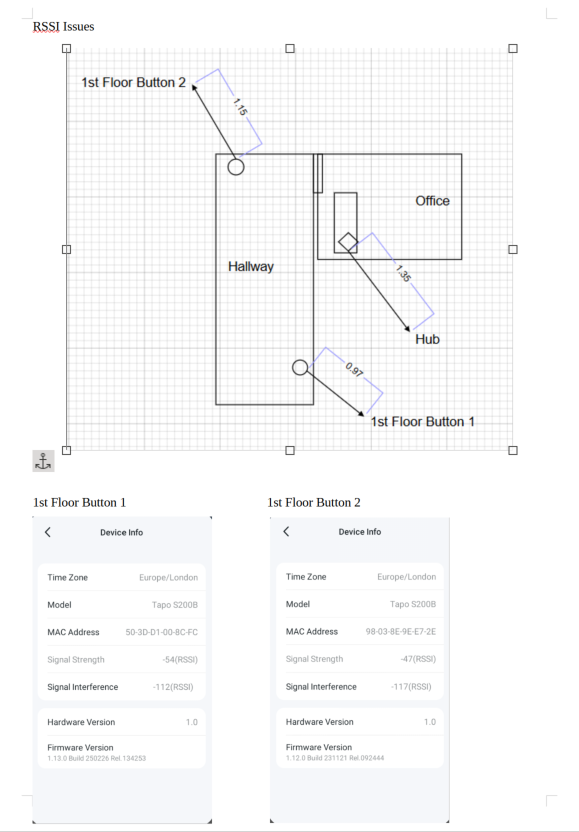
- Copy Link
- Report Inappropriate Content
@Riley_S any response to this?
- Copy Link
- Report Inappropriate Content
@Riley_S Any update to this?
- Copy Link
- Report Inappropriate Content

For issues that cannot be resolved through regular troubleshooting, especially unusual ones like this, it typically requires the involvement of our support team for an in-depth investigation.
I recall that we created a support ticket on your behalf quite some time ago. Have you had a chance to communicate with them regarding this issue?
- Copy Link
- Report Inappropriate Content
@Wayne-TP I don't have anything in my inbox for this. Please can someone from TP contact me and i will go through that.
Thanks
- Copy Link
- Report Inappropriate Content
Information
Helpful: 0
Views: 1188
Replies: 11
Voters 0
No one has voted for it yet.