Tapo C250 4K 8MP -Time stamp and video delay on live view

Tapo C250 4K 8MP -Time stamp and video delay on live view

Tapo C250 4K 8MP -Time stamp and video delay on live view
Sunday
Model: Tapo C210  
Hardware Version: V1
Firmware Version: 1.1 2

Newly released Tapo C250 4K 8MP wifi wired pan/tilt camera - (not on your model selection hence selected nearest similar one) just bought. When added to multiple live view in Tapo app, compared to basic C100 model it starts at the same time stamp but longer I view both, bigger time gap between both become. From seconds to up to 5 min time and video difference between them. C100 is 💯 correct and shows everything as it happens, it operates at 25 frame per second (fps)max, even though I am sure there used to be 30 fps before but it disappeared from selection. Newly released Tapo c250 operates only at max 20 fps,  which is a bit ridiculous for newly release 4k camera! I assume time difference and lag could be due to different fps, not sure, but when Tapo c250 live view is 5 min late then I really would no longer call that live view. It is really confusing when watching walking person on c100 going towards view of other cam, c250 and person or cars do not show up for up to 5 min. Is there any way to resolve this? I bought 4k cam as lower resolution has blurry moving objects, but while 4k is sharper, moving objects are still blurry. Is there any way to resolve it as well?
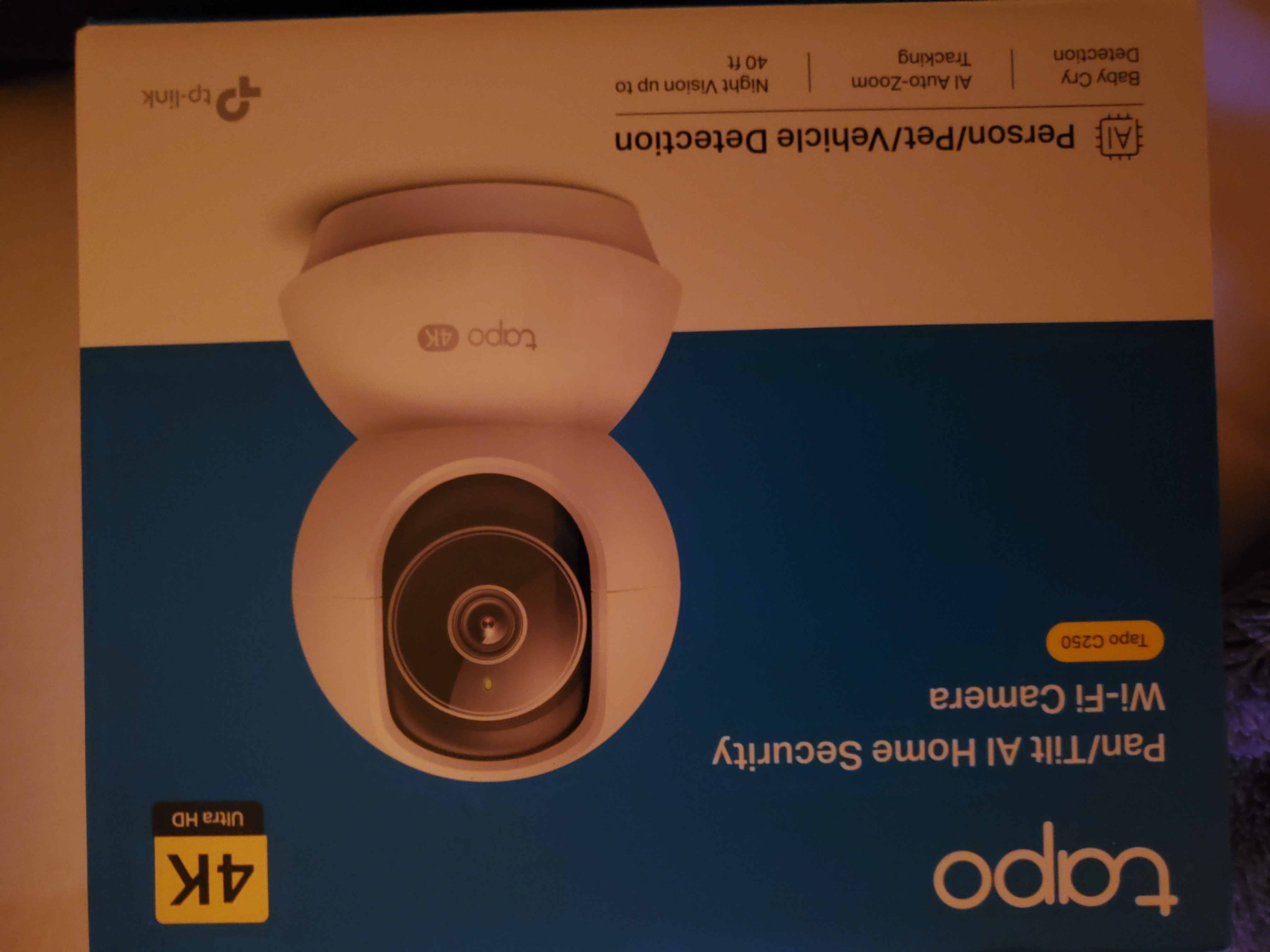
Tapo c250 Above c100, below new c250 - shows live video lagging, time stamp Caption


  0      
  0      
#1
Options
2 Reply
Re:Tapo C250 4K 8MP -Time stamp and video delay on live view
Sunday
Just to add, above cam image is tapo c100 and lower image is tapo C250 4K, multiple live view.
  0  
  0  
#2
Options
Re:Tapo C250 4K 8MP -Time stamp and video delay on live view
8 hours ago

  @Alka-3Sunflower 

Hello,

Welcome to the community, and thank you for taking the time to share such a detailed comparison between your cameras.


To help narrow down the cause, we kindly suggest the following basic checks and tests:

  • Check signal strength: Please verify the Wi‑Fi signal quality of the C250 in the Tapo app, including its RSSI value, and ensure it remains stable during live view.
  • Swap camera positions: If possible, try exchanging the physical locations of the C250 and C100 to see whether the delay follows the camera or the location.
  • Isolate the live stream: Temporarily close or stop the live view of the C100 and observe the C250 alone to check whether the delay improves.
  • Test on the local network: Please confirm whether the same delay occurs when viewing the C250 while your mobile device is connected to the same local network (LAN) as the camera.
  • Network latency check: If you are familiar with basic network testing, you may also try pinging the C250’s local IP address to see whether there is noticeable network latency or packet loss: How to use the Ping command


If the issue persists after these checks, please let us know your test results, along with the app version you are using.


Best Regards

  0  
  0  
#3
Options